Editing Related Data

I'm using a map service with feature access enabled in a site with a HTML5 2.3 viewer. The only toolbar option I have for editing tools is Create New Feature. I just want users to select existing features and edit attributes. How do I do that?
-
Good morning Rebecca,
To edit the attributes within HTML5, the option is available when you select the feature within the feature service. You mentioned you have given feature access when the service was hosted. I will assume that you brought your featureServer service in that allows for editing.
Then all you have to do is do an identify on that feature, then select the result, and you'll see your options to edit attributes/upload photo on the left:/customer/servlet/servlet.FileDownload?file=00P6000000em1eCEAQ
Hope this helps,
Marshall
0 -
Thanks Marshall! What do I have to do to add attachments? I'm now at GE 4.4 GVH 2.5 and that option doesn't appear to be there by default. 0 -
They have changed the Identify layout for GVH 2.4 and 2.5. Now when you identify on the layer there is a icon in the header of that feature next to the 'X' that closes it (if that makes sense). 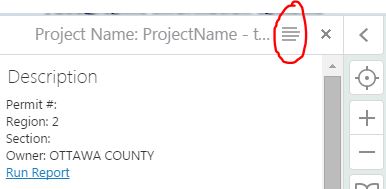
Click this and a drop down will apper showing similar options as 2.3: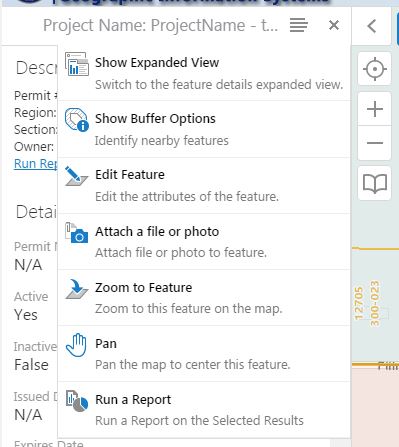
Hope this helps. And I just happened on this post, apparantly since the updated community we don't get email updates. I'll start following this thread in case you have any more questions.
Marshall0
Bitte melden Sie sich an, um einen Kommentar zu hinterlassen.
Kommentare
3 Kommentare