send email

Hello,
I am using send email function. however i never got the email. the email address is a good one. do i need to set something at geocortex server?
thanks in advnace.
0
-

You will need to specify the following in the 'Misc' area of the activity.
Host - Address of the SMTP server host.
Password - Password to set up the credentials to authenticate the sender with the Host.
Port - Port of the SMTP service in the Host.
UserName - User name to set up the credentials to authenticate the sender with the Host.
Here is an example using gmail: https://www.digitalocean.com/community/tutorials/how-to-use-google-s-smtp-server0 -
thanks. is username / password required? i was told the email address i am going to use is a resource email so there is no username/password attached. 0 -
Hi Kevin,
I've tried the procedure you provided on my email address and it doesn't work?
what might be the issue?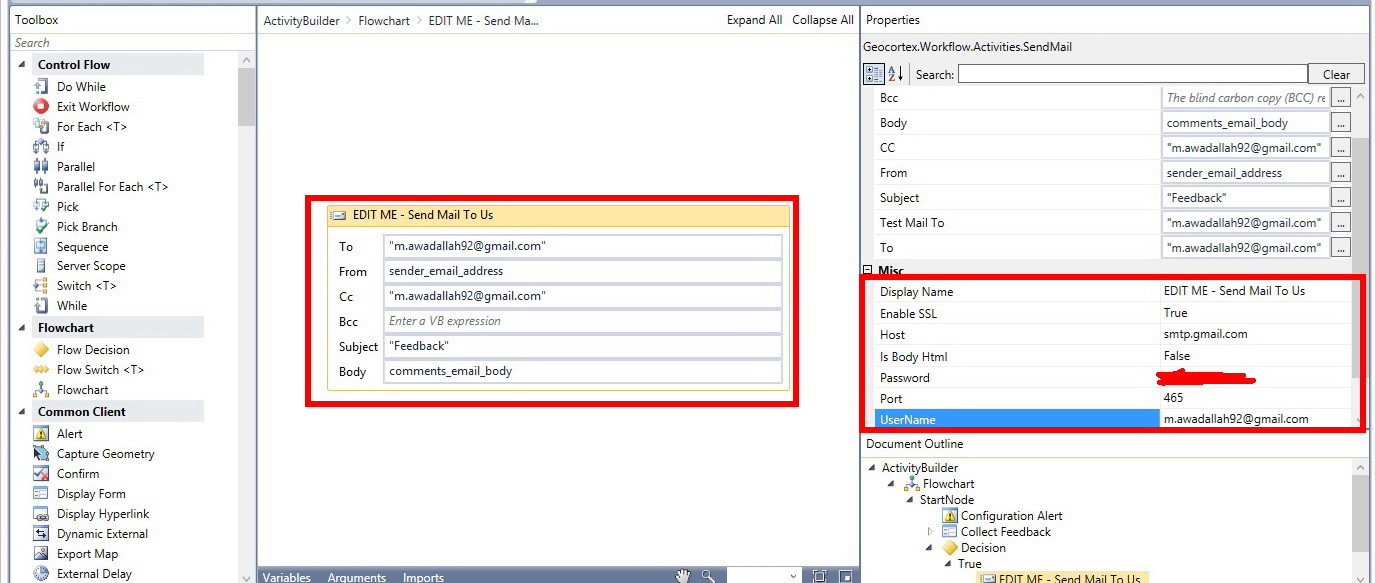
Best,
Majdoleen0 -
I figured it out using Gmail using the settings below used with the sendmail activity in Geocortex Workflow Designer. Apparently it will not work using my work email (Microsoft Exchange) because SSL is not enabled (our Geocortex site is https) on the server and tour IT department won't change the company policy for this single workflow.
Host: smtp.gmail.com
Enable SSL: True
Port: 587
Username: myusername@gmail.com
Password: mygmailpassword
I also went and ensured that Access for less secure apps was turned on in my gmail security settings and enabled POP and IMAP for all mail (not sure if the IMAP and POP step was necessary)0 -
Thank you Harold, really appreciate.
Best,
Majdoleen0 -
Hi Harold,
Yes, actually if you are using gmail, you need to turn on less secure option for this to work.
Regards,
Mohammad Ashaf0
Bitte melden Sie sich an, um einen Kommentar zu hinterlassen.
Kommentare
6 Kommentare