Concatenate fields in a Report

I would really like to be able to concatenate 2 or 3 fields together in a text box in a report to make the report look cleaner. I've tried a few different sytax options but nothing has worked. Has anyone done this? Can it even be done?
0
-
Are you talking about using display form in workflow for report or using feature description in the html viewer? 0 -
Try using a Calculated Field in the Report Designer.
I concatenate City, State Zip using the attributes 'City', 'State', 'Zip'
In the top right of the workflow designer I expand 'Fields' and right click 'Calculated' and choose 'Add'.
I then change the name to a title that is not an attribute name like 'calc_CityStateZip'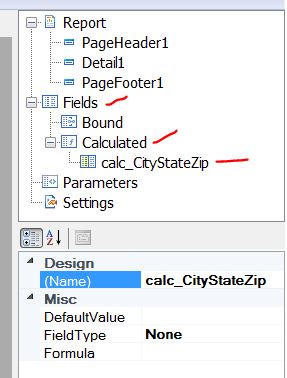
I then click in the Formula field and insert the following:
(City == System.DBNull.Value ? " " : City + ", ") + (State == System.DBNull.Value ? " " : State + " ") + (Zip == System.DBNull.Value ? " " : Zip+"")
Basically the formula checks that City is null. If it is, it places a space and if not, it places the value of City and appends a comma and space.
Then does the same thing with the state and again with Zip.
Then you just asign the textbox DataField attribute to 'calc_CityStateZip'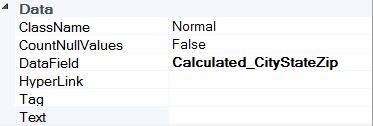 0
0 -
Perfect! That is exactly what I wanted to do! Thanks!!!!! 0 -
Can this also be done with AGO hosted domain values? I tried the below formula but it returns Control script failed error.
(fieldvalue == System.DBNull.Value ? " " : fieldvalue.name() + ", ") + (fieldvalue2 == System.DBNull.Value ? " " : fieldvalue2.name() + " ") + (fieldvalue3 == System.DBNull.Value ? " " : fieldvalue.name()+"")0
Bitte melden Sie sich an, um einen Kommentar zu hinterlassen.
Kommentare
4 Kommentare