add control to form dynamically

Can I add controls to the display form dynamically? based on the feautreset i need to add checkbox to the form so user can select again. 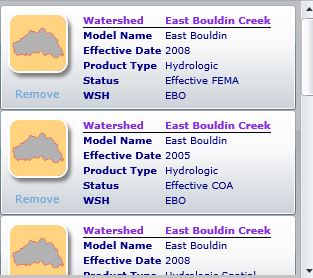
here is what i want to do:
I'd like to use a goupbox for all the attributes displayed for one feature. and add a checkbox in the groupbox to replace the remove button in above picture. since fetureset count varies so i can not add goupbox at design time. please help.
thanks in advance.
0
-
I tried the sample and it has the things i need.. Then I need to display the attributes from the feature. I searched the forum and found out that i can not use groupbox descriptiong to display the composed text since its line break does not work. somebody in the forum suggested to use group. The line break works with group. I tested it. Now I do not know how to create a group control dynamically. i created a group variable as type of "Geocortex.Forms.Client.Items.Group" and it did not work. I had runtime error-- Unhandled exception:"The calling thread mush be sta, because many UI components require this" 0 -
i am going to post this as another thread so it will get enough attention. thanks. 0 -
Dear Ying,
I am working on a similar task and am able to generate the form dynamically however, am not satisfied with the spacing between container components. Your desired form is really nicely designed and layed out. Can you please share your thougths if your resulted dialog was as per your shared screen or different? I also have created another thread in this regard which can be reached at 'https://support.geocortex.com/essentialsGSCForum?sub-nav=forum&main-nav=essentials&#!/feedtype=SINGLE_QUESTION_DETAIL&dc=GEManager&criteria=OPENQUESTIONS&id=906f2000000fxmaAAA'. Thanks in advance for your help.0 -
Hi Michel,
the layout in the picture was from the silverlight/AG for Server site, I could not do it using geocortex.
Please check this site: http://www.austintexas.gov/floodpro/
using Download Floodplain Model at I want to..... section
you will find out how i solved this.
Please let me know if you need more information.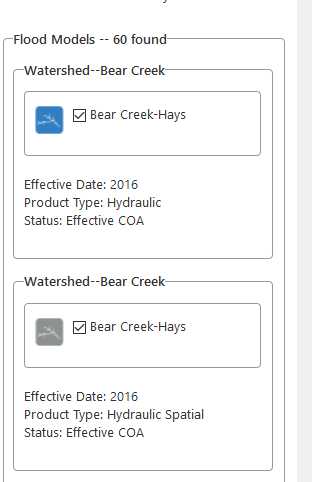 0
0 -
Hi Yinghong Li,
Thanks for the quick reply. Your dialog is layed out better then mine. I am using a GroupBoxFormItem and then adding ContainerFormItem but it creates unnecessary space between ContainerFormItem. Can you kindly share what type of item are you using to add to the GroupBoxFormItem for 'Effective Date, Product Type and Status fields' or if you are using any special technique in this design? I am attaching my result dialog screen here.
Thanks.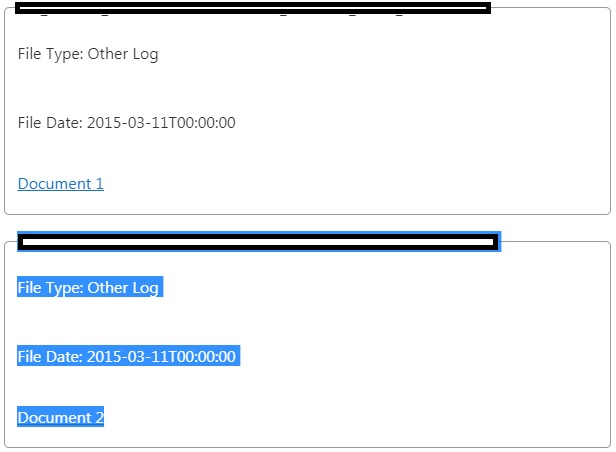 0
0 -
hard to explain. i'd like to attach my workflow here but it seems there is no butoon for the file. if you give me your email i can send to you. i used many controls in this case and it was a time consuming process to get everything look this way, which is the best i can do. I truly like the final look. 0 -
Thanks Ying for your quick help. My email is 'Michel.Turmel@gov.sk.ca'. Though, you can also open your workflow (.xaml) file in notepad, copy its content and paste it along the same reply and share it with the forum if you feel convenient. 0 -
here comes..... 0 -
too many words. sent to your email. 0 -
Thanks Yinghong Li, I will update my findings here shortly. 0 -
I found the difference and it really worked for what I was looking for. I was adding individual ContainerFormItem for each returned field while in your implementation string is cancatinated first and then added as inidividual ContainerFormItem. It really worked and thanks for your time and help. 3 Cheers for Yinghong Li :). 0 -
Yinghong's workflow can be found (http://data.latitudegeo.com/community/userfiles/yli/GetFloodPlainModel.zip) here . Thanks, Ying! 0
Bitte melden Sie sich an, um einen Kommentar zu hinterlassen.
Kommentare
13 Kommentare