Add group control to form dynamically

I need to add a goup control to a form dynamically using RuntimeModification. I created a group variable as type of "Geocortex.Forms.Client.Items.Group" and it did not work. I had runtime error-- Unhandled exception:"The calling thread mush be sta, because many UI components require this" . Please help.
0
-

Can you provide some more info? Are you trying to add a new group control based on previous steps in your workflow, or are you trying to format the content in and existing group control? 0 -
I want to add a new group control to a form dynamically so I can display the attributes from previous query task. of course by defaul there is always a group control in a form. So my sequence is:
1. add a groupbox control to the default group control.
2. add a group control in the groupbox control created in step 1. the attributes will be displayed in its description.
3. add a checkbox to the groupbox created in step1 below the group control.
I need to display attributes per field per line, which i can not do by using groupbox since groupbox can not take line break.
thanks.
thanks.0 -
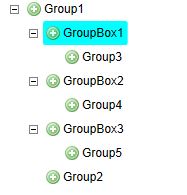
I want to add a group control which looks as above image dynamically. I know how to add groupbox control .
groupBoxFormItem1=new GroupBoxFormItem() With { .Header=wshedname+" -- "+fsModelList.Count.ToString()+" found"}
add groupBoxFormItem1 to form.ContainerFormItem.FormItems
however the similar way did not work on group contro. the reason i need this is that groupbox description can not break line, by </br> or environment.newline.
Help please.0 -

Do you get an error message? 0 -
Thanks. This is just what i want! 0
Bitte melden Sie sich an, um einen Kommentar zu hinterlassen.
Kommentare
5 Kommentare