Search Box Auto-Complete for Geocode Service

Subject: Search Box Auto-Complete for Geocode Service
I have a geocode service I am using to allow a user to put in an address, and the results are returned in a table. However, it does not auto-populate as user types. How do I accomplish this?
0
-

Hi Ryan, did you ever get a response to this? We are looking to do exactly this and not sure how to go about it.
Thanks, Lee0 -
I would like to see if there is an answer for this also. I am using the ESRI geocoding service which provides a suggest format, but I have no idea how to incorporate this into an autocomplete box. 0 -
Here is another possibility....
The ESRI World Geocoding service has a SUGGEST method:
https://developers.arcgis.com/rest/geocode/api-reference/geocoding-suggest.htm
Basically this allows you to format the URL to return suggestions based on the text you pass as a parameter. I can get this to work in the browser directly:
http://geocode.arcgis.com/arcgis/rest/services/World/GeocodeServer/suggest?text=2516+Balboa&f=pjson
and it passes back several suggestions. I would assume that you could use this construction in an AutoComplete text box, but so far I haven't been able to make this work. I don't get any records returned. Here is how I am structuring this, maybe someone could suggest the correct way to do this, since it needs the URL formatted a particular way to return results?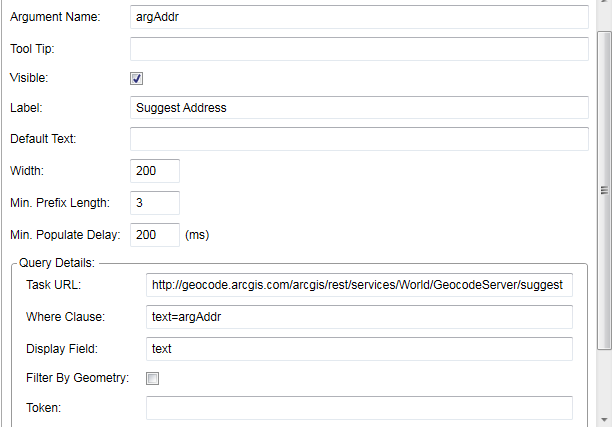 0
0 -

Hi everyone,
As Tami's found, the autocomplete box formats queries to services in a very specific way, which isn't compatible with the geocode server's suggest method. It specifies to use the query method and adds a paramater for "where=". For example, if you were to use the configuration from the image above, the request that will be sent to the geocode server is:
http://geocode.arcgis.com/arcgis/rest/services/World/GeocodeServer/suggest/query?returnGeometry=false&spatialRel=esriSpatialRelIntersects&where=text%3d2516+Balboa&outFields=text&returnDistinctValues=true&f=json
Because this format doesn't work for geocode services, I think we would need to have additional settings added to the Autocomplete box form item, or a different new form item altogether to make this work. If that's something you would like to see, I would recommend posting to the Ideas (https://support.geocortex.com/GSCIdeas?c=09a6000000008RsAAI&filter=1&categ=all&sub-nav=ideas&main-nav=essentials&page=1) section so that other users can vote to have the feature considered.
Hope that helps,
Amanda0
Bitte melden Sie sich an, um einen Kommentar zu hinterlassen.
Kommentare
4 Kommentare