Shortening HTML5 URLs KB article: note about named instances

Great to see the KB article (https://support.geocortex.com/essentialsGSCkba?sub-nav=kba&main-nav=essentials&#!/feedtype=SINGLE_ARTICLE_DETAIL&dc=All_Essentials_kba&criteria=BESTANSWERS&id=kA360000000Cina) as I was looking for this last week. Just an additional note:
If you are using a named instance of GE, you have to insert the name of the instance between /Essentials and /REST in the path.
So in my case it would be similar to: shortname: "https://server.domain.com/Geocortex/Essentials/instancename/REST/Sites/SiteName/viewers/ViewerName/virtualdirectory/Resources/Config/Default/" + shellName + ".json.js"
But now some of my icons are broken. They point to: https://server.domain.com/virtualdirectory/Images/Icons/Basemaps/imagery-16.png

If I figure this out, I will post, or if someone has a bright idea, let me know!
0
-
I have not figured out the broken icon thing after shortening urls using an instance other than the default. Any suggestions welcome. 0 -

Hi Heather,
What values have you configured for your icons in Essentials? It sounds like we're not completely resolving a replacement token, so the link ends up going to the root of the server rather than using a relative path.0 -
I was unable to upload my screenshot. The location is when you choose an icon for a base map in the base maps section of the site. The URL is {RestVirtualDirectoryUrl}/Images/Icons/Basemaps/imagery-16.png 0 -
Hey, it worked this time. 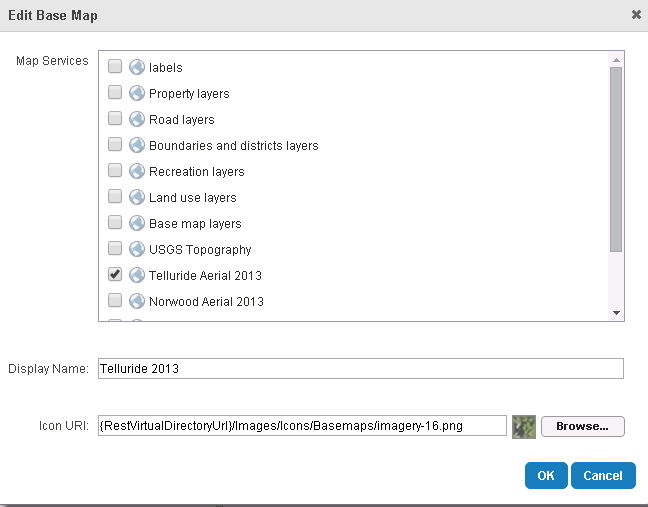 0
0 -
Hi Malcolm
I note that in that article that it is stated that Note: In the html file, the name of your viewer must be all lowercase
In what circumstances is this true?
I have managed to it it named using mixed case and the shortened URL still works when the incorrect case is used in the browser address.
Thanks
Ralph Price0 -
Hi Ralph,
As of version 2.5 of the Viewer for HTML5, we no longer defer to a lower-case version of the viewer configuration. It's case insensitive, so you can use whatever you like in the configuration dictionary and the launch URL.
We'll update the KB article to suit.
Heather: there's obviously something up with the way we resolve {RestVirtualDirectoryUrl}, I'll get someone to investigate that.
Regards,
-Malcolm0 -
Thanks, Malcolm. Please let me know what you find out. 0 -
Hi Heather,
What is the full URL to your viewer config, that was added to index.html?
If the "sites" folder name in the URL is not all lower case, then the code that resolves the replacement tokens won't actually find the location of Essentials.
This isn't a problem with named instances, just a problem with the long URL. So, if you have:"shortname": "https://server.domain.com/Geocortex/Essentials/instancename/REST/Sites/SiteName/viewers/ViewerName/virtualdirectory/Resources/Config/Default/" + shellName + ".json.js"replace it with:"shortname": "https://server.domain.com/Geocortex/Essentials/instancename/REST/sites/SiteName/viewers/ViewerName/virtualdirectory/Resources/Config/Default/" + shellName + ".json.js"
Note the /REST/sites/SiteName syntax.
Regards,
-Malcolm0 -
Criminy. I thought I had tried every permutation of cases in that URL, but I obviously missed one. Lowercase "sites" worked. Thank you! 0
Bitte melden Sie sich an, um einen Kommentar zu hinterlassen.
Kommentare
9 Kommentare