html5 2.5.1 Buffer tool doesn't work

-
Here is a prime example. You can see the buffer includes the surrounding empty lots, but they are not included in the results. I can't believe the problem lies with the multi-part polygon since some of the parts are selected. Further the southern strip of lots is only half selected. Not usable. 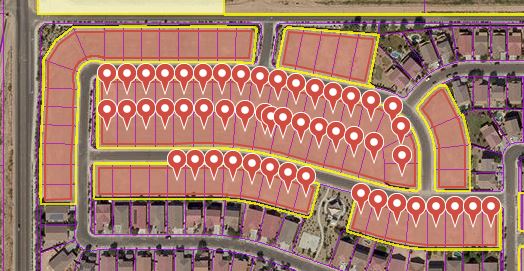 0
0 -

We share your frustration with the new Buffer tool. It does not consistently find results (results seem to vary by scale, even if layer visibilty is the same across scales) and it disappears too quickly/easily (it should be added as markup). 0 -

Hi Ethan,
I am trying to replicate the issue you are experiencing and haven't been able to so I was wondering if I could confirm a couple of things with you.
From the information provided I assume you are using a multi-part polygon feature and then performing a negative buffer on said feature? If so I have replicated your use case and received all the correct features returned on a test site.
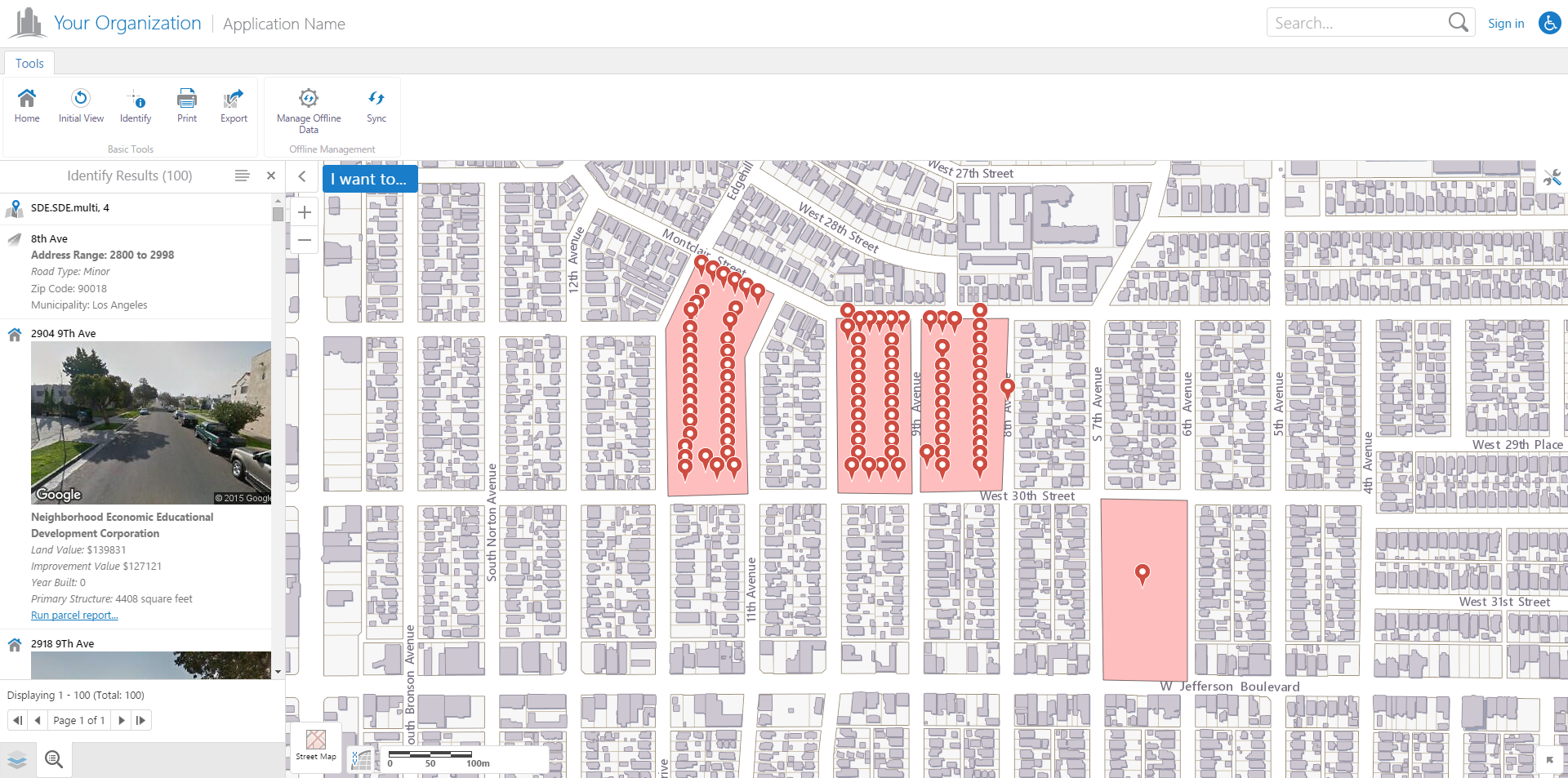
Note: To get all the features to appear as pushpins on my site I had to explicitly set the results list to allow more than 50 results per page. This setting can be changed within configuration.json (if you leave it as default it will only show pushpins for the first 50 features identified).Let me know if I am trying to replicate with the correct use case and I can continue looking further into this issue.
Cory Purnell
Latitude Geographics Quality Assurance Team0 -
I realized later that the results are paginated (where is that setting located?), but the bigger problem is that if you have more than one item identified, the buffer won't work. For example. I identified a subdivision and selected that one subdivision, but because the county boundary layer was also identified, even though it wasn't selected, I got every parcel in the entire county, every street line segment in the entire county, bascially it buffers the entire county and not what is selected. There doesn't appear to be any way to select a single feature other than to turn off all identifiable layers except one, identify your feature, turn back on the identifyable layers and then do your buffer, but this crashes the app. Doing a query simply causes the entire app to crash too. And the buffer won't work if the layer is not visible, which kind of sucks if there is scale dependency on the layer visibility. Which would be the case if I was looking for parcels over 1,000 Ac within a county. Anyway, i can only get the buffer to work for a very narrow use case. The Silverlight buffer function worked much more predictably and reliably. 0 -
Hello Ethan,
Unfortunately there is no functionality to change the pagination settings in the Geocortex Viewer for HTML5 Management pack, but you can change it in your viewer's configuration json files.
The Desktop.json file for your viewer is located in a similar place to this url by default:
C:\Program Files (x86)\Latitude Geographics\Geocortex Essentials\Default\REST Elements\Sites\<site_name>\Viewers\<viewer_name>\VirtualDirectory\Resources\Config\Default\Desktop.jsonThe Tablet.json and Handheld.json files are located in the same directory.
Once you open that in a text editor, perform a search for "isPaged", this should take you to the "ResultsListView" settings and you can set that option to false to remove all pagination, or directly below it you can set how many results you want per page. Lower down in the json configuration file is the pagination options for the "ResultsTableView" as well.
Regarding the single feature buffer, if you select a feature from the results list after an identify and navigate to the feature details menu for that feature, there should be a buffer option in the configurable actions menu for that feature. This will perform the buffer on only the selected feature. Unfortunately we don't have the ability to select multiple specific features and perform a buffer on them (excluding other features that may have been selected in the identify). I can create a feature improvement request in our bug tracking software for that issue, if you would like me to.
I will also take a look at the issue you are experiencing with the app crashing after setting the identifiable layers and then turning them off before a buffer and will file that in our bug tracking software.
Hopefully this was helpful, and I really appreciate the feedback. It lets us know what we have missed in feature development and helps us understand the use cases that are being used outside our QA environment.
Let me know if you have any other questions or issues and I will try my best to help solve them.
Cory Purnell
Latitude Geographics Quality Assurance Team0
Bitte melden Sie sich an, um einen Kommentar zu hinterlassen.
Kommentare
5 Kommentare