Find Data - showing the correct attribute of the layer when showing the identify result

When doing find data on a layer. The tool gives you a list with all the results. These list shows an attribute of the corresponding layer.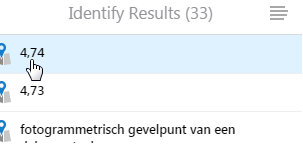
For example in the image below. I want to change the value 4.74. Some other attribute should shown.
Kind Regards, An
0
-
I think this shows the Feature Label that you configure in Essentials Manager. Edit the layer and add a Feature Label - it can be text and/or attributes from the data. 0 -
Further to this - I am pretty sure if you don't have a Feature Label set, it just shows whatever the Display Expression field is in your MXD. If you don't want to configure all the Feature Labels in Essentials, you could change the Display Expression field in the MXD instead. It is found under Layer Properties, Display tab. 0 -
IMHO, I think that the default should at least be the Layer Name + the Display field (as it shows now). Manually editing so many layers is cumbersome 0 -
Yes I agree with Gareth's comment. This is how the defualt pop-up functions in AGOL web maps and would be nice option to have in Geocortex. This would especially helpful for apps that have large set of layers that need to be configured. 0
Bitte melden Sie sich an, um einen Kommentar zu hinterlassen.
Kommentare
4 Kommentare