Refresh a map service to add new map layers?

Occassionally I modify existing map services to respond to evolving user needs. These modifications either add new layers to the service, new tables that are likely joined to layers within the service, or more recently, add a field to an existing view that is joined to a layer within the service.
Viewing the ArcGIS REST Services Directory shows the changes correctly. Within GE Manager, I don't see those changes. I DO see them if I go into the 'Add Map Service' dialog, but what I want to avoid is the need to delete the existing map service with all of my customizations and adding the map service again and trying to ensure that I make all of the same customizations.
An additional concern is--if I must delete and re-add the service, will the map service ID remain the same or will it be assigned a new ID? I could see that causing a cascading list of issues if the affected map service is used in various workflows.
Anyone have any tips/tricks for how you deal with this issue? I can't be the only one with this type of workflow/process.
0
-

As far as adding new layers to the service -- once you have published the map, edit the site in Essentials Manager. Click the "Edit Map Service" button: 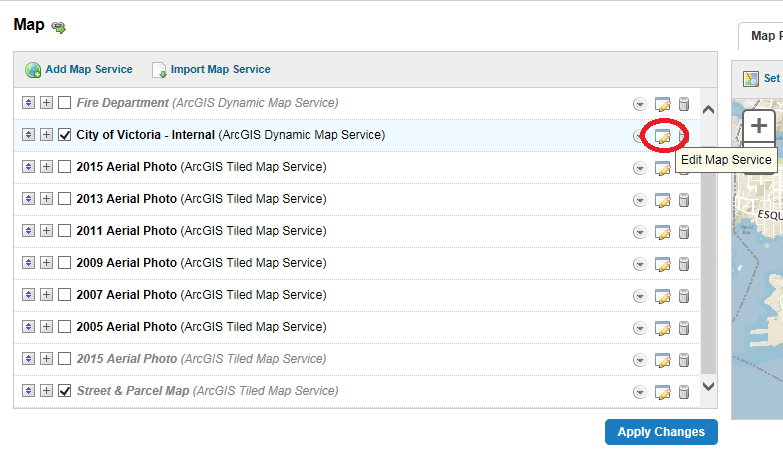
Then click the "Add/Remove Layers" tab. Your new layer(s) will be in the "Excluded Layers" list on the right. Click on them and click the arrows to move them into the "Included Layers" list: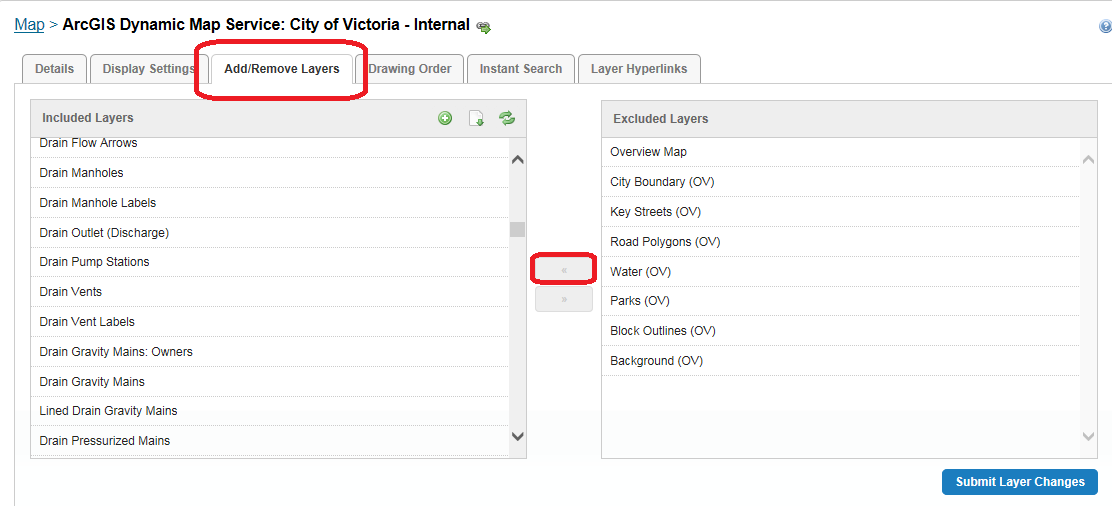 0
0 -

I was wondering the same thing. I had the issue where the new layers weren't in the Excluded Layers list but already in the Included Layers list but I still couldn't get it to show in the legend for the map. 0 -
When you edit the layer, check to make sure the checkbox is checked to include it in the legend: 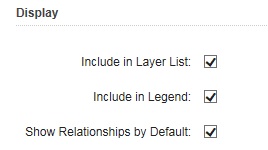 0
0 -
Stephanie,
Thank you for your response! My immediate need was to get an additional field from a view joined to a layer in my map service to be visible. Using your procedure description, I ended up excluding that particular layer, then added it back in. From there, I needed to go to the add/remove fields tab and add the new field in. I need to add some new layers into various map services and your procedure will help make that process a super smooth one. Thanks again.0 -
It has been my experience that restarting a service generally is enough to cause Manager to notice the changes. If I add a layer to an existing group, I will get an exclamation point error in the upper left hand corner of the screen after I open a site that has had one of its services modified. Sometimes a dialogue will just come up (missing fields?) when the site is opened. It could be that you are doing something that does not cause an error flag - adding a new field, or a new layer that is not in a group, etc. If that is the case, you should be able to see the changes in Manager - goto add field (if it is a new field) and "Add layer or map service" to include a new layer. 0 -
Thanks, Mike! I'll watch for that in the future now that I know what to look for. 0 -
Following this process, is it confirmed then that the map service ID remains the same? That would be great - presently when we add an updated service with revised/removed/additional layers it gives the service a new ID and breaks everything from symbology to workflows to saved projects. 0 -
James,
It is only modifying the map service so I believe the map service ID stays intact. I confess that I've only done this a couple of times and currently don't have workflows, etc. that might break so I haven't paid attention.
I'm building a layer that will be added to an existing map service soon. I'll try to remember to check the IDs before and after when I do that. I don't have a solid feel for when that might be as I am getting some outstanding questions answered before finalizing the layer. Stay tuned.0 -
I'll add an additional bit of info to Stephanie's response that I marked as the best answer. It seems that in certain cases you also need to go into the "Includes layers and Map Services" dialog (I believe this may have been what Mike was referring to as "Add layer or map service") in order to make the layer visible in your layer list. 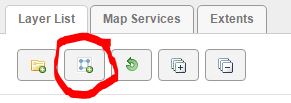 0
0 -
James, this is a follow-up to your question about map service IDs when modifying an existing map service.
I just added a new layer into an existing map service. In GE, the map service ID for this particular map service stayed the same. So that will probably be good news for you.
As I expected, the index for a particular layer within that map service will shift based upon where the new layer was added in the overall list of layers within the service. But I believe the "best practice" for workflows is to use the layer name and not the index?0 -
I am experiencing this same issue with "grouped layers" in the MXD. When I add a new layer to an existing group and refresh the map service in ArcGIS Server, the layer is missing in GE. I do know to go through the process of adding excluded layers to the list of layer to be included. When I do, I receive an error that the layer may be missing or the IDs have changed.
The AGS map service shows all unique layer IDs, but within the Site manager, there is a duplicated layer ID.
I would like to know if this is a known bug that has/has not been fixed within GE and if there is any problem with using the map service in a HTML5 viewer. Currently, I am using GE 4.2.2 and HTML5 viewer 2.3.
Thank you0 -
As an additional piece of information. I, too, do not want to have to "re do" all of the tweaks on my specific layers (such as configure popus, global/instant search, etc). I prefer the groups that I created in ArcMap because they help separate out data into themes for my end users. 0 -
@Brian: It looks like Geocortex keeps the index that the map service has, so I would recommend turning on "Allow assignment of unique numeric IDs for map service publishing" so that your old layers won't change and your new layers will get new numbers. See more information here (http://desktop.arcgis.com/en/arcmap/10.3/map/publish-map-services/map-authoring-considerations.htm#ESRI_SECTION1_4C54586DEB0445B4B97AF15856E546AB) . I would double check once you turn that on that your old layers have the ids you want, so you don't mess anything up when you republish the service. 0 -
So I followed the instructions to allow assignment of unique numeric IDs in the mxd, but I did this after setting up all my sites. Now that the layer IDs are all assigned new IDs, the Essentials sites no longer point to the correct layers and everything is topsy turvy. I would recommend not doing this unless you are setting up new sites. I don't know how to "repoint" Essentials to the new ID, so I'm going to have to put everything back... 0 -

If you enable "Allow assignment of unique numeric IDs for map service publishing" after you have already published a mapservice, then overwrite that mapservice, you will have issues unless you manually change the ID in the MXD to match the existing ID in the mapservice.
If you do not "Allow assignment of unique numeric IDs for map service publishing" then the MXD items will be given sequential IDs starting at 0 every time you publish. If you add something to the middle of the TOC, everything below it will get new IDs incremented by 1.
When you enable "Allow assignment of unique numeric IDs for map service publishing" the IDs are updated to reflect what I think is the order the items were originally added/created in the MXD. Update these to match what the mapservice shows before republishing and you will be fine. If you remove a layer/item, do not re-use the ID.
This is why we have started enabling "Allow assignment of unique numeric IDs for map service publishing" on every service we publish, so the IDs will never change for an item unless we manually change them.0
Bitte melden Sie sich an, um einen Kommentar zu hinterlassen.
Kommentare
15 Kommentare