AddDataTableRow - Input array is longer than the number of columns in this table

Hello all,
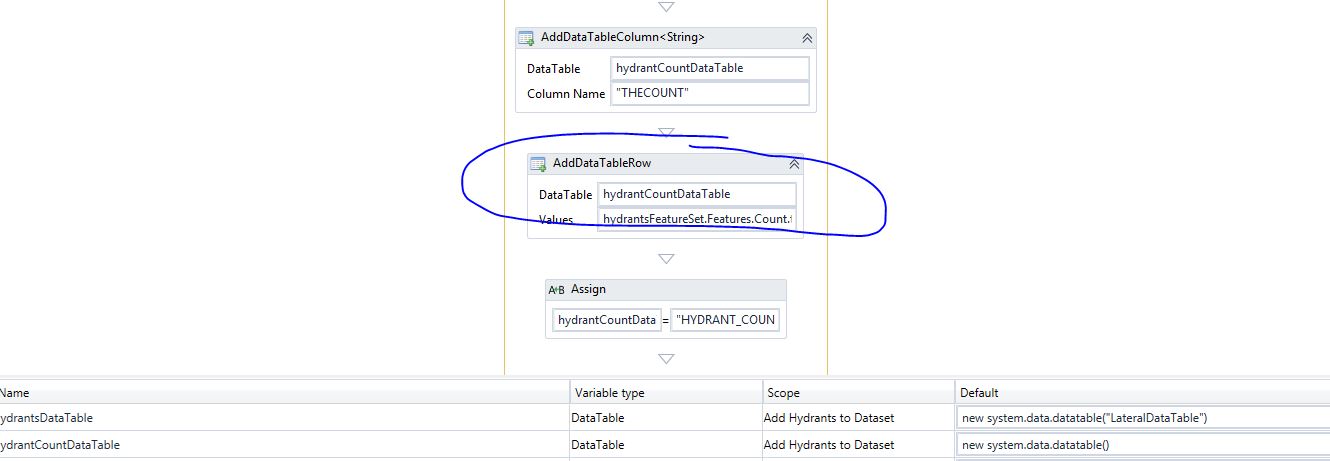
I am building a workflow (using the Multi Layer workflow/report example) in which I am trying to report the Number of Hydrants found within 500 feet of a selected parcel. I thought all was working as the the number of hydrants would display on the report UNTIL I happened to find a location that had more than 9 hydrants. Once a location has 10+ hydrants, I receive the following error.
Below is the part of the workflow where the above error occurs. I have created a Table with one string column and am passing the featureSet.Features.Count.toString as the value in that field.
I must have missed something when setting up this table, but I don't know what.
It will only ever have One field and one record that will have a count converted to a string. Again, it works as long as the count is 9 or less. If the count is 10 or more, it fails.
If you think this is most likely a bug, I will submit to GC support. We are running low on support hours so starting here first!
Thanks,
Carmen
0
-
After speaking with Malcolm with Technical support, he advised me to try creating a list, adding the hydrant count to the list and then add the list to the data table. This worked. Otherwise, if the number of hydrants was over 9, it was trying to add each character to the datatable and was seeing it as needing 2 columns if the hydrant count had two digits.
As a visual here is what this section of the workflow looks like now.
_img_ alt="User-added image" src="https://latitudegeo--c.na53.content.force.com/servlet/rtaImage?eid=90760000000XZit&feoid=Body&refid=0EM60000000XqFi" _/_img_
Thanks,
Carmen0
Bitte melden Sie sich an, um einen Kommentar zu hinterlassen.
Kommentare
1 Kommentar