Viewing related data in feature long description

Is there a way to view a feature’s related data (this data is related to the feature via a relationship class) in the feature long description?
Best Regards,
Hani
_img_ alt="User-added image" src="https://latitudegeo--c.na53.content.force.com/servlet/rtaImage?eid=90660000000Xa62&feoid=Body&refid=0EM60000000XqJz" _/_img_
0
-

Hello Hani,
Yes, this can be achieved by using token replacement. The syntax is as follows: {RelationshipName.FieldName}.
Thanks, Stefan0 -

Is anyone experiencing the following behavior with related tables and the generated link when a map tip first shows up?
We are using the HTML5 2.6 viewer. The feature description and long description contain the same description as follows.Name: {PROJECT_INFO.project_name}<br/> <a href="command:RunWorkflowWithArguments?workflowId=RunReportFromHyperlink&Project_nbr={project_nbr}&LayerName=ALL_POLYS_SDE&ReportId=0">Get project report.</a>
This displays fine. However, when this is first displayed at a map tip the generated url has javascript to kill any mouse events. Here is what the map tip link appears when first opened.<a _key="1" href="javascript:void(0)" data-binding="{@event-onclick: handleHyperlinkClick}{@event-mouseup: ignoreEvent}{@event-mousedown: ignoreEvent}">Get project report.</a>
This terminates any click event. This is why when you click nothing happens.
However, if you click view additional details the generated link does not have the kill mouse events and the link works. The link generates correclty in both side panel view and in the expanded table view.
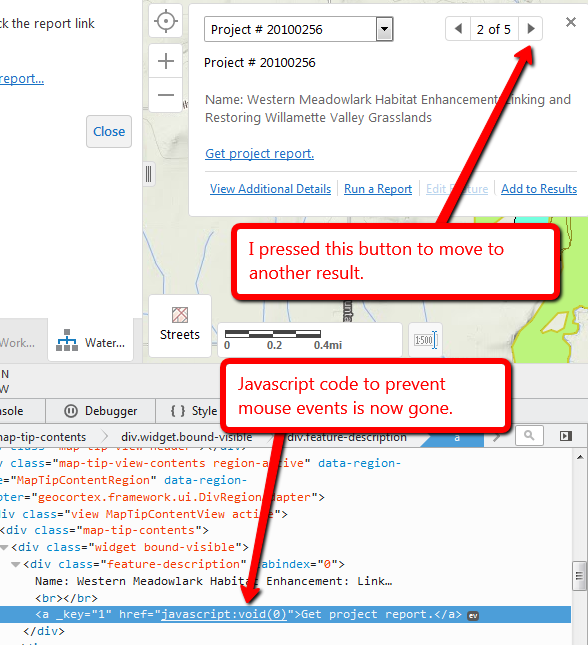
If the feature you selected on the map has multiple records the map will show you a number of records you can page through. Again the first time the map tip opens the kill mouse event code is present. However, if you press the arrow button (or choose a different result from the drop down) the generated link will work as the javascript code is gone.The link issue appears to be due to using related table data. For example. If the description using the following the href below it will generate a bad link.
Name: {PROJECT_INFO.project_name}<br/>If plain text is used or a field from the current feature is used the link is generated correclty.
Name: {project_nbr}<br/>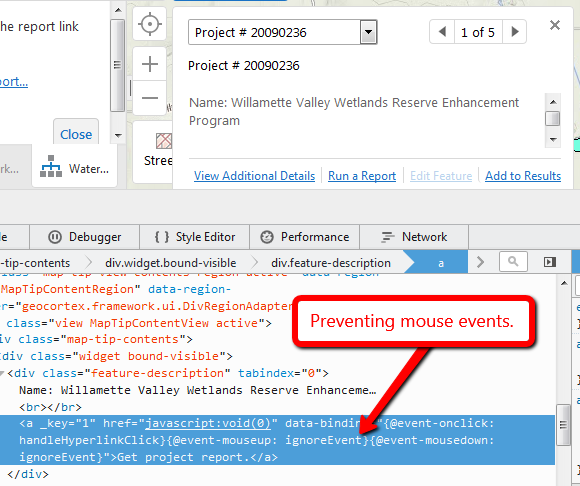
 0
0
Bitte melden Sie sich an, um einen Kommentar zu hinterlassen.
Kommentare
2 Kommentare