Show Mouse Coordinates in Decimal Degrees

I would like to show Mouse coordinates in Decimal Degrees but not like what's shown in the picture. Where do I make the setting? Under Viewer-->Map Widgets--> I could only see 'Show Map Coordinates' to check and uncheck.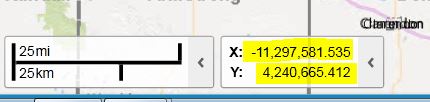
0
-

Hello Naresh,
Beside the mouse coordinates widget is a menu where you can change how these values are displayed. There are options for DDM, DMS, and Lat/Long. You can also add additional coordinate systems in the Management Pack. What are you hoping to configure the widget to display?Thanks, Stefan
0 -

Another option if you just want to add DD and not deal with the Management Pack, is go into the Viewer file and just add DD to the coordinate systems like (see bold):
"viewModels": [
{
"id": "CoordinatesViewModel",
"type": "geocortex.essentialsHtmlViewer.mapping.modules.coordinates.CoordinatesViewModel",
"configuration": {
"isEnabled": true,
"openByDefault": true,
"useBasemapCoordinates": false,
"numDigits": 5,
"coordinateSystems": [
{
"displayName": "Lat / Long - DD",
"wkid": 4269,
"output": "dd"
},
{
"displayName": "Lat / Long - DDM",
"wkid": 4269,
"output": "ddm"
},0 -
Ryan,
Where is the Viewer file located?0
Bitte melden Sie sich an, um einen Kommentar zu hinterlassen.
Kommentare
3 Kommentare