HTML5 2.4 - Print Map returning error

I have Essentials 4.3 installed with the HTML5 viewer 2.4. I draw a rectangle on the map, I click the Print Map button on the toolbar, I select the output to be PDF (only option), click OK and get the following message: "Print error: Exception has been thrown by the target of an invocation. Object reference not set to an instance of an object." In the Silverlight viewer(1.10), I get a different but similar message:"The print operation could not be completed successfully. Please contact your system administrator for assistance." Using the Print Map with earlier versions of the software worked. The only change is the upgrade to 4.3 Essentials and the HTML5 viewer.
0
-
Sounds like the error I get sporadically. My quick fix is to restart IIS. Not sure what is causing the issue, but it also affects online editing. 0 -

Patrick and Marshall, did you ever find a solution to this error? I am getting a sporadic "Print error: Exception has been thrown by the target of an invocation. Object reference not set to an instance of an object." error and the only apparent fix is to restart IIS. Any ideas? 0 -
No it is still happening, I have several versions of Essentials, Silverlight, and HTML5 and if I get the print error in one, it affects all applications. Don't know if it is an AppPool thing, memory leak, or what. I have been restarting IIS when I get to the office each day and I only get the issue once every other week or so now 0 -
OK, thanks for getting back to me. I'll switch the app pools to recycle a couple of times a day and hope that prevents the error. I wish I could track down what's causing it. Here is a bit of the log file.
<Event Timestamp="2015-12-17T13:03:27.7913079-06:00" Level="ERROR" Identity="Guest"><Message>Failed to generate an image from map service (ID: "46"). The following error occurred: The operation completed successfully</Message></Event>
<Event Timestamp="2015-12-17T13:03:27.7922749-06:00" Level="INFO" Identity="Guest"><Message>Win32Exception: The operation completed successfully
Server stack trace:
at MS.Win32.HwndWrapper..ctor(Int32 classStyle, Int32 style, Int32 exStyle, Int32 x, Int32 y, Int32 width, Int32 height, String name, IntPtr parent, HwndWrapperHook[] hooks)
at System.Windows.Threading.Dispatcher..ctor()
at System.Windows.DependencyObject..ctor()
at System.Windows.Media.Imaging.BitmapSource..ctor(Boolean useVirtuals)
at System.Windows.Media.Imaging.WriteableBitmap..ctor(Int32 pixelWidth, Int32 pixelHeight, Double dpiX, Double dpiY, PixelFormat pixelFormat, BitmapPalette palette)
at Geocortex.Gis.Services.MapFunctionality.DrawExtentWithTiling(DrawOptions options, DrawExtentCoreHandler drawExtentCoreHandler, Int32 supportedImageWidth, Int32 supportedImageHeight)
at System.Runtime.Remoting.Messaging.StackBuilderSink._PrivateProcessMessage(IntPtr md, Object[] args, Object server, Object[]& outArgs)
at System.Runtime.Remoting.Messaging.StackBuilderSink.AsyncProcessMessage(IMessage msg, IMessageSink replySink)
Exception rethrown at [0]:
at System.Runtime.Remoting.Proxies.RealProxy.EndInvokeHelper(Message reqMsg, Boolean bProxyCase)
at System.Runtime.Remoting.Proxies.RemotingProxy.Invoke(Object NotUsed, MessageData& msgData)
at Geocortex.Gis.CoreMap.GenerateMapImageDelegate.EndInvoke(IAsyncResult result)
at Geocortex.Gis.CoreMap.Draw(MapDrawOptions mapDrawOptions)
</Message></Event>
<Event Timestamp="2015-12-17T13:03:28.132347-06:00" Level="ERROR" Identity="Guest"><Message>Exception has been thrown by the target of an invocation.
The operation completed successfully</Message></Event>
<Event Timestamp="2015-12-17T13:03:28.1333608-06:00" Level="DEBUG" Identity="Guest"><Message>Win32Exception: The operation completed successfully
at MS.Win32.HwndWrapper..ctor(Int32 classStyle, Int32 style, Int32 exStyle, Int32 x, Int32 y, Int32 width, Int32 height, String name, IntPtr parent, HwndWrapperHook[] hooks)
at System.Windows.Media.MediaContextNotificationWindow..ctor(MediaContext ownerMediaContext)
at System.Windows.Media.MediaContext..ctor(Dispatcher dispatcher)
at System.Windows.Media.DrawingVisual.RenderOpen()
at Geocortex.Gis.MapImage.Combine(MapImage bottomMapImage, MapImage topMapImage, Boolean resizeToBottomImage, Single transparency)
at Geocortex.Gis.CoreMap.Draw(MapDrawOptions mapDrawOptions)
at Geocortex.Essentials.MapBase.Draw(MapDrawOptions mapDrawOptions)
at Geocortex.Essentials.Reporting.Transforms.MapDataTransformer.a(OverviewMap A_0, Envelope A_1)
at Geocortex.Essentials.Reporting.Transforms.MapDataTransformer.a(Map A_0)
at Geocortex.Essentials.Reporting.Transforms.MapDataTransformer.Execute()
at Geocortex.Essentials.Reporting.ReportRunner.GetReportContextData(ReportContext reportContext, ImageTable imageTable)
at Geocortex.Essentials.Reporting.ReportRunner.b()
at Geocortex.Essentials.Rest.Resources.RunPrintTemplateOperation.Run(RunTemplateReportOptions options)
at Geocortex.Essentials.Rest.Resources.RunTemplateReportOperation.RepresentAsJson()
at Geocortex.Essentials.Rest.Resources.ResourceBase.WriteJson()
TargetInvocationException: Exception has been thrown by the target of an invocation.
at System.RuntimeMethodHandle.InvokeMethod(Object target, Object[] arguments, Signature sig, Boolean constructor)
at System.Reflection.RuntimeMethodInfo.UnsafeInvokeInternal(Object obj, Object[] parameters, Object[] arguments)
at System.Reflection.RuntimeMethodInfo.Invoke(Object obj, BindingFlags invokeAttr, Binder binder, Object[] parameters, CultureInfo culture)
at System.Reflection.MethodBase.Invoke(Object obj, Object[] parameters)
at Geocortex.Essentials.Rest.EssentialsRestRequestDispatcher.a()
RestException: Exception has been thrown by the target of an invocation.
The operation completed successfully
</Message></Event>
<Event Timestamp="2015-12-17T13:03:43.5337659-06:00" Level="INFO"><Message>[2015-12-17 13:03:43,533][INFO ][666 ][ ][Geocortex.GAS.InstanceCounter] Creating RedisCache (9287d009-3f26-409d-9c84-4e8286ae88ef)</Message></Event>
<Event Timestamp="2015-12-17T13:03:43.5347666-06:00" Level="INFO"><Message>[2015-12-17 13:03:43,534][DEBUG][666 ][ ][Geocortex.GAS.MethodTracer] Entering GetClusterSetting(redis.Host)</Message></Event>
<Event Timestamp="2015-12-17T13:03:43.5357707-06:00" Level="INFO"><Message>[2015-12-17 13:03:43,535][INFO ][666 ][ ][Geocortex.GAS.Cluster] Entering FindClusterSetting for setting redis.Host.</Message></Event>
<Event Timestamp="2015-12-17T13:03:43.5357707-06:00" Level="INFO"><Message>[2015-12-17 13:03:43,535][DEBUG][666 ][ ][Geocortex.GAS.MethodTracer] Leaving GetClusterSetting</Message></Event>
<Event Timestamp="2015-12-17T13:03:43.5367708-06:00" Level="INFO"><Message>[2015-12-17 13:03:43,536][DEBUG][666 ][ ][Geocortex.GAS.MethodTracer] Entering GetClusterSetting(redis.Port)</Message></Event>
<Event Timestamp="2015-12-17T13:03:43.5377679-06:00" Level="INFO"><Message>[2015-12-17 13:03:43,536][INFO ][666 ][ ][Geocortex.GAS.Cluster] Entering FindClusterSetting for setting redis.Port.</Message></Event>
<Event Timestamp="2015-12-17T13:03:43.5377679-06:00" Level="INFO"><Message>[2015-12-17 13:03:43,537][DEBUG][666 ][ ][Geocortex.GAS.MethodTracer] Leaving GetClusterSetting</Message></Event>0 -
If you are publishing basemaps/layers with immutable id's from 10.3 and consuming those in Geocortex, try removing those basemaps/layers from appearing "in the legend" in the Map Services settings and see if you can then print. Not that this is ideal, but it might help locate what needs to be addressed. This was our error: 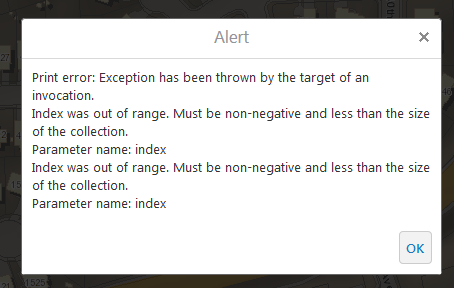 0
0
Bitte melden Sie sich an, um einen Kommentar zu hinterlassen.
Kommentare
5 Kommentare