Add labels to selected features

For example, I have 20 parcel features selected and those parcels are sorted by parcel number.
I need to mail letters only for those 20 selected parcels.
I want to a counting label displayed at the center of each selected parcel starting from 1 to 20.
So when the map gets printed out, the numbers on the parcels will be used for identifying parcels.
I did research on how to do this in workflow environment (not manually), but so far no luck!
Any help would be greatly appreciated.
0
-
This is NOT answer to the question but a follow-up.
Workflow doesn't provide activities/tools for a single feature symbology/labeling.
Custom script might be a possible solutions to this problem.
It can be addressed as described in pseudo code below.
int num_feats = taxparcelFS.Features.Count;
TextSymbol textSymbol = null;
Graphic g = null;
for (int i=0; i<num_feats; ++i) {
// create a text symbol
textSymbol = new TextSymbol();
textSymbol.Text = (i+1).ToString();
// create a graphic and add the text symbol to it
g = new Graphic();
g.Geometry = taxparcelFS.Features[i].Geometry.getCentroid();
g.Symbol = textSymbol;
// add the graphic to map
map.Graphics.Add(g);
}
I'm having trouble accessing "map" and how to run the script in workflow.
I saw video clip on running script
https://support.geocortex.com/essentialsGSCVideo?sub-nav=videos&main-nav=essentials&#!/feedtype=SINGLE_ARTICLE_DETAIL&criteria=BESTANSWERS&id=kA560000000CauhCAC
But still not successful with running my script (adding unique labels).0 -
I'm interested in doing something similar and am wondering if you found any answers to this question? 0 -
Hi folks,
We could do this by building a new point featurset using the parcel centroids, then use the method I described here (https://support.geocortex.com/essentialsGSCForum?sub-nav=forum&main-nav=essentials&feedtype=SINGLE_QUESTION_DETAIL&dc=Workflow&criteria=ALLQUESTIONS&id=906f20000000CISAA2) to create a renderer that draws numbers for each point using an UpdateGraphicsLayer activity. It would be a bit of work, but it's a workflow-only solution.
Here's the pattern you would use to create the point featureset. You could alternatively skip this, and apply the method from the other post straight onto the parcel featureset, but the resulting label placement is a bit different between each: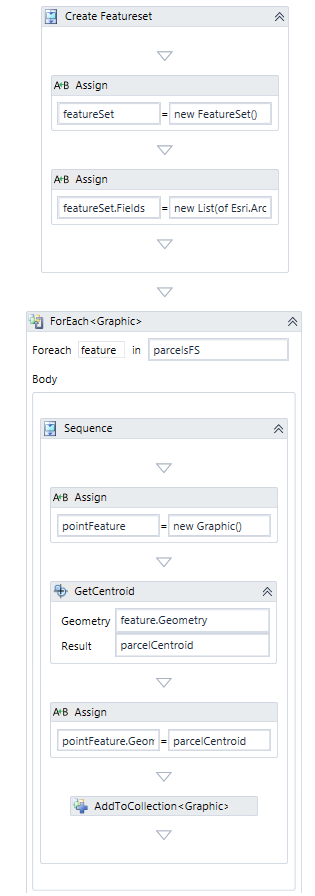
- The truncated text in the 2nd Assign is:
new List(of Esri.ArcGIS.Client.Field) - The AddToCollection adds pointFeature to featureSet.Features
-Amanda0 - The truncated text in the 2nd Assign is:
Bitte melden Sie sich an, um einen Kommentar zu hinterlassen.
Kommentare
3 Kommentare