autocomplete inconsistent in 2.5.2

I have a parcel search workflow that supports searching by owner, address, and roll number, with autocomplete enabled on each choice. Since updating to 2.5.2, the roll number autocomplete does nothing, yet succeeds in the SLV and still works for both owner and address in GVH 2.5.2. Has anyone else encountered this? What might I try to correct it?
0
-

i have also noticed this behaviour. @latitudesupport??? any comments. we are using 2.5.1 HTML5 viewer. 0 -
I'll have the QA team take a look. A couple of quick questions:
* Is this something you see in a particular browser, or does it happen in multiple browser?
* Is this the default parcel search workflow? If it's been modified or is custom, would you mind sending a copy to (support@geocortex.com) ?
* Is there a publicly-accessible site that they can take a quick look at? If not, would you mind zipping up the entire site folder and also sending it to (support@geocortex.com) ?
It may be that this is something we can reproduce here fairly easily, but just in case it's an issue that is specific to both of your environments, this will help us speed up our investigation.0 -
I'm now getting this behavior at 2.6.1. Half of my custom parcel searches autocomplete (Account Number, PIN, Subdivision name) the others don't (owner name, address, LEA - this one requires login). Consistently inconsistent across browsers. The launch link to the advanced viewer is https://maps.sanmiguelcountyco.gov/advanced and the searches are linked right off the home panel.
I can provide my workflows. I have tried to stare and compare the autocomplete settings, but I'm not seeing it.0 -
Is anyone else experiencing this? 0 -
Hi Heather,
We have a few Instant Search auto complete bugs that may be releated to this. Could you please let me know some specific examples of results that are working, and some that are not working so we can try to narrow down your issue?
Thanks!
Danny0 -
Thanks for the response! They aren't instant searches, they are workflow searches. The instant search is working.
On the home panel of the advanced viewer (https://maps.sanmiguelcountyco.gov/advanced) are the searches, also on the Search tab of the toolbar. Here are example values.
Owner name search: FISCHER does not autocomplete.
Property Address: 333 W COLORADO does not autocomplete
Parcel ID: 456536320002 autocompletes
Account Number: R1010001147 autocompletes
Subdivision Name: ALDASORO RANCH autocompletes
I can send the workflows if that helps.
Just to add to the confusion, the property address search autocomplete works on another viewer/site (https://maps.sanmiguelcountyco.gov/property) pointing to the same workflow. Owner name still doesn't autocomplete.0 -
Hi Heather,
Thanks for clarifying, I must have had Instant search on the brain, haha.
I ran the property address search on the two viewers and compared the results I got back in the Chrome developer tools. On the working site I see this URL being queried:
"https://maps.sanmiguelcountyco.gov/gis/rest/services/public/property_new/MapServer/1/query?f=json&where=UPPER(FSA)"%"20like"%"20UPPER("%"27333"%"20w"%"25"%"27)&returnGeometry=false&spatialRel=esriSpatialRelIntersects&outFields=FSA&returnDistinctValues=true"
And on the non working site, I see this one:
"https://maps.sanmiguelcountyco.gov/gis/rest/services/public/property_new/MapServer/dynamicLayer/query?f=json&where=UPPER(FSA)"%"20like"%"20UPPER("%"27333"%"20w"%"20"%"25"%"27)&returnGeometry=false&spatialRel=esriSpatialRelIntersects&outFields=FSA&returnDistinctValues=true"
The difference seems to be the map service URL that is being queried. On the non working site, the layer ID is missing. If the two sites are in fact referencing the same workflow, it's possible that they may be using different arguments.
I hope this helps! If not, please open a case and send us your workflows so we can have a look :)
Thanks,
Danny0 -
Ah ha! Still not sure why it was working in one but not the other, but I was missing the Layer Source in the GeMapServiceInfo for the addresses layer - when I see that "dynamic layer" in the URL, that's what is missing. 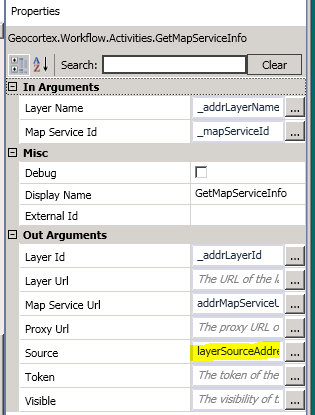
As for the owner search, it doesn't like the multi-value query which was working before.
It works with only one field:
"UPPER(" + _queryField + ") like UPPER('%{0}%')"
but not with two:
"UPPER(" + _queryField + ") like UPPER('%{0}%') OR UPPER(" + _queryField2 + ") like UPPER('%{0}%')"
Any idea why this should have changed?0
Bitte melden Sie sich an, um einen Kommentar zu hinterlassen.
Kommentare
8 Kommentare