SErvice Connections - Add Connection

When adding a connection to GE, I receive "connection failed" on external servers. I can access these servers through ArcGIS and also just browsing through IE11. I'm sure it's something simple but I can't find it :)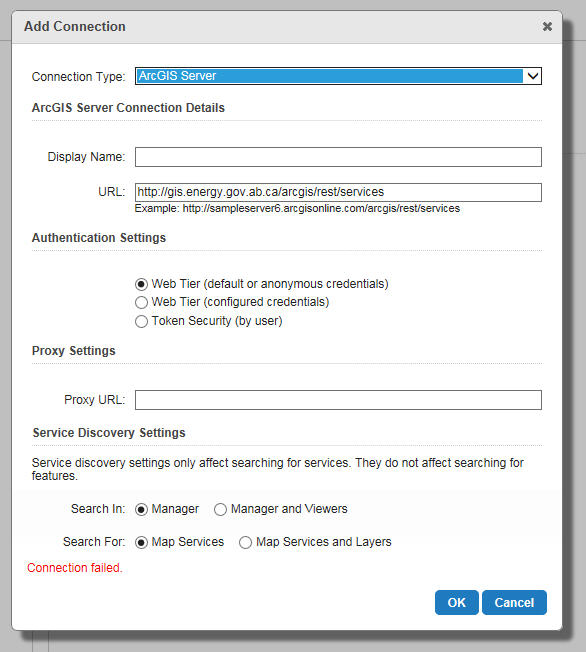
I'm wondering if it's something with cross domain (all enabled) or our proxy. Thoughts?
connection failed examples:
http://gis.energy.gov.ab.ca/arcgis/rest/services
http://geoappext.nrcan.gc.ca/arcgis/rest/services
Any information would be greatly appreciated!
Chase
0
-

Chase,
Is your server that has GE installed behind proxy? if so you will need to set up the proxy properly to direct http request to internet. Modify the web.config from the following two locations:
\\yourserver\c drive\inetpub\wwwroot\Geocortex\Essentials\REST
\\yourserver\c drive\inetpub\wwwroot\Geocortex\Essentials\RestManager
Add the following code inside of <system.net>
<defaultProxy>
<proxy proxyaddress="http://proxyserver:port" bypassonlocal="true" />
</defaultProxy>
Jin0 -
Hi Jin,
Thanks for your response.
I currently have this:
<defaultProxy>
<proxy autoDetect="false" bypassonlocal="true" proxyaddress="http://xx.x.xxx.xxx:3128" scriptLocation="http://proxy.xx.xxxxx.xxx/proxy.pac" usesystemdefault="false" />
</defaultProxy>
Maybe there is something else I need to add to it?
Chase0 -
I should add that I generated that from https://msdn.microsoft.com/en-us/library/sa91de1e.aspx back in 2012 0
Bitte melden Sie sich an, um einen Kommentar zu hinterlassen.
Kommentare
3 Kommentare