Use ListBox results to filter map

I'm working on a workflow that lets the user choose multiple names from a list box. Next I want to use those names in a SetLayerDefinition to filter the map to show only the records assigned to those names.
I've got the list box populating with a distinct list of all the names, but I don't know how to use the results from the list box to write the definition query, which would be something like "Name = 'Name1' OR Name = 'Name2'...". I'm trying to use a ForEach activity, but I'm getting errors when trying to use the results from the list box.
Am I missing a step, or is there a specific TypeArgument I need to set my ForEach activity to in order to use my list box results to write a definition query?
0
-
Thanks very much, Marshall. That workflow is fairly old, so I just needed to add the Cast <T> activity to cast from Object to System.Collections.Generic.IList and use the result in my ForEach activity.
I'll post the completed workflow when I'm done with it.0 -
I posted the workflow here:
https://drive.google.com/open?id=0B_hHHiqcTKMfeElqc19iVjM2djg
The basic logic:
1) Get a distinct list of names from the map layer
2) Convert the list to a data item
3) Use the list of names in a list box
a) Include an option to filter records by today's date
4) Cast the list box results (Object) to an IList<Object>
5) Build the definition query based on what the user chose in the Display Form using ForEach
6) Query and Select the records to return them in the search results
7) Set the layer definition so only those records show up on the map0 -

Hi John,
Would you like this submitted to our Code Gallery so others could use it?
Regards,
Wayne Richard
Latitude Geographics Group Ltd.
Head Office: 300 – 1117 Wharf Street Victoria, BC Canada V8W 1T7
Tel: (250) 381-8130 | Fax: (250) 381-8132 | wrichard@latitudegeo.com
Developers of Geocortex web-based mapping software | www.geocortex.com
An Esri Platinum Business Partner0 -
Sure! I'll clean it up a bit first tp make it more generic, and then I'll send it to you! 0 -
Perfect, thanks! 0 -
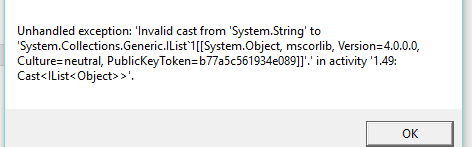
Good Afternoon John, I am trying to create a workflow that accomplishes the exact same task, that presents a user with a list to choose from, and filters the map based off of their choice. I found your sample workflow in the code gallery, and created it using my own values/fields, however I am getting an error in the cast activity. I've followed your steps exactly so I"m not sure what I'm doing wrong, any help is greatly appreciated! 
 0
0 -
My guess from that error is that your output argument variable for your listbox in your display form is a string and not an object. The Cast activity in my sample workflow expects an input Object data type that it will cast to an IList data type.
If that's not it, can you post your workflow here so I can take a look at it?0 -
Is there a way to get around the '32,000 character limit'? My workflow has 29,000 characters but I'm not able to upload... 0 -
No, that's why I upload my workflow samples to Google Drive, which also makes it easier to catalog them and keeps posts shorter! 0 -
Ok, let see if this works...
https://drive.google.com/file/d/0B5rgPuFOw9yfSWxydzVoaXB5czA/view?usp=sharing0 -
Yes, that worked.
It look like your List Box mode is set to Single, whereas my example workflow used Multiple. When I changed it to multiple and replaced your sample layer with one of my own, I got past the Cast activity without any errors.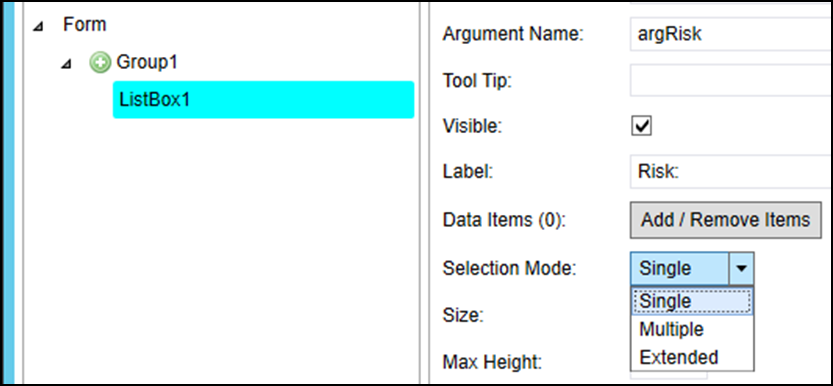 0
0 -

Morning John,
This is a fantastic workflow, and I think I’m trying to accomplish much the same thing with a slight twist. Instead of asking the user to choose one of more values and filtering a map based on the values chosen, we want to automatically filter individual records' in a map layer based on a user’s credentials (the user name would be part of the dataset). Essentially, we want a given user to see records that only they are responsible for. Do you think your workflow can be modified to accomplish this?
Contact me with questions. Thanks for your insight!0 -
It'd be a lot faster and simpler to build a new workflow that identifies who the user is and set the layer definition based on that.
1) Use Get Current User to determine who's signed in
2) Use a series of either If statements or Flow Decisions to determine a Set Layer Definition to run based on the current user0
Bitte melden Sie sich an, um einen Kommentar zu hinterlassen.
Kommentare
13 Kommentare