Geometry to Feature Set

I want to convert a geometry variable (resulted from capture geometry activity) to a featureset variable.
Is this possibe? Any suggestion?
Thank you in advance
0
-

I used the Assign Activity to assign the following:
ptClickedFeatureSet = new ESRI.ArcGIS.Client.Tasks.FeatureSet(ptUserClick)
Where ptUserClick is the Result from Display Capture geometry (ptUserClick set as variable type "Geometry" in workflow)
In my case, the user is only clicking a point and not drawing other geometry types.
Hope this helps.
Carmen
and ptClickedFeatureSet is a variable set in the workflow to be a variable type "FeatureSet"0 -
(sorry the previous post had lines out of order.... here is how I meant to reply...)
I used the Assign Activity to assign the following:
ptClickedFeatureSet = new ESRI.ArcGIS.Client.Tasks.FeatureSet(ptUserClick)
Where ptUserClick is the Result from Display Capture geometry (ptUserClick set as variable type "Geometry" in workflow)
and ptClickedFeatureSet is a variable set in the workflow to be a variable type "FeatureSet"
In my case, the user is only clicking a point and not drawing other geometry types.
Hope this helps.
Carmen0 -
Many Thanks for the helpful input Carmen,
Seems that I mis-represented my issue, I want to select the features that intersect the geometry I sketch, not the geometry itself (shown in the screenshot below).
I tried your suggestion and it selected the geometry. However, I want to select the feature.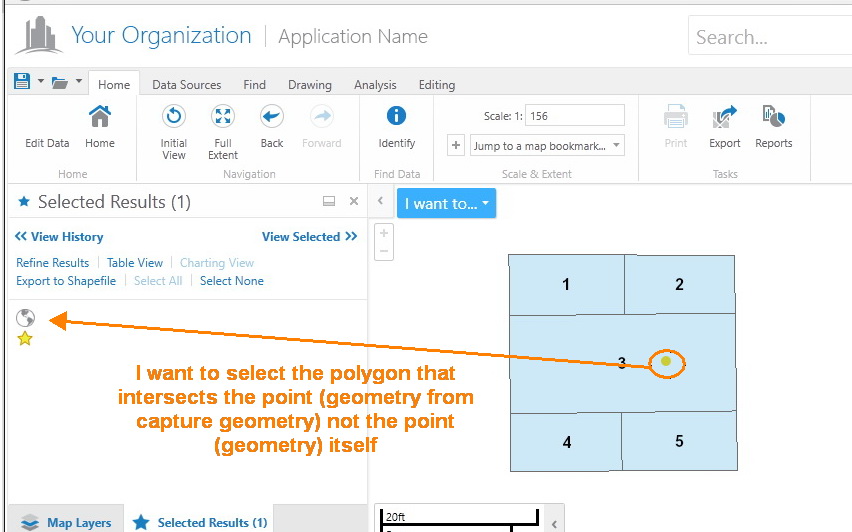
Best Regards,
Hani0 -
You need to use a query task after you capture the geometry. Query the polygon service you are wanting to select and in the query task, use the geometry from the Display Geometry activity to filter the results. This will return the polygon that intersects the geometry you captured and then you can select it. 0 -
Thanks a lot Robert,
Thats exactly what I want!0 -
Hi - anyone know if this process works with 'event layers' published from ArcMAP. I'm having issues getting a selection of features of an event layer.
Thanks0
Bitte melden Sie sich an, um einen Kommentar zu hinterlassen.
Kommentare
6 Kommentare