Edit record from search results

I have an html5 viewer (v.2.5.2, GE 4.4.2) which allows field staff to add hydrant maintenance records. The maintenance records are in a related table that's related to the feature data through a relationship class in ArcGIS. I've configured the search so users can search on system ID which returns a results list. The user selects the appropriate search result which makes the map highlight and zoom to the feature. Perfect. The problem is the related records are only visible at this point.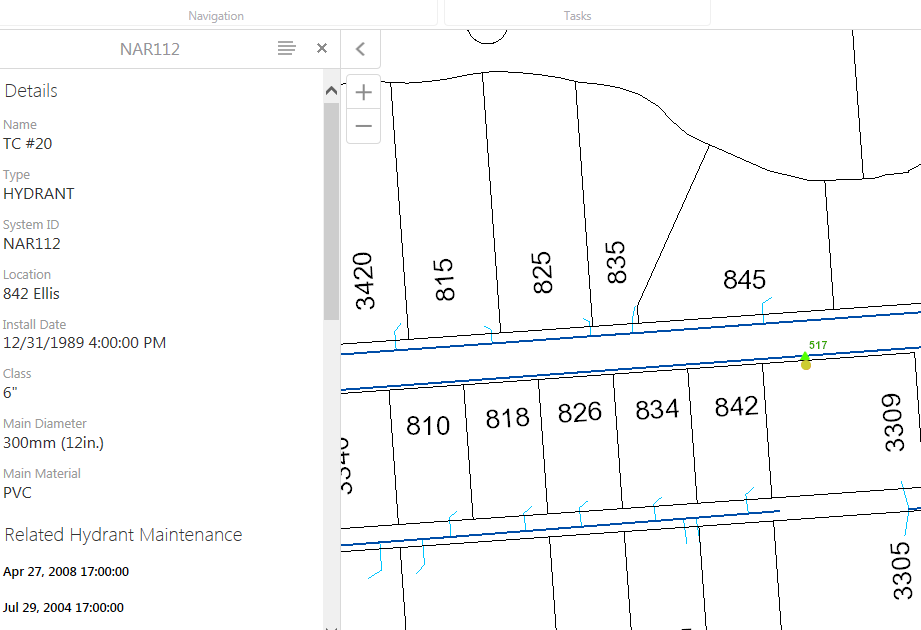
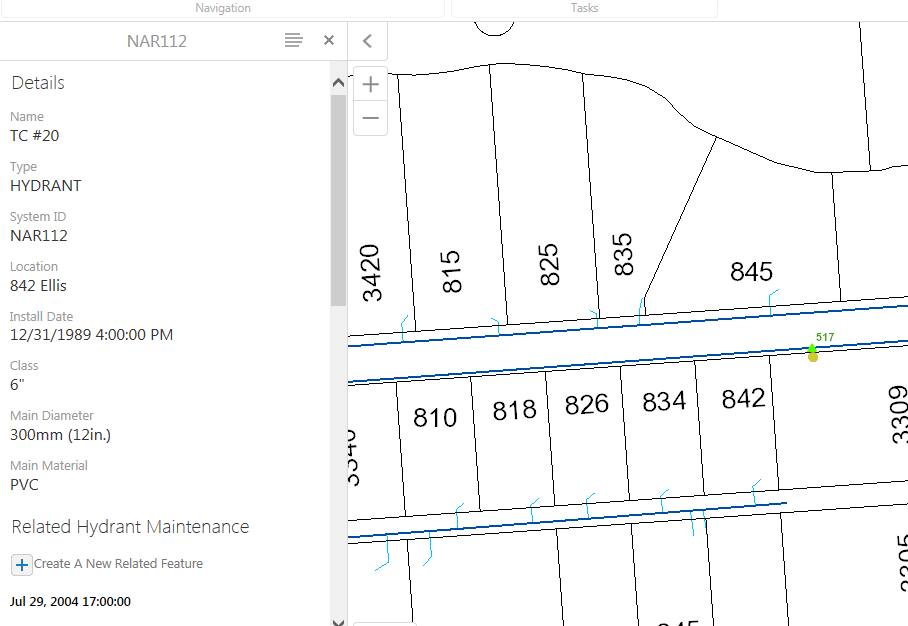
The user has to use the identify tool to click on the feature again and choose it from the results list in order to allow them to add a related record.
This seems like too many steps. Is there a better way to configure this or is this something that's being looked at for improvement?
0
-
I believe this has something to do with configuration in the workflow. For example tools in the workflow allow you to suggest which GE layer and map service the selection is from and also lets you configure the long and short description. I'm not sure what your workflow looks like so I can't exactly give a direct answer but I believe you shouldn't have to use the analyse tool in order to see relationships set at the ArcGIS level and acknoledged in the GE manager. 0 -
I'm not using a workflow. This is simply a difference in the way search results and identify results are presented in the viewer. A search result doesn't allow the user to add a related record (first image above) but an identify result does (second image above - includes "Create a related feature" option). This means after a feature is selected from a list of search results a user then has to also click the feature with an identify tool to expose the related table for adding records. 0 -
"search results" <-- is it not a workflow which is presenting the search results? Maybe this is the 'Global Search tool"? It's not clear at all as to where they're coming from and how they're generated. 0 -
Search results from a user doing a search using the search box. The service has instant search enabled. The user types a search term into the search box and results are generated. The user selects a search result from the results list, the map zooms to the selected feature and displays the attributes, including related table records. At this point the related records are available to view but adding a new related record is not allowed (no plus sign at the top of the related records list). At this point the user has to use the identify tool to click on the feature that's already been selected. The identify result that's returned displays the attributes, with the related records but now the user can add a related record. I didn't create a workflow to do any of this. It's all out of the box functionality. I'm not really sure how else to describe it. 0 -

Maybe the search is returning results from the mapservice and not the featureservice? We don't use Instant Search so I am not sure if you can configure it to use only the featureservice. Does the Panel Actions menu show an 'Edit Feature' option when you select a result from the list? 0 -
That might actually be it...thanks, Dan! I never even thought of that. I'm pretty sure the search is happening on the map service not the feature service. 0 -
Yeah, Latitude makes things confusing by calling the the same tool two different names. It definitely sounds like something isn't right with the layer so I'm on board with Dan. If it actually doesn't work after it's confirmed to be configured correctly then I would suggest making a workflow as a workaround for the moment. Let us know how it goes :) 0
Bitte melden Sie sich an, um einen Kommentar zu hinterlassen.
Kommentare
7 Kommentare