Enable Snapping by Default?

How do I enable snapping, by default, upon startup of a viewer? I have a feature service that I want users to be able to snap to another layer when digitizing. This all works great, if they go into the measure tool, pretend like they are going to draw a linear graphic, and enable snapping. But I can't seem to figure out how to enable it without that step. I have tried a few hacks in the Desktop.json file, without success. Anyone?
0
-
Still a little "stuck" on this one... However, I did notice the Enable Snapping is part of the CreateNewFeatureControlRegion tool in the Toolbar options. So, once the user clicks "Create New Feature", the option is there to "EnableSnapping" - though I'd still like to be able to enable it by default without them having to click it. Better yet, have it enabled by default, and hidden, so they are forced to snap to the layer I have already assigned, 0 -

Hi Ryan,
Did you get to the bottom of this? I'm having the same issue, I even tried the command 'ActivateSnapping', but it doesn't seem to do anything (the snapping button in the CreateNewFeatureControlRegion is still not toggled).
Regards,
Hans0 -
Apparently this is a bug. I opened a ticket last week. The technician assigned to the case and I tried a few different things together, without any luck. GVH-8856.
Ryan0 -
Hi Folks,
This is an older post, but I thought I would mention that the issue boils down to not being able to change snapping behaviour from a workflow when there is no active tool in the viewer, or when there is an active tool but it does not support snapping. Depending on your workflow, you might be able to work around the issue by including an additional RunExternalCommand activity to change the active tool before activating snapping (and then clear it again if needed).
For example: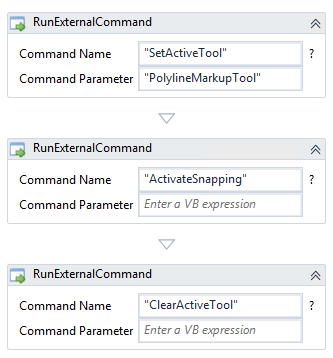
Hope that helps!
-Amanda0
Bitte melden Sie sich an, um einen Kommentar zu hinterlassen.
Kommentare
4 Kommentare