Show Legend - Html5 2.5.2

Maybe I celebrated a bit too much over the holidays...but I can't figure out how to turn on the Show Legend button in the Html5 viewer like it is in our Silverlight viewers. Can someone tell me how to turn it on? Is it just not available?
Also, when searching these forums, is there a way I can tell which posts are for GVS and which are for GVH in the results list? Super annoying to click on a post that sounds like a perfect solution but it ends up being for the other viewer. It would also be nice to limit results to the chosen forum. Rant over.
0
-

Hey Rebecca,
I'm using 2.5.1, but it should be the same. There is a "Action Panel" menu button in the header of the "Map Layers" pane that contains the "Show Legend" button. Not sure if this is how it works in Silverlight, but I hope this helps.
Frank0 -
Hi Frank,
I found that option but it's a little more buried than in the Silverlight viewer. I was hoping for a button or something that's immediately visible to users. I'd just like to easily show the legend somehow. Maybe I can default to the legend instead of the layer list...0 -
I wrote a small workflow to accomplish this in the Silverlight viewer, but it doesn't work in HTML5 and I don't know why. It is just two "RunExternalCommand" activities; the first to "ToggleDataFrame" and the second to "SwitchToLegendView". It works great in Silverlight, but in my HTML5 viewer it opens the data frame but doesn't switch to legend view. Anyway, thought it was worth mentioning in case someone knows how to make it work for HTML5 too.
<Activity mc:Ignorable="sap" x:Class="{x:Null}" sap:VirtualizedContainerService.HintSize="381,376" mva:VisualBasic.Settings="Assembly references and imported namespaces serialized as XML namespaces" xmlns="http://schemas.microsoft.com/netfx/2009/xaml/activities" xmlns:eac="clr-namespace:ESRI.ArcGIS.Client;assembly=ESRI.ArcGIS.Client" xmlns:eacg="clr-namespace:ESRI.ArcGIS.Client.Geometry;assembly=ESRI.ArcGIS.Client" xmlns:eact="clr-namespace:ESRI.ArcGIS.Client.Tasks;assembly=ESRI.ArcGIS.Client" xmlns:gce="clr-namespace:Geocortex.Core.Extensions;assembly=Geocortex.Core" xmlns:gfc="clr-namespace:Geocortex.Forms.Client;assembly=Geocortex.EssentialsWpfApi" xmlns:gfci="clr-namespace:Geocortex.Forms.Client.Items;assembly=Geocortex.EssentialsWpfApi" xmlns:gr="clr-namespace:Geocortex.Reporting;assembly=Geocortex.Reporting" xmlns:gwa="clr-namespace:Geocortex.Workflow.Activities;assembly=Geocortex.Workflow" xmlns:gwa1="clr-namespace:Geocortex.Workflow.Activities;assembly=Geocortex.Workflow.Activities" xmlns:mc="http://schemas.openxmlformats.org/markup-compatibility/2006" xmlns:mva="clr-namespace:Microsoft.VisualBasic.Activities;assembly=System.Activities" xmlns:s="clr-namespace:System;assembly=System.Core" xmlns:s1="clr-namespace:System;assembly=System" xmlns:s2="clr-namespace:System;assembly=mscorlib" xmlns:sa="clr-namespace:System.Activities;assembly=System.Activities" xmlns:sap="http://schemas.microsoft.com/netfx/2009/xaml/activities/presentation" xmlns:scg="clr-namespace:System.Collections.Generic;assembly=mscorlib" xmlns:sl="clr-namespace:System.Linq;assembly=System.Core" xmlns:x="http://schemas.microsoft.com/winfx/2006/xaml">
<Sequence sap:VirtualizedContainerService.HintSize="341,336" mva:VisualBasic.Settings="Assembly references and imported namespaces serialized as XML namespaces">
<sap:WorkflowViewStateService.ViewState>
<scg:Dictionary x:TypeArguments="x:String, x:Object">
<x:Boolean x:Key="IsExpanded">True</x:Boolean>
</scg:Dictionary>
</sap:WorkflowViewStateService.ViewState>
<gwa1:RunExternalCommand CommandName="ToggleDataFrame" sap:VirtualizedContainerService.HintSize="319,86" />
<gwa1:RunExternalCommand CommandName="SwitchToLegendView" sap:VirtualizedContainerService.HintSize="319,86" />
</Sequence>
</Activity>0 -
Thanks Stephanie. I'd condisered a workflow too but haven't got that far yet. I found a setting in the desktop.json file. In the Legend module section, there's a visible setting that's false by default. I changed it to true so now when users click the layer list icon they get the legend first and then can toggle to the layer list if they want. Basically the opposite of the default settings. I'd hoped to somehow have a legend showing as well as the home panel rather than instead of it but this will do for now. 0 -

If you want to use a workflow to active the legend in the GVH, you can use the external command ActivateView to activate the LegendView. You can also create a link on the home panel that will turn the legend on.
<a href="command:ActivateView?LegendView">Show Legend</a>0 -
Thanks John! I'll give that a try! 0 -
One other question...how do I remove the X from the legend panel so users can't inadvertently close it? 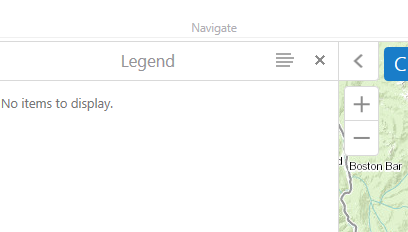 0
0 -
The legend is part of the LayerDataContainerViewModel, which you can turn off the X for by setting the backButtonOnRootView setting to false in your viewer config. I don't think you can individually turn off the X for each view within that view model though.
If you want your Legend to display by default, just change the ordering in your LayerDataContainerViewModel to make the LegendView the first to display.
"ordering": {
"LayerListView": 2,
"LayerActionsView": 1,
"LegendView": 0,
"MapDataMenuView": 3,
"FeatureLayerListView": 4,
"FeatureLayerDetailsView": 5,
"EditLogView": 6
}0 -
Did that, and I also had to change showBackButtonAsX to false to make it disappear. The X is now gone, but when I leave the legend/layer list (or use the back arrow to get to the home panel) it closes the panel completely and the tab at the bottom disappears. I need the tab at the bottom to not disappear, if possible. 0 -
For some reason those changes I made to the config file (showBackButtonAsX, backButtonOnRootView to false) revert back to true when I reopen the viewer. It must be overwritten somehow? 0 -
I've seen the config get overwritten when making changes to the viewer in GE Mgr, but not just from relaunching the viewer. 0 -
That's what I thought too. Strange. I tried it again this morning, same result. 0
Bitte melden Sie sich an, um einen Kommentar zu hinterlassen.
Kommentare
12 Kommentare