Print Template - prints 2 pages, the 2nd is always blank

I've tried adjusting the elements on the print template to leave more white space around the edges but no matter what I do I always get a second, blank page in the pdf. Does anyone know how to resolve this? Users are complaining about wasted paper.
0
-

Can you upload the template? Might make it easier to trouble shoot. My guess is it is something simple you are just missing it - I do it all the time. An extra set of eyes can make all the difference. 0 -
I can....except I can only attach images or code samples to this forum thread (as far as I can tell). Is there some way to upload/attach other files? 0 -
I am not sure if there is a limit to the code sample but if there is not then you can see the code of the print template by opening the rpx file with notepad (just as you can to see the code behind the workflows).
The white space around the map in the layout is part of what determines the number of pages that are generated. It comes down to the total size of the elements in the report.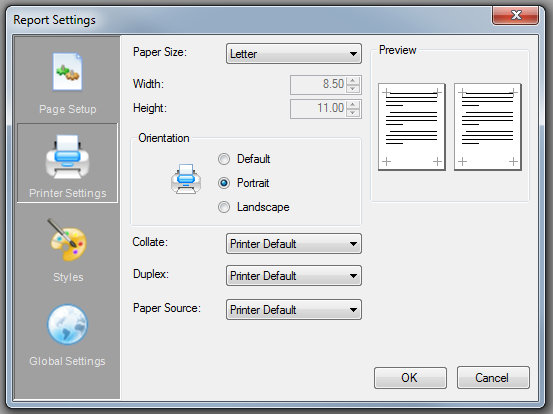
There are several places to set the size of the page and of the portions of the report. Don’t trust the rulers! From experience, I believe that the Settings window takes precedence in determining how many pages are generated so if the width or height values are exceeded in the report, a second page will be generated. Its not well documented anywhere that I know of.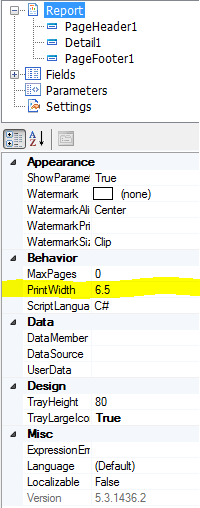
The Report settings let you set the width of the report itself (under Behavior). If the print width exceeds the size of the width in the Settings window, it will run onto the next page of the report.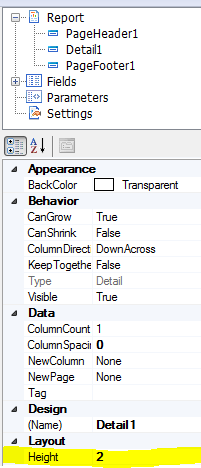
Each part of the report has a Height setting to it (under Layout). Typically you have a header, detail, and footer. If the Height of the header, detail, and footer add up to be more than the height value of the Settings window, it will also run onto the next page of the report.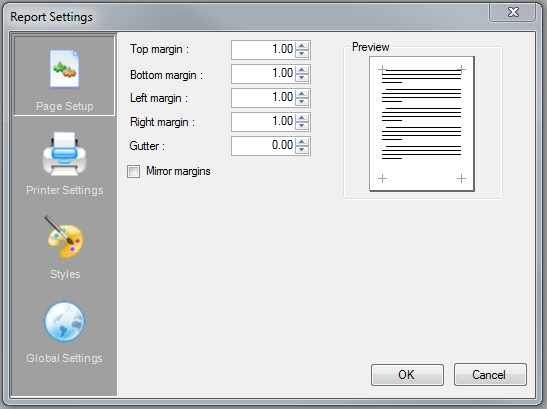
The settings window also lets you lets you set the margins of the page. You have to account for this too in the total size of your page. So if you have 1 inch margins with an 8.5x11 page, your report should not be more than 6.5x9
Once you verify the overall height and length of your report fit on the page size you specify in the settings window, you also need to be mindful of your real printer’s settings and how it will interact with the pdf or image you are generating. If you find the pdf has only one page but your printer is still printing two pages, you might need to specify a smaller Width and Length in the Settings Window and redesign your print template around a different size layout.0 -
Got it! Thanks Brian! And Bryan :) Hopefully they'll spend some development effort on improving the report designer in the near future. It's not very user friendly. 0 -
As an aside, we're very close to introducing the ability to upload files to posts and ideas on the Support Center. 0
Bitte melden Sie sich an, um einen Kommentar zu hinterlassen.
Kommentare
5 Kommentare