What is the proper JPath expression syntax for the Get JSON Value Workflow activity?

I'm attempting to extract a value from a JSON string with the Get JSON Value workflow activity, but I haven't found a "JPath expression" that works.
Has anyone used this activity successfully? Where can I find a JPath syntax resource? The interwebs are somewhat muddled on the subject.
0
-

I am realying what my collegue posted internally here, and tested by myself (see below screenshot).
The Get Json Value workflow activity makes this whole thing so much easier.
Say you have a JSON response that looks like this:
{
"routeDescription": "fastest route in km and json",
"searchTimestamp": "2016-04-14 14:31:47.19",
"executionTime": 15981,
"version": "1.2.0",
"disclaimer": "http://[yourwebser]/disclaimer",
"privacyStatement": "http://[yourwebser]/privacy",
"copyrightNotice": "Copyright 2016",
"copyrightLicense": "http://[yourwebser]/copyright",
"srsCode": 4326,
"criteria": "fastest",
"distanceUnit": "km",
"fromPoints": [
[
-119.407515,
49.839604
]
],
"toPoints": [
[
-116.854024,
49.744483
],
[
-122.90762,
49.225588
],
[
-115.76651,
49.511239
]
],
"pairs": [
{
"from": 0,
"to": 0,
"distance": 395.575,
"time": 18321,
"timeText": "5 hours 5 minutes"
},
{
"from": 0,
"to": 1,
"distance": 382.254,
"time": 13936,
"timeText": "3 hours 52 minutes"
},
{
"from": 0,
"to": 2,
"distance": 527.091,
"time": 21165,
"timeText": "5 hours 52 minutes"
}
]
}
And you want to get the “distance” of the pair that came back with “from”: 0 and “to”: 1
You’d drag the activity into your workflow, select the variable type you’re expecting (double, in this case) and then put the following in the “Path” parameter:
"$.pairs[?(@.from == 0 && @.to == 1)].distance"
This is JPath syntax. $.pairs will find the “pairs” array, and everything inside the [] is basically a “where” clause in that array, and then .distance outputs that specific field from the resulting found pairs array item.
It’s pretty slick, and powerful, and makes json responses so much easier to work with!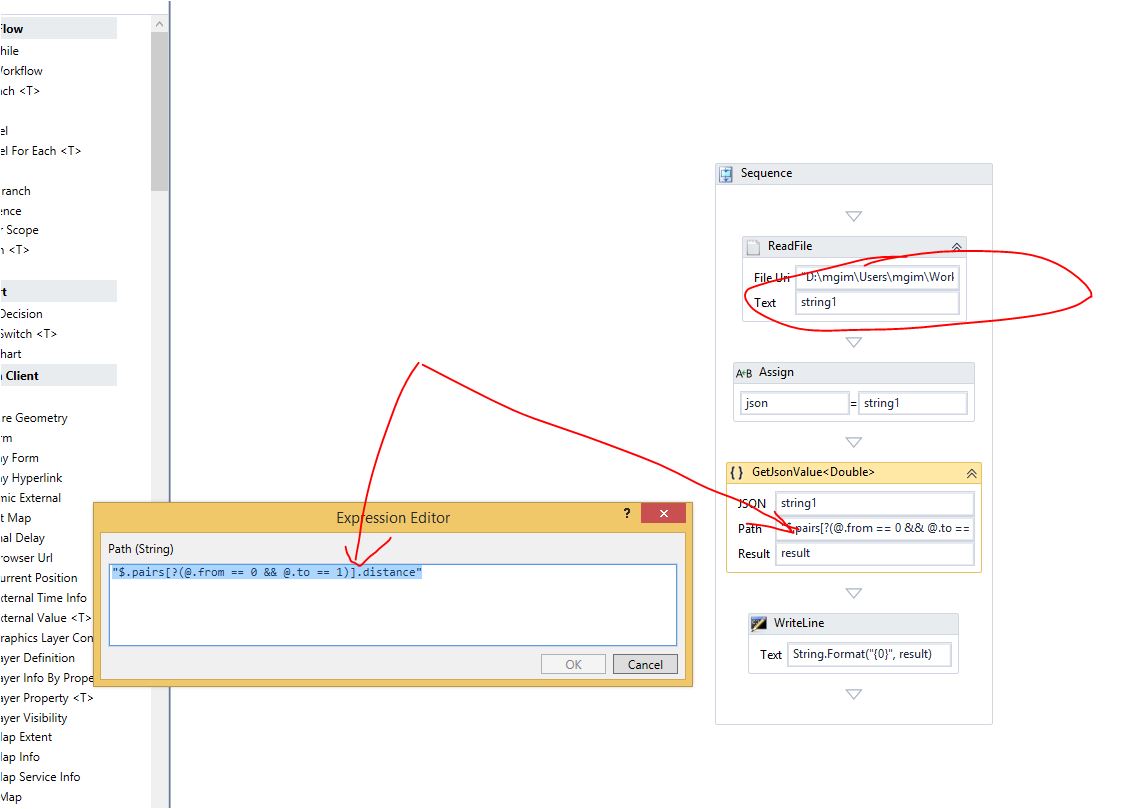 0
0 -
Thanks for the sample! I'll give it a try. What I have is a JSON created from a FeatureSet with two attributes:
{
"hasZ": false,
"hasM": false,
"features": [{
"attributes": {
"Address": "1610 SANCHEZ ST, AUSTIN, TX, 78702",
"Location": "Point[X=3125596.99759172, Y=10075289.0027167, WKID=102739]"
}
}, {
"attributes": {
"Address": "1810 SANCHEZ ST, AUSTIN, TX, 78702",
"Location": "Point[X=3125463.49830816, Y=10075939.0023985, WKID=102739]"
}
} . . .
I'm trying to get a DataItemList for use in a DisplayForm ListBox where the Name value is the "Address" and the select value is the "Location". I'd love to use the JSONToDictionary activity to create a dicitonary, and then use the Dictionary To DataTable, then the DataTable To DataItemList. But the JSONToDicitonary activity won't accept my JSON as an input with the Dictionary output - JSON is String,String while the Dicitonary output is String,Object.0 -
Sean,
I saw your another post re: JsonToDictionary: https://support.geocortex.com/EssentialsGSCForum?sub-nav=forum&main-nav=Essentials&feedtype=SINGLE_QUESTION_DETAIL&dc=Workflow&criteria=ALLQUESTIONS&id=906600000000BjmAAE
'JSonToDictionary' activity was implemented before for its specific purpose, and many founds its difficulty what you found too. Yes you need to loop through Dictionary output from Json since it returns with <string, object> whre Object value has it inner structure from inner Json string to get what you want to get for your case.
So for your case, GetJsonValue ( new activity) will be easier to use, while JSonToDictionary activity is for another users for their purpuse like if JSON input has very simple strucutre as one level, and For-Each on Dictionary (Key-ValuePair), and construct to another Dictionary as <string, string>, and another example to use JSonToDictionary may be to get all mapservice url of the Site by request Site Rest endpoint on the workflow etc I think. So there is some use cases to use that activity for someone.
By the way, there is JSonToDictionary sample workflow on the SampleSites on the delivery package of the GE,
Also, as you may know already, Newtosoft dll is available to use on the workflow too.0
Bitte melden Sie sich an, um einen Kommentar zu hinterlassen.
Kommentare
3 Kommentare