Good way to move/hide measurement line labels in 4.5/2.6?

Does anyone have a recommendation for moving the new labels for measurement lines? Specifically the total distance box. It displays right over the end of the line? And if the line is small enough, it displays over the entire line.
Example:

I do like the labels, but they may need to be more responsive to the size of the line as well as the final length off the end of the line like it was in 4.4:

For now, I'm working on a button to show/hide the div "Drawings_measurement_layer".
0
-
We are experiencing a problem with measuring small areas. F.e. 2 meters * 3 meters. Then the result looks like this. 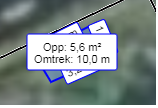
Is there a solution so that it is possible to see the area and the results at the same time (offset?)?0 -
Hi Albert,
Can you try the 'polylineLabelOffset' that Amanda mentions above and see if it helps? It will move the 'total' label out of the way.
Regards,
Wayne Richard
Latitude Geographics Group Ltd.
Head Office: 300 – 1117 Wharf Street Victoria, BC Canada V8W 1T7
Tel: (250) 381-8130 | Fax: (250) 381-8132 | wrichard@latitudegeo.com
Developers of Geocortex web-based mapping software | www.geocortex.com
An Esri Platinum Business Partner0 -

Hi Wayne - We are running into the same issue as Albert. When we measure small areas the label completely covers the area measured. I tried adding the "polylineLabelOffset" to the Desktop..json.js file that Amanda mentioned above and it only moved the label if we are measuring with a polyline. It doesn't move the label when measuring an area. Is there something like "areaLabelOffset" that we could use to offset the label for area measurements? 0
Bitte melden Sie sich an, um einen Kommentar zu hinterlassen.
Kommentare
33 Kommentare