Reports - show scale

I'm a report newbie and can't figure out how to make the north arrow, scale bar and associated text to show correctly on a report. Everything else looks great. Can anyone suggest how I can fix this?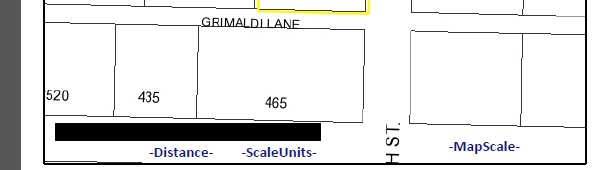
0
-

Check out this post:
https://support.geocortex.com/EssentialsGSCForum?id=90660000000074iAAA0 -
I guess what I need to know is how to modify the control properties to make them show up once I've dragged them onto the map. I'm confused as to what to set as datafield values (or other properties) for north arrow, scale bar units, scale bar distance, scale bar in order for them to display correctly on the report. The help documentation is a not very helpful.
_img_ alt="User-added image" src="https://latitudegeo--c.na53.content.force.com/servlet/rtaImage?eid=90760000000Xcek&feoid=Body&refid=0EM60000000Xw89"_/_img_
_img_ alt="User-added image" src="https://latitudegeo--c.na53.content.force.com/servlet/rtaImage?eid=90760000000Xcek&feoid=Body&refid=0EM60000000Xw84"_/_img_
_img_ alt="User-added image" src="https://latitudegeo--c.na53.content.force.com/servlet/rtaImage?eid=90760000000Xcek&feoid=Body&refid=0EM60000000Xw7z"_/_img_
_img_ alt="User-added image" src="https://latitudegeo--c.na53.content.force.com/servlet/rtaImage?eid=90760000000Xcek&feoid=Body&refid=0EM60000000Xw7u"_/_img_
_img_ alt="User-added image" src="https://latitudegeo--c.na53.content.force.com/servlet/rtaImage?eid=90760000000Xcek&feoid=Body&refid=0EM60000000Xw7p"_/_img_0 -
Hi Rebecca,
If you are using the Print tool to create a print template, then you can use the built-in variables (i.e. _NorthArrow, _MapScale, _MainMap) to populate your map template.
If you are constructing a report that runs from a layer or through a workflow, then unfortunately, those variables are not available to you. You will have to generate those values yourself or add in your own North Arrow image to the report. The easiest way of adding a reference scale is using a ratio scale. You can use the Get Map Info activity to get the current scale of the map and then add that to the report.
I hope this helps,
Carmen0 -
Thanks Carmen. It's being produced via a workflow so that explains it. I'll contact the Geocortex analyst who created the workflow for me. 0
Bitte melden Sie sich an, um einen Kommentar zu hinterlassen.
Kommentare
4 Kommentare