Identify "operation failed"....or did it?

Getting this error on a site (GE 4.5.1 GVH 2.7) when doing an identify. Clicking OK clears the error and the user can proceed but most of them don't know that. Any suggestions how to fix it?
_img_ alt="User-added image" src="https://latitudegeo--c.na53.content.force.com/servlet/rtaImage?eid=90660000000TSfb&feoid=Body&refid=0EM60000000M1AP"_/_img_
0
-

Hi Rebecca,
Did you find a solution to this alert?0 -

I just had this alert pop up last night, we republished the map service and it seemed to fix the issue. I'm not sure if that will solve your issue but it might be worth a shot. Good Luck!
Nelson0 -
I haven't found a solution. It happens randomly so it's hard to troubleshoot. I did change the service isolation setting to low isolation so I'm wondering if that might be creating the problem but, since it's happening randomly and doesn't indicate which service is actually throwing the error, it's really hard to figure out. 0 -

Hi Rebecca,
I agree that this error can be annoying to troubleshoot. It's sometimes an indication of a problem in an underlying map service, so in some cases (like Nelson's) the underlying issue gets fixed by republishing the service or changing isolation to high. It's hard to tell for sure what's going on in this case though since the identify operation does seem to complete correctly.
If it's possible to reproduce it during a Fiddler capture, that would be ideal to get some insight about the problem, but I understand that that might be difficult to do given that it's intermittent. Another thing to check would be the ArcGIS server logs. If any of your users can record and tell you the time at which they received the error you could check the logs from that point and see if anything shows up there. Though this might not necessarily be the issue, one possibility is that after the user identifies a feature, the server is slow to reply so the client (the viewer) terminates the response and throws the error before the server replies with the requested information.
Hope that helps a bit!
Amanda0 -

Just this week I started getting the same pop up. I checked the AGS logs and it didn't like 2 shape fields, didn't have the issue before. I turned off the highlighted with no further issues. 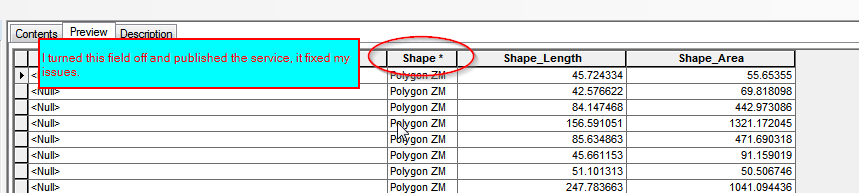 0
0 -
@Amanda - I got a Fiddler capture...should I send it to support? 0 -
Hi Rebecca,
Yes, please do send the Fiddler capture and the problem description along to support. One of us will be happy to look into the capture to see if we can identify what went wrong.
Thanks,
Amanda0 -
It appears that I had identify enabled on some annotation layers and they were the cause of the error. I've combed through all my sites and disabled identify for all the annotation layers. The problem seems to be gone! Hopefully this will help others. 0 -
Hi Rebecca,
I just wanted to say thank you for posting about your resolution here. The "requested operation failed" error message is both a common and troublesome problem, so I'm sure others will find this helpful at some point :)
Amanda0 -

When talking to Esri about this issue in my situation this is the answer.
[BUG-000099970: Certain arrangement of the attribute table fields result in duplicate SHAPE fields and missing Shape.STArea fields at the REST Endpoint.]
This is a recent bug that was logged, so it is still under review by development. However, I will attach this case to the bug so that you will be able to track its status at my.esri.com. Specific field arrangements that cause duplicate SHAPE fields include:- When SHAPE is at the bottom
- When any other field is at the bottom
0
Bitte melden Sie sich an, um einen Kommentar zu hinterlassen.
Kommentare
10 Kommentare