How do I use one FeatureSet to identify and remove features from another FeatureSet?

I have workflow where a user selects features using the DisplayCaptureGeometry activity, the features are highlighted in the map and stored in a FeatureSet. Then the workflow allows the user to select features to remove from the original set using the DisplayCaptureGeometry again. Now I have a selection of features I want to remove.
How do I use the unique identifier of the "Remove" list of features to remove features from the original FeatureSet?
I have tried various combinations of converting things to lists, collections and data tables, but there doesn't seem to be a clear way to loop through the Remove FeatureSet and then identify a row in the original FeatureSet/Collection/DataTable, etc., or a simple "remove" activity for the various types of lists. The RemoveFromCollection activity requires the zero-based index position of the row in the collection I want to remove something from, but all I have is a spearate collection containing identifiers with no regard to the zero-based position of rows in a second collection.
I'm sure there is an easy way to accomplish this, but . . .
0
-

Hi Sean,
I've managed to accomplish something close to what you've described here by iterating through the original FeatureSet as a list with a ForEach<Graphic> activity and using "If" logic within the loop to compare each feature in the original FS against the unique attributes of the feature which was selected for removal. The only catch is that this only compares a single feature selected for removal at a time against the list of original features, not a collection of features as you describe. You could, however, use a flowchart to loop back to the start of this sequence to allow a user to remove multiple features on a one-by-one basis.
For a feature with three unique attributes, attribute1, attribute2, and attribute3, the "If" comparison condition would look like this:feature.Attributes("attribute1").ToString.Equals(removeFS.Features(0).Attributes("attribute1").ToString) And feature.Attributes("attribute2").ToString.Equals(removeFS.Features(0).Attributes("attribute2").ToString) And feature.Attributes("attribute3").ToString.Equals(removeFS.Features(0).Attributes("attribute3").ToString)If this logic validates to True the "RemoveFromCollection<Graphic>" activity is called in the "Then" box of the "ForEach<Graphic>" loop. The "Else" box remains empty. The Collection parameter would be your original FS and the item would be the feature variable you specify in the beginning of the "ForEach" loop. See the screenshot below to clarification-- "NaboFS" is the FeatureSet which the user selected first and "removeEiendomFS" is the FeatureSet which contains the feature which should be removed from NaboFS.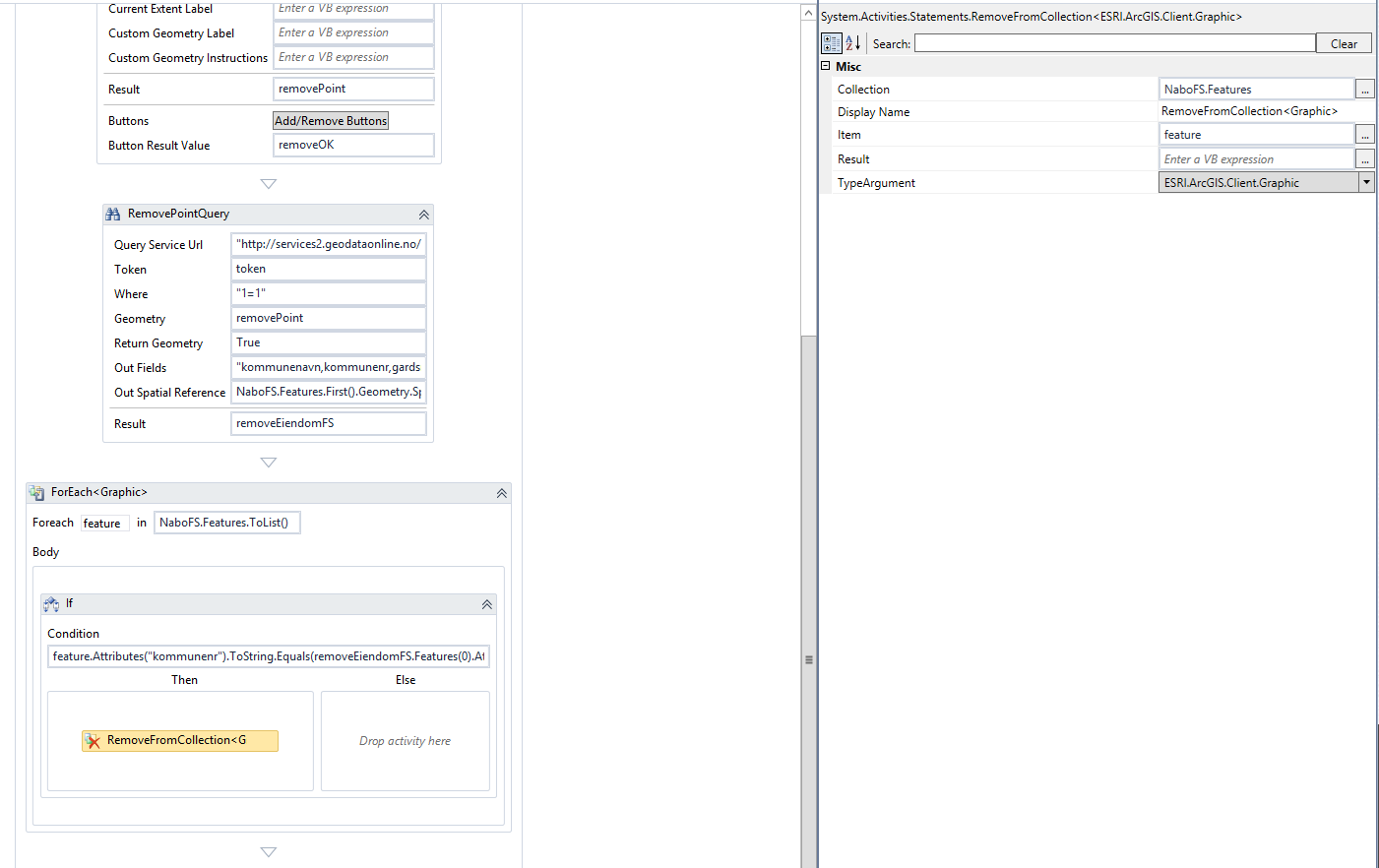
Hopefully this gives you some ideas toward a solution!0 -
The solution I use, is a take off of the 'Complete Parcel Selection, Buffering, and Report Workflow' from the code gallery (https://support.geocortex.com/essentialsGSCCodeGallery?sub-nav=codegall&main-nav=essentials&#!/feedtype=SINGLE_ARTICLE_DETAIL&dc=Workflows_and_Workflow_Designer_cg&criteria=BESTANSWERS&id=kA4600000004EV2).
In the flow chart, there is a sequence called 'Remove From Selection' that will do exactly what you're asking.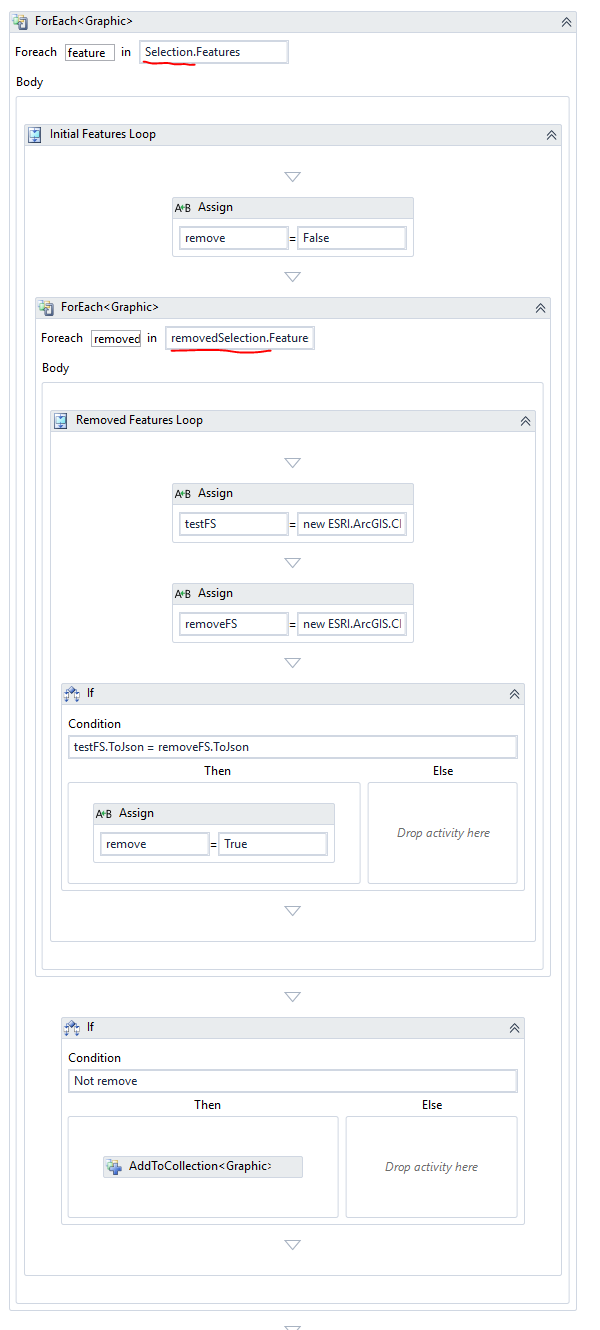 0
0
Bitte melden Sie sich an, um einen Kommentar zu hinterlassen.
Kommentare
2 Kommentare