Has anybody used the "Text Fields" property on "Report" Activity in workflows?

Has anybody used the "Text Fields" property on "Report" Activity in workflows?
If yes, then can you share your example, please ?
0
-

Hi, we are testing this and having the same problems. We followed your instructions, Carmen, to create the Dictionnary and populate it with an entry having "Title" as key, and then set, in the report, a TextBox "DataField" property to "Title". What we see in the report is the original Text of the Report's TextBox (eg.: TextBox3) instead of the value passed by the workflow. Are we missing something?
Thank you
Regards,
Guido Sitta0 -

Has anyone found the answer to this? I am not able to pass any values to the text boxes in my report using the method described above. 0 -

This doesn't seem to work for a layer report. When inspecting the network activity, one can see that a request is made to the report's rest endpoint, but the dictionary's values are not included. The HTML interface to the REST endpoint doesn't have an option to pass extra values either: https://SERVER/Geocortex/Essentials/INSTANCE/REST/sites/SITEID/map/mapservices/1/layers/0/reports/0/run?f=html
For a Print Template OTOH this would work, if the TemplateReport activity had a Text Fields property (which it doesn't)0 -
I'm in agreement with Berend, It looks like it doesn't send the data from this property to the REST request made for the report. I've filed the issue for investigation (#23563). It might be that it behaved differently in the past and the documentation needs to be updated.
You might consider looking to Workflow and Reporting 5-series; its definitely possible there to pass extra parameters from a workflow to a report. https://docs.geocortex.com/workflow/latest/help/Default.htm#wf5/help/activities/run-report.htm%3FTocPath%3DActivities%7CActivity%2520Reference%7C_____1350 -
Any update on this bug? I'm in need of this functionality now. Please add me as a stakeholder, Amanda. 0 -

Please add me as a stakeholder as well. Although we're interested in using the 5 series and have begun developing some things with it, the majority of our reports are still from Report Designer. This would be neat functionality to have. 0 -
Hi Everyone,
I've finally got a working example of using the TextFields property. There's a lot of considerations needed to make it work, including a site.xml edit. I would recommend reading the responses from Nicholas Steele, Munhwan Gim, and Petter Platten at https://support.geocortex.com/essentialsGSCForum?id=9066000000007rQAAQ
When you check everything over, make sure that all of these match:- The key in your dictionary that you provide in "Text Fields" property of the workflow activity
- DataFieldName and DisplayName for the <TextField> in the site.xml
- DataField value for the textbox control in the subreport
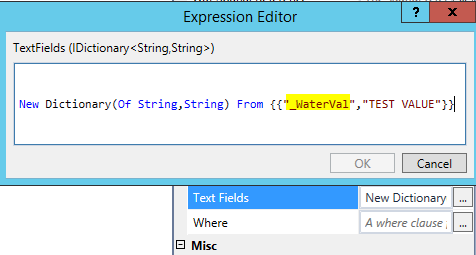

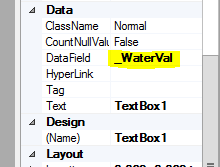
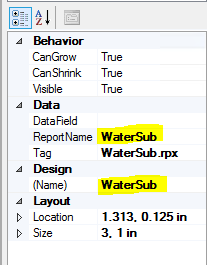
And make sure that all of these match:- The ID for the <MapTemplateReport> in the site.xml
- The ReportName and (Name) properties on the subreport control in your main report

 0
0
Bitte melden Sie sich an, um einen Kommentar zu hinterlassen.
Kommentare
7 Kommentare