Change color or form items

I am trying to find the css to change the color of my form items. I would like the read-only items to have a gray fill. Can anyone direct me to the correct file to make this change?
Thanks!
0
-

I'm not sure about read-only items, but for finding css properties in general you can use the inspection tools in any major browser. Here's an example using Chrome. 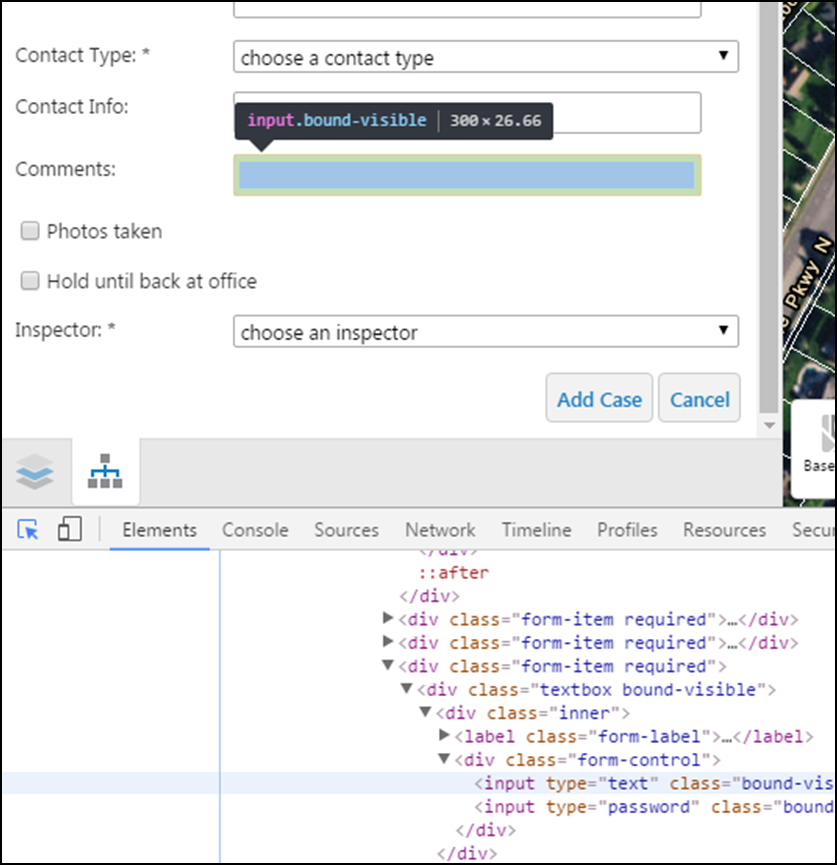 0
0 -

Hi Shana,
An easy way to get custom css into your viewer is through this location: C:\Program Files (x86)\Latitude Geographics\Geocortex Essentials\Default\REST Elements\Sites\sitename\Viewers\viewername\VirtualDirectory\Resources\Styles\Custom
Open the files there (there will be one for each shell) and add in your custom css.
Hope that helps!
Amanda0 -
Thanks Amanda and John! 0 -

Did you find a solution to this? i was trying to change the css at path mentioned in above thread by amanda but nothing is changing 0 -
Hi Arish,
Please see the "Update the CSS files" section on this help page -
https://docs.geocortex.com/essentials/gvh/latest/admin-help/Default.htm#gvh/admin/modules/shells-module.htm
and using a tool like Fiddler or the browser developer tools, make sure you see your changes when the viewer loads. Fiddler or the developer tools will show you a copy of the CSS that is being loaded.
Regards,
Wayne Richard
Latitude Geographics Group Ltd.
Head Office: 300 – 1117 Wharf Street Victoria, BC Canada V8W 1T7
Tel: (250) 381-8130 | Fax: (250) 381-8132 | wrichard@latitudegeo.com
Developers of Geocortex web-based mapping software | www.geocortex.com
An Esri Platinum Business Partner0
Bitte melden Sie sich an, um einen Kommentar zu hinterlassen.
Kommentare
5 Kommentare