Have expanded results default to the description tab

Thanks
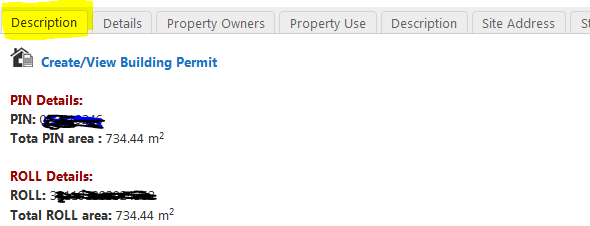
-
Hi Craig,
You can change this in the configuration file for the shell you are working with (for example, the Desktop shell: C:\Program Files (x86)\Latitude Geographics\Geocortex Essentials\Default\REST Elements\Sites\<site_name>\Viewers\<viewer_name>\VirtualDirectory\Resources\Config\Default\Desktop.json.js )
In that file, you are looking for is the FeatureDetailsExpandedViewModel's defaultTabViewForLayer setting. By default it will look something like this:
{
            "id": "FeatureDetailsExpandedViewModel",
            "type": "geocortex.essentialsHtmlViewer.mapping.modules.FeatureDetails.FeatureDetailsViewModel",
            "configuration": {
              "defaultTabViewForLayer": {
                "FeatureAttributesProviderView": "default"
              }
By default it has the setting "FeatureAttributesProviderView", which is the details tab it is set to. If you change that value to be "FeatureDescriptionProviderView" then it will default to opening at the Description view instead. It will end up looking like the following json snippet:
{
   "id":"FeatureDetailsExpandedViewModel",
   "type":"geocortex.essentialsHtmlViewer.mapping.modules.FeatureDetails.FeatureDetailsViewModel",
   "configuration":{
      "defaultTabViewForLayer":{
         "FeatureDescriptionProviderView":"default"
      }
Let me know if this worked for you, or if you have any other questions.
Cory Purnell
Latitude Geographics Quality Assurance Team0 -
This worked perfect. Thanks 0 -
I know this is an old thread but I'm working on a similar change to one of our sites and had a couple related questions.
1) Is there a way to remove the Description tab in the expanded view? We only want to show information using the Details tab.
2) Is there a way the get the Details tab to use more than 3 columns? It doesn't seem to use a fluid design to dynamically add a 4th or 5th column if space permits, so we have lots of blank space on the right side of the region but users have to scroll down to see the remaining attributes.0 -

1) I think you could set the enabled property to false. { "type": "geocortex.essentialsHtmlViewer.mapping.modules.FeatureDetails.FeatureDetailsProviders.DescriptionViewModel", "viewId": "FeatureDescriptionProviderView", "viewType": "geocortex.essentialsHtmlViewer.mapping.modules.FeatureDetails.FeatureDetailsProviders.DescriptionView", "title": "@language-feature-description", "markup": "Mapping/modules/FeatureDetails/FeatureDetailsProviders/DescriptionView.html", "config": { "longDescription": true }, "enabled": true }
Each feature detail provider supports an optional enabled property, which is on the same level as the config property. To enable the feature detail provider, set enabled to true; otherwise, set it to false. The default is true by virtue of the feature detail provider's presence, so in most cases, the enabled property is omitted.0 -
That was just the ticket, Nico. Thank you! The details look much cleaner now and you gain some extra screen space without the header for the tabs being shown. 0
Bitte melden Sie sich an, um einen Kommentar zu hinterlassen.
Kommentare
5 Kommentare