Mobile Toolbar does not change size regardless of size settings

Hi All,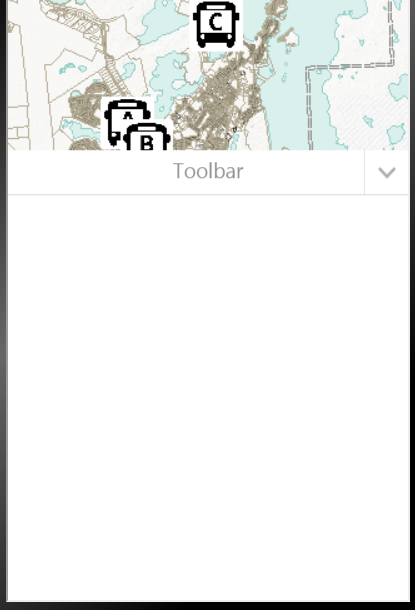
my Mobile Toolbar looks like this:
How do I set this to be minimized? Nothing in the "Look and Feel" affects this look.
0
-
Have you tried configuring the toolbar to be hidden by unchecking the box to Open Toolbar by Default? (mine is configured simultaneously in this screen shot) 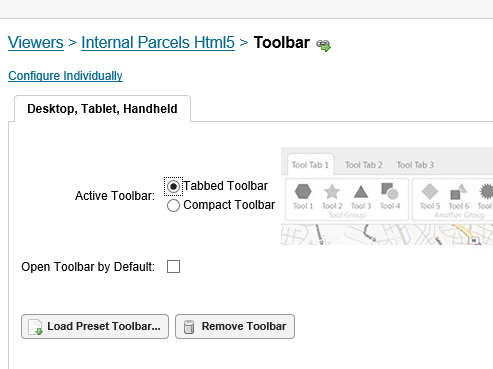 0
0 -
Good tip. By resetting to Configure Simultaneously and then then back to Individually, the toolbar started to work. There must be a little bug that requireds a toggle between the modes to ensure the Toolbar does not open in Mobile. 0 -

Hello,
I know this post is a little old and was already answered, but I was having this same problem with one of my maps, and switching to configuring it simultaneously and then back to individually did not solve my problem. However, I found a solution. I have the compact toolbar configed instead of the tabbed toolbar for mobile, but when the map loaded, there would be an empty container taking up half the screen that said "Toolbar" on top. When I copied the site, this behavior also copied over. Since I have not experienced this behavior with any of my other sites, I decided to search the Handheld JSON file for this site for toolbar settings. Under "moduleName": "TabbedToolbar", I found the following code:"viewModels": [ { "id": "TabbedToolbarViewModel", "type": "geocortex.essentialsHtmlViewer.mapping.modules.toolbar.TabbedToolbarViewModel", "configuration": { "toolbarGroupRefs": [ "ToolsTab", "hDvQPP3F", "CSE3gXKh", "yccp4bsi" ], "toolbarOpenByDefault": true }, "require": "Mapping/modules/Toolbar/TabbedToolbarViewModel" },I had to manually change the value of "toolbarOpenByDefault" from true to false. This solved my problem. However, I tried setting the compact toolbar to open by default, but I could not get it to do so by using the checkbox in GE Manager nor by changing the value of "toolbarOpenByDefault" under "moduleName": "CompactToolbar" to true. However, after manually expanding the toolbar, I decided that I do not want to cover up the I Want To menu button by default. Anyways, I hope this helps.
Thanks,
Denise0
Bitte melden Sie sich an, um einen Kommentar zu hinterlassen.
Kommentare
3 Kommentare