Change name of Workflow Completion

Currently at the end of my workflows in the HTML5 2.7 the results are shown with the default name Workflow(1), Workflow(2) etc... as shown in attached image. I've tried changing this by configuring workflow containers but at completion it always reverts back to the default Workflow(1) - how can I change this?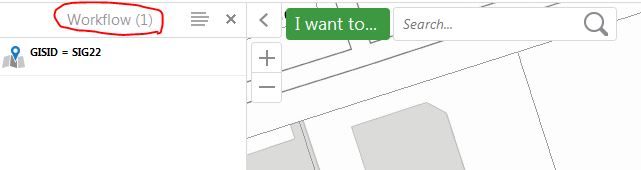
Thanks!
0
-

Change the value "Workflow" for the language-workflow-title key in your locale files. "defaultContainerTitle": "@language-workflow-title"0 -
Thanks Nico,
I changed the value as follows for the desktop.json file but I'm still getting the same issue:
"moduleName": "Workflow",
"moduleType": "geocortex.essentialsHtmlViewer.mapping.modules.workflow.WorkflowModule",
"configuration": {
"showTitleInFormBody": false,
"defaultContainerRegionName": "DataRegion",
"defaultContainerTitle": "Asset Results",
"defaultContainerIconUri": "Resources/Images/Icons/Toolbar/workflow-24.png",
"showCaptureStatusMessages": true,
"displayResultPickerTemplateComplexity": "complex",
"startupWorkflows": [],
"formItems": {},
But workflows still finish with the "Workflow (1)", "Workflow (2)" titles. I've inspected the html element and it's css component but can't find a way to change the panel header as you can see here: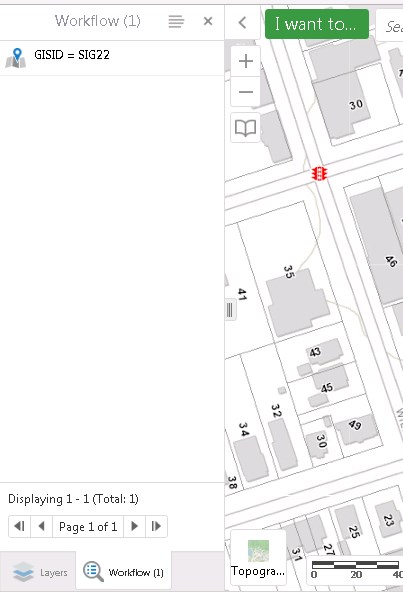 0
0 -

Are you sure that's a workflow container? It looks like the results panel to me. If you are executing a selection be sure to set the Collection Name parameter. 0 -
Hi James,
It is as Zack says, in the "Select Features" activity there is a parameter called "Collection Name". If you populate this with a string, then it will use that instead of the default title.
I hope this helps
Carmen0 -
Thanks to both Zack and Carmen....my error for calling it a workflow container when i meant results panel! I had run a "Select Features" activity much earlier the workflow with collection name as a string variable but it did not persist through the much longer workflow. A simple "Select Features" at the end of my workflow with a collection name "Selection Results" returns the title text perfectly - thank you both again 0 -
Hey there. What if your results come from an Identify Command within RunExternalCommand? I don't have to run SelectFeatures and therefore have no collection name? 0
Bitte melden Sie sich an, um einen Kommentar zu hinterlassen.
Kommentare
6 Kommentare