Disallowing the attribute table to appear with clicking a return result (HTML5),

Disallowing the attribute table to appear with clicking a return result (HTML5),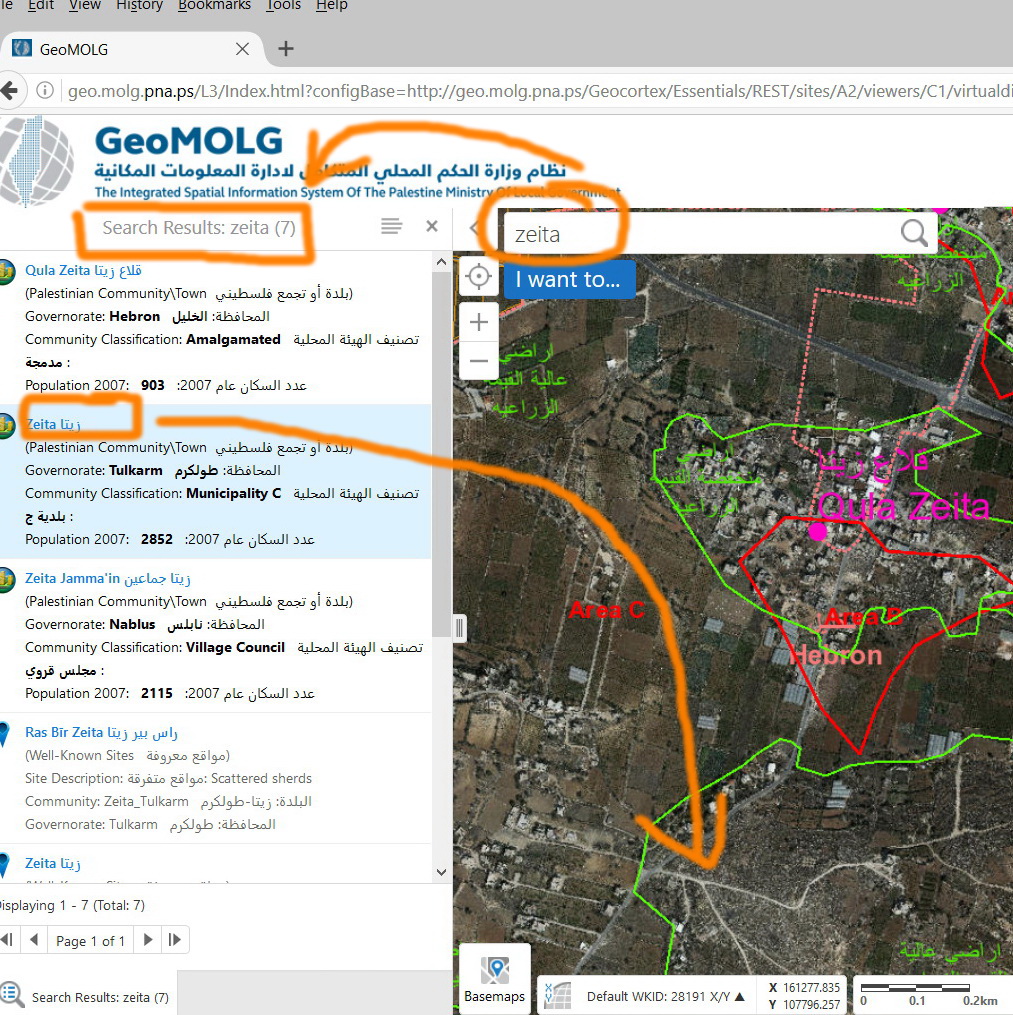
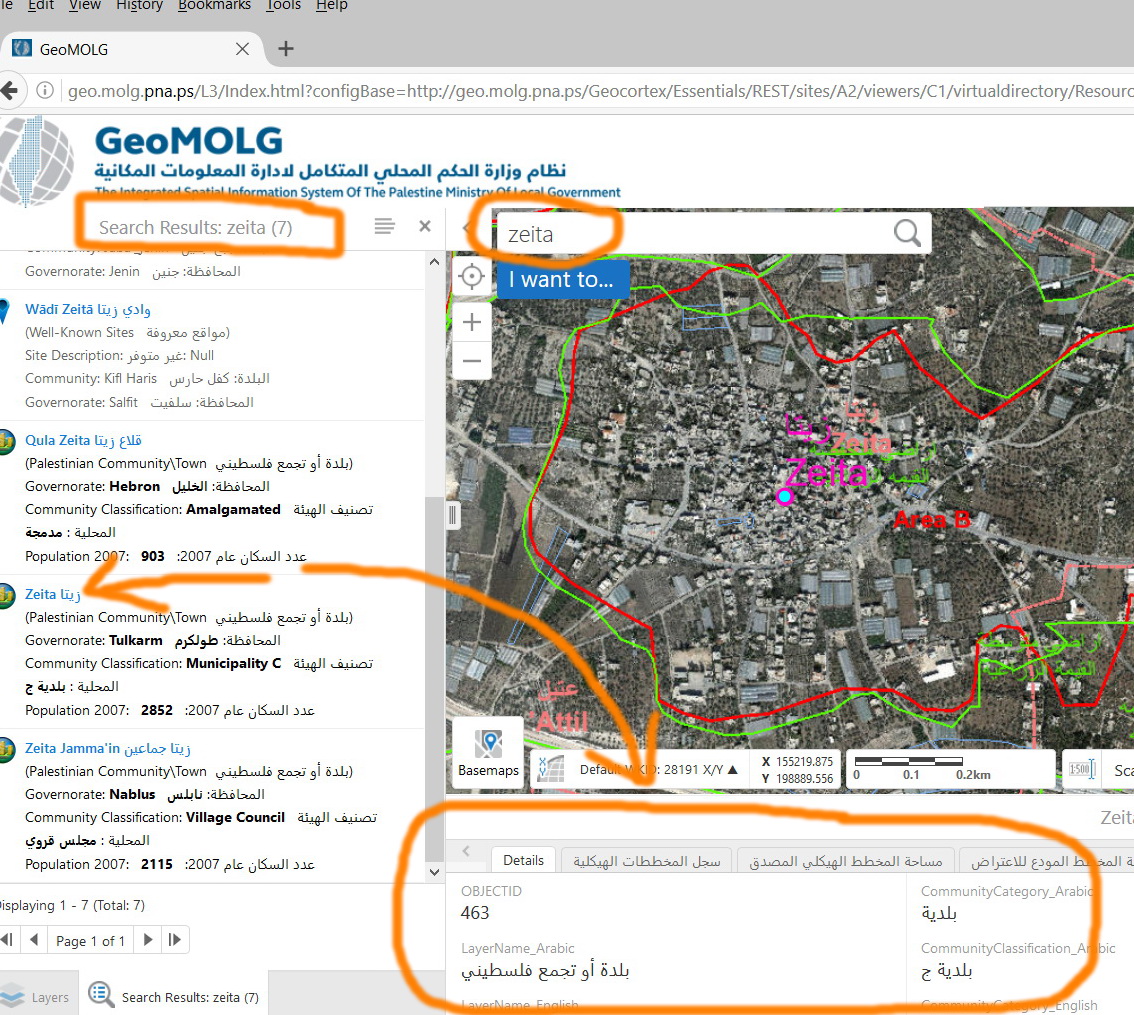
I’m not sure if there is a way to disallow the attribute table to appear with clicking a return result!
Thank you
Best
Jamal
0
-

Hi Jamal,
I'd just like to clarify what you're hoping to do. Is it:
-remove just the attribute information from this table?
-completely stop the feature details table from opening when a result is clicked?
-change the behaviour so that the compact feature details view opens when you click a result instead of the expanded table?
Thanks!
Amanda0 -
Thanks Amanda for paying attention to my issue.
Simply, I need the behavior to be similar to the one in the GVS! There, the table doesn’t show up by default as one of the results is clicked. There have been two clicks in GVS:- If you click the icon then the zoom occues
- If you click the text, the attribute tables pops up
0 -
Hi Jamal,
We can change the behaviour of results that are clicked from the results list by modifying the commands in the shell configuration files (eg, C:\Program Files (x86)\Latitude Geographics\Geocortex Essentials\Default\REST Elements\Sites\SIteName\Viewers\ViewerName\VirtualDirectory\Resources\Config\Default\Desktop.json.js **remember to back these up before editing). Here's what the behaviours for clicking features from the results list would typically look like:"behaviors": [ { "name": "ResultsListFeatureClickedBehavior", "event": "ResultsListFeatureClickedEvent", "commands": [ "ShowFeatureDetails" ] }, { "name": "ResultsListFeaturePressedBehavior", "event": "ResultsListFeaturePressedEvent", "commands": [ "ShowFeatureDetails" ] },Changing "ShowFeatureDetails" to this:"ZoomToFeature", "HighlightFeatureDefault"would stop the icon/feature description area from opening the feature details (attribute table), and instead make clicking on that area just highlight and zoom to the feature.
The issue then is that you are no longer able to open the feature details at all. We could fix this by changing the Feature Label for each layer to run the "ShowFeatureDetails" command, but this would need to be done for every layer on that site.
Example: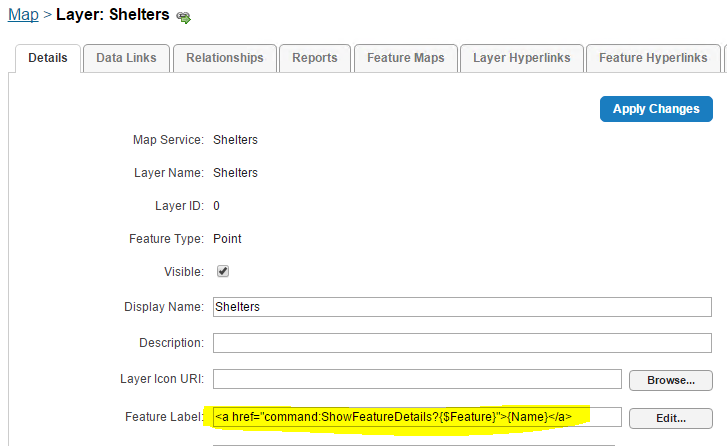
Hope that helps!
Amanda0 -
Thanks Amanda,
Stopping the feature details from appearing works well, but I didn't succeed to run the feature details when clicking the feature label.
Here's what I wrote in the Feature Label Box:
<a href="command:ShowFeatureDetails?{$Feature}">{CommunityName_English}</a>
Is there any problem with that?
Thanks again0 -
Hi Majdoleen,
I don't see anything wrong with the feature label you've written, as long as {CommunityName_English} is a valid replacement token for that layer and the feature label does appears in the viewer. That format works on my end. Is it a matter of the link doing nothing, or does something unexpected happen when it is clicked?
Thanks,
Amanda0 -
Hi Amanda,
Yes, {CommunityName_English} is a valid replacement token for that layer and the feature label does appears in the viewer.And Nothing happens when the link is clicked.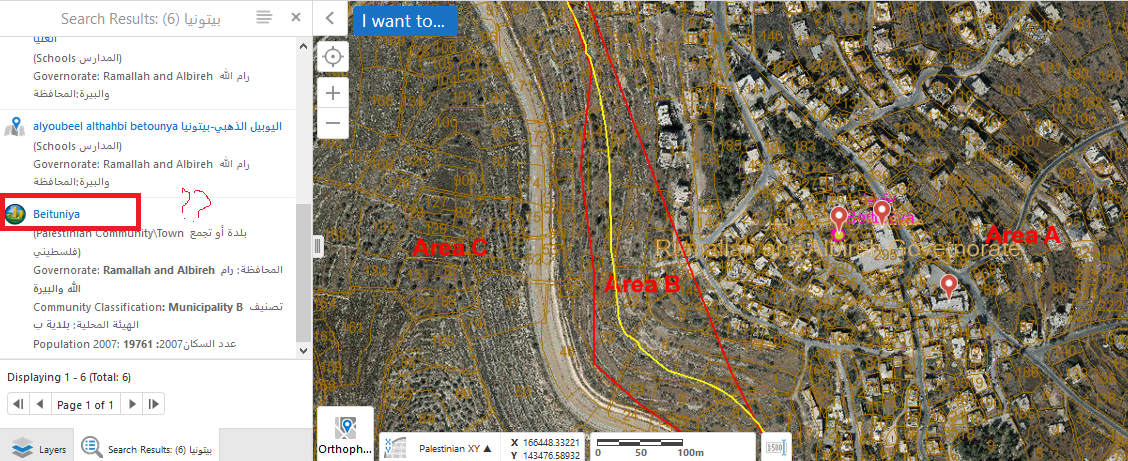 0
0 -
Hi Amanda,
We would appreciate if you try to access our application and find out what current clicks produce
http://geo.molg.pna.ps/0 -
Hi Majdoleen and Jamal,
I'll be happy to test this out on my end. Can you provide the exact name of the layer for which you've changed the feature label, so that I can find an appropriate feature to test it with?
Also, I didn't realize that the expanded table view was not the default for your viewer. As such, you may want to change the label to:<a href="command:ShowFeatureDetailsExpanded?{$Feature}">{CommunityName_English}</a>in order for the expanded view to open rather than the compact one.
Thanks,
Amanda
Amanda0 -
Hi,
I was wondering if someone could help me? is there anyway to have the results (in the results list) of a query opne up or expand without having the user click on it? we have just upgraded to HTML viewer 2.11 and now when a query gets into the list, the user now has to click on it to open it. In the older version we were using, it would expand on popultation of the list.
Hope this makes sense. It is hard to explain.
Thanks
Larisa0 -
Dear Larisa Johnstone,
In our geocortex site, we applied this approch to expand the table of the results, hope thus will help you:
First you need to go the desktop. json file, Search for: ShowFeatureDetails and edit them as shown in my attached (add expanded", and "ZoomToFeature") :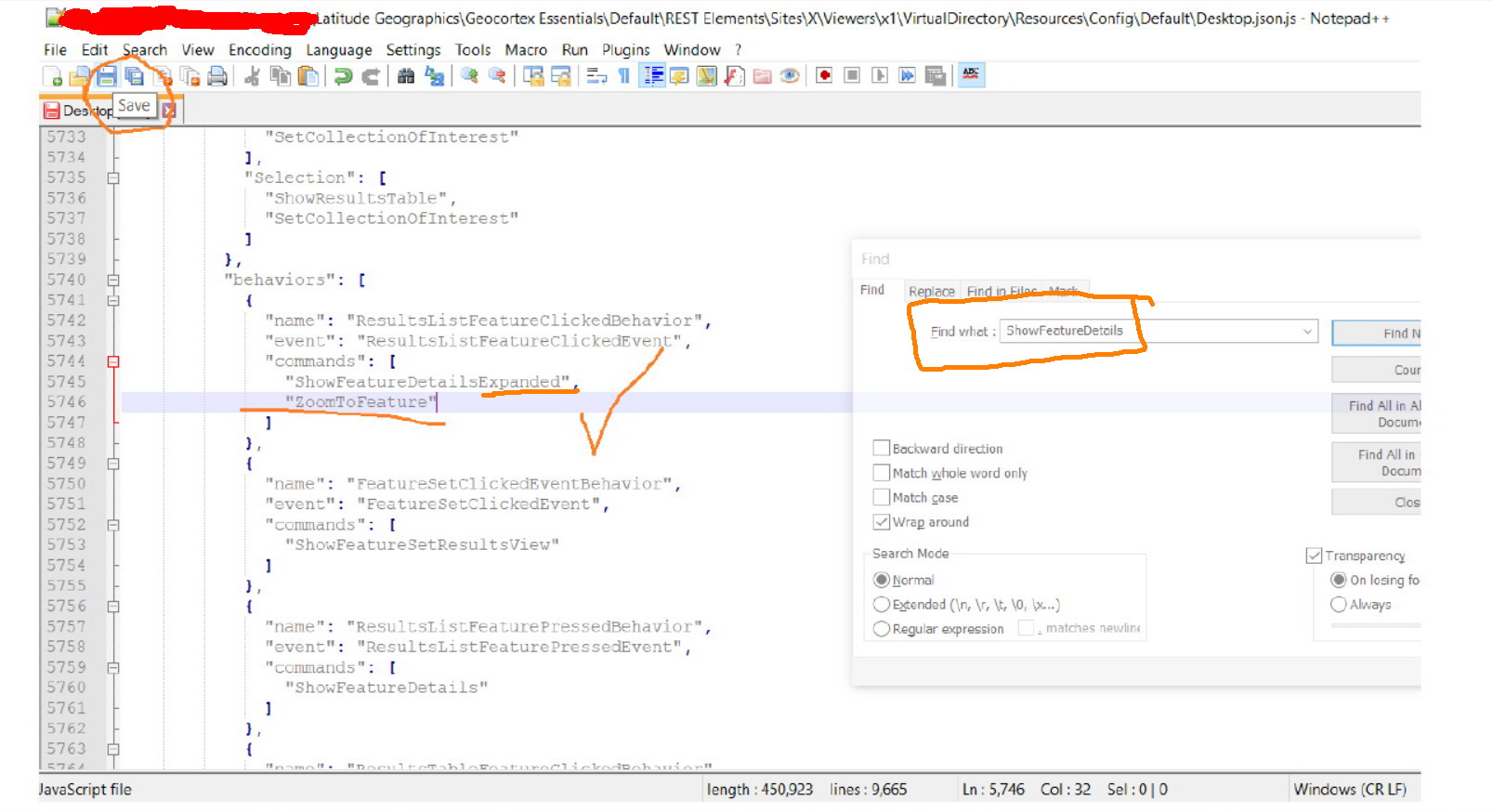
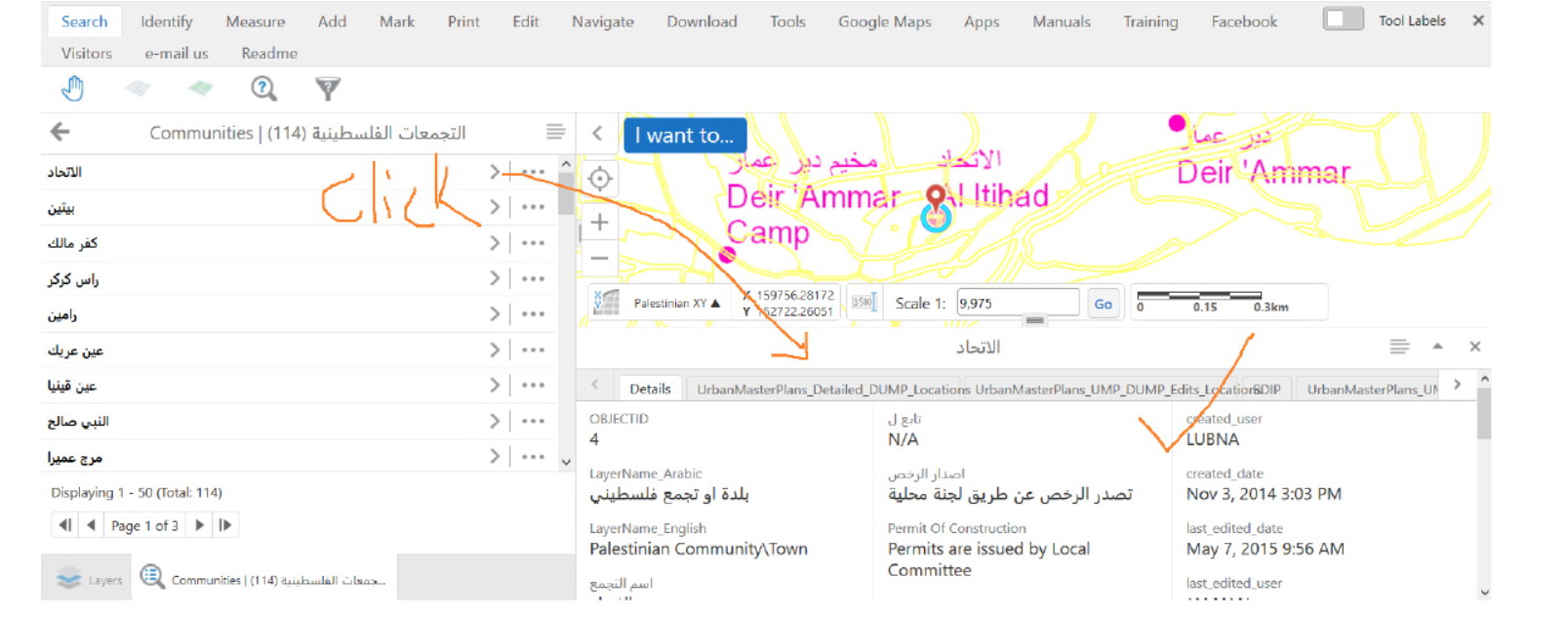
Please let me know if you have any inquiries.
Best
Majdoleen0 -
More elaboration is here:
Displaying the identified results in GE 4.7\GVH 2.8 without grouping (as in GE 4.6\GVS 2.7.2) (https://support.geocortex.com/essentialsGSCForum?sub-nav=forum&main-nav=essentials&feedtype=SINGLE_QUESTION_DETAIL&dc=GEManager&criteria=ALLQUESTIONS&id=90660000000CjydAAC#!/feedtype=SINGLE_QUESTION_SEARCH_RESULT&id=90660000000GtxDAAS)0 -
Hi All,
We are struggling with this issues when it comes to 4.12 release (GE and GVH), the relate keeps the values of the first searched/ Identifies word (you need to refresh each time in order to get the correct relate for the searched values), and we found that the main result behind this issue is this approach which expanded the table of the results by default, (Shown in my previous comment)
"First you need to go the desktop. json file, Search for: ShowFeatureDetails and edit them as shown in my attached (add expanded", and "ZoomToFeature")"!!!
Any Idea regarding this?
For more elaboration, visit this link (https://support.geocortex.com/essentialsGSCForum?sub-nav=forum&main-nav=essentials&#!/feedtype=SINGLE_QUESTION_DETAIL&id=906f20000000s2gAAA)
Best
Majdoleen0 -
Hi again,
I actually ended up finding a quick work-around for the second issue with the expanded view, set the command to be the following and it works as expected.
"commands": [
"ShowFeatureDetailsExpanded",
"ShowFeatureDetails",
"ZoomToFeature"]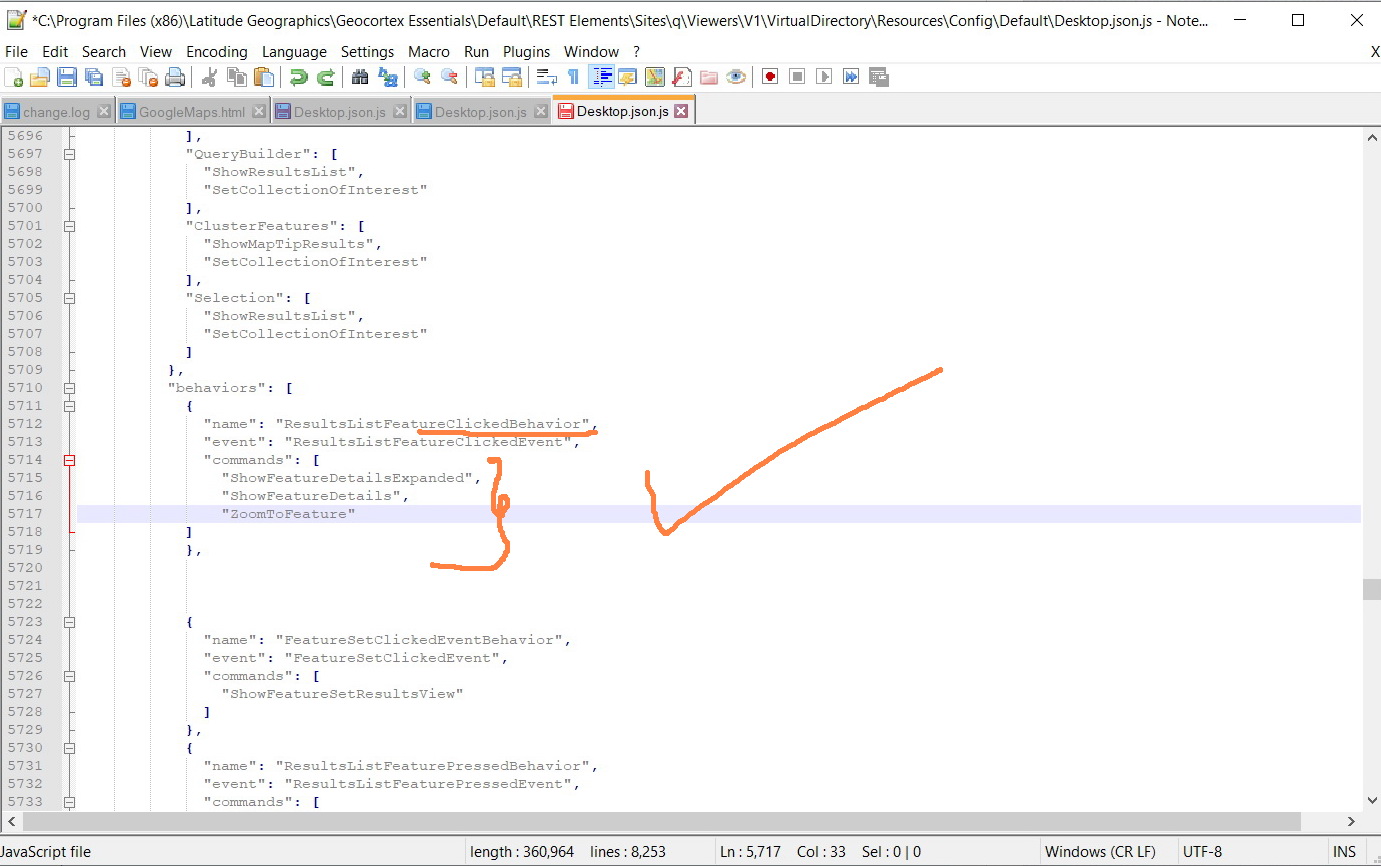
Best
Majdoleen0
Bitte melden Sie sich an, um einen Kommentar zu hinterlassen.
Kommentare
13 Kommentare