GE 4.6.1 i forgot the cluster shared secret

GE 4.6.1 i forgot the cluster shared secret , is there anyway i can retrive the shared scret without uninstall the core.
0
-

You should be able to find it here...
/Latitude Geographics/Geocortex Core/Bin/Geocortex.Platform.Host.exe.config0 -
That's correct Bill, as long as both Core config files contain the same secret text the 2 cores will cluster. The values will be encrypted but this is irrelevant, as long as they are the same value.
Regards,
Wayne Richard
Latitude Geographics Group Ltd.
Head Office: 300 – 1117 Wharf Street Victoria, BC Canada V8W 1T7
Tel: (250) 381-8130 | Fax: (250) 381-8132 | wrichard@latitudegeo.com
Developers of Geocortex web-based mapping software | www.geocortex.com
An Esri Platinum Business Partner0 -

so to get past the initial Configure Cluster Information screen on the Geocortex Core Setup do you just create a new cluster and then go back in and modify the Geocortex.platform.host.exe.config file? 0 -

I have a similar question to Jeff Timm's. I'm trying to install Analytics and in order to connect to the cluster on another machine, I need to know its secret, which is unknown, though I can obtain it in encrypted form. The encrypted form is not accepted in the installation screen for Analytics. Is there a way to continue with the Analytics installation then afterwards go back and connect it to the cluster using the encrypted secret? 0 -
Is there a way to reset the shared secret for a cluster? Is the only way to do this to reinstall Geocortex Core and if I do this would I need to reinstall Geocortex Essentials as well? The cluster is running on Core 3.0.3 with Essetnials 4.6.2. It's a big setup with 5 instances of Essentials and several sites, so I'd rather not have to reinstall the whole shebang just for the sake of a forgotten shared secret. 0 -
Hi Jeff and Mark,
Jeff, you are correct, you can set up a temporary cluster, and then go into the platform.host.exe.config file later, and join the target cluster by pasting in the encrypted shared secret. The benefit here is that you can join the cluster with the encrypted key, without knowing what it is.
Mark, as for your question, you can either do what i just described for Jeff, or you can reset it by stopping Core on all your cluster nodes, and setting the shared secret to a plain text string in the platform.host.exe.config file on all your nodes. Once this is done, you can start Core, and the nodes will authenticate using the new key you've provided. The drawback here is that the key will be unencrypted in the file.
In most cases, this is not a big concern, since the main purpose of the shared secret is to prevent rogue Core nodes from joining your cluster.
I hope this helps! Please let me know if you guys have any followup questions about this.
Thanks,
Danny0 -
I tried that and restarted my core. I get this 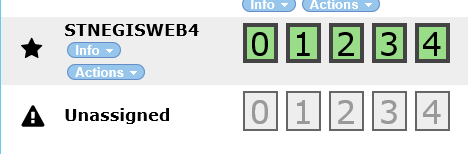 0
0 -
Hi Jeff,
You'll likely need to restart it on all the cluster nodes. Usually new nodes are only detected on startup.
Thanks,
Danny0
Bitte melden Sie sich an, um einen Kommentar zu hinterlassen.
Kommentare
8 Kommentare