Adding private content from portal for arcgis to the user

I am able to connect to the portal for arcgis but when I add map service in the site. error saying "this is private content. End use will be required to enter user and password". I don't want user to enter the user and pass again. Is it possible to add the private content to the viewer without asking the end user for password?
0
-

Hi,
Did you register Essentials with your instance of ArcGIS Portal? See section 8.3.4 of the Essential Installation Guide. If the configuration is done correctly the viewer should prompt the user to sign into Portal in order to see the private content.
Thanks,
Mike Ketler0 -
Thanks for your answer but not resolved.
Registration for portal for arcgis is done. I also configure a custom identity server and permission in manager. This custom indentity server controll who can access to the site and viewer. Once users launch the viewer with their login (not portal login), I don't want them to enter the portal user and pw. Is it possible?0 -
Hi,
See my attached screenshot, if you add private content in Essentials Manager it will warn you.
"The is private content. End users will need to sign in using an ArcGIS named user in order to access it."
Private content requires that the Essentials site be configured with the Portal Security Provider (Essentials Manager Security Tab). When the user opens the viewer this security provider will prompt them to sign in with a valid ArcGIS named user account. Unfortunately, using the Identity Server and private content from ArcGIS Portal will not work.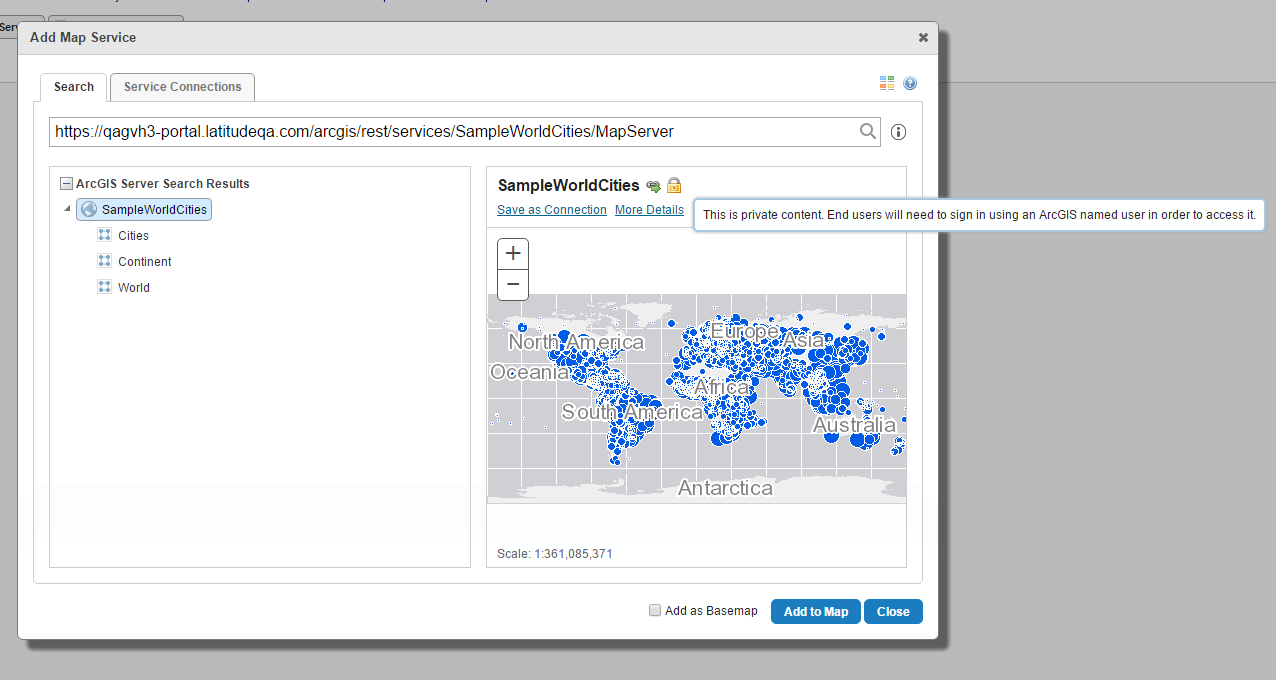
Please note you can right click on the image and open in a new tab to view at a higher resolution.
Thanks,
Mike Ketler0 -
Hi. Mike,
Thanks but this is bad. Can "Site" authenticate the portal access? I need to make the end user with permission for the viewer/site can access the content in the potal without knowing the portal credential. Basically what you're saying is it is not possible.0 -
Hi,
Unfortunately, private content from ArcGIS Portal can only be accessed by valid ArcGIS user accounts. If you make the content shared with everyone then the viewer can be accessed without a valid user or with a different type of security like the Geocortex Identity Server.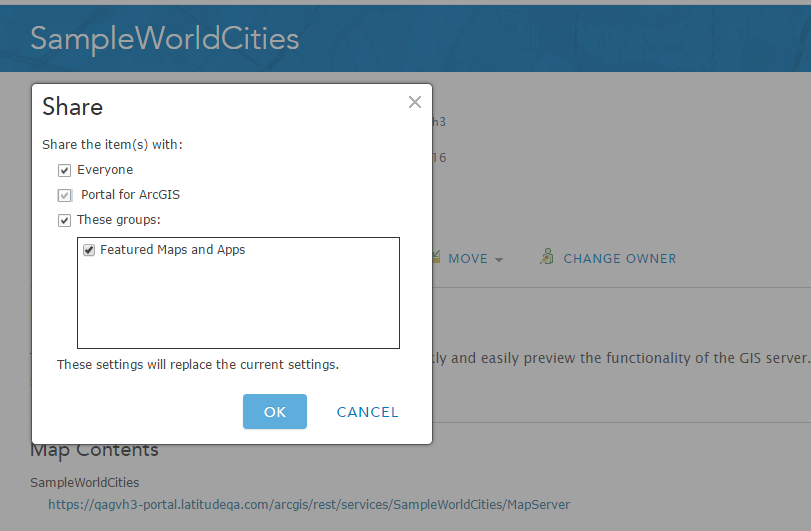
Thanks,
Mike Ketler0 -

Hi Mike,
Just to clarify, even if the end user is a named user in Portal/AGOL they would still be required to enter their Portal credentials? If Portal have single sign-on configured (ie Enterprise logins) could this by-pass the credential prompt?
Thanks!0 -
Yih Pyng Lee
Did you ever get an answer to this question? I am also trying to work out how to by-pass the credential prompt.
Thanks
Inga0
Bitte melden Sie sich an, um einen Kommentar zu hinterlassen.
Kommentare
7 Kommentare