Controlling Excel Output Formats

Even though my dates, unit and increment values (please see attached) have been displayed correctly, when I run this data through a workflow with an excel output, the values change formats. The upper part of the image is of the 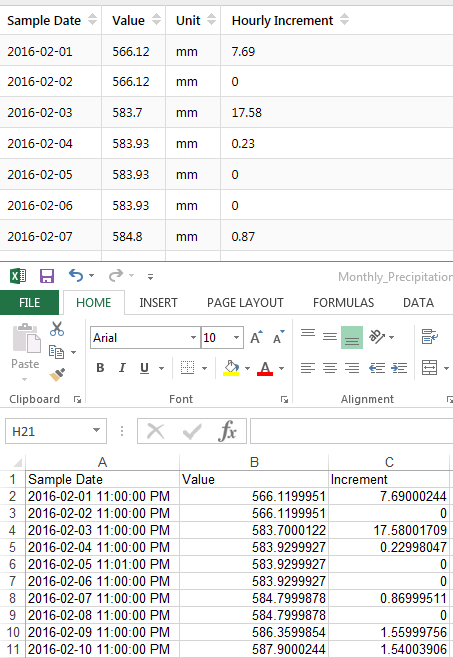
data table in the viewer, while the bottom portion is of the output.
Is there a way to control what is generated inside an excel file from a workflow?
Walter
0
-

Hi Walter,
Unfortunately, we don't have any activities in Workflow Designer that would let you set the display format for a field (or column) in your Excel table. So, when you're converting a DataTable or DataSet to XLS or XLSX, we will just take the base value out of the data and won't apply any of the formatting in your Site.
(Site configuration is one step removed from Workflow too, which is another issue altogether).
You would need quite a bit of custom development to load the generated Excel spreadsheet and modify the display settings for the cells. You may want to investigate using Excel scripting to apply your desired formats afterward, perhaps from another document in Excel.
Regards,
-Malcolm0
Bitte melden Sie sich an, um einen Kommentar zu hinterlassen.
Kommentare
1 Kommentar