“Search Parcel” tool selects all identified layers in GE4.7\GVH2.8

“Search Parcel” tool selects all identified layers in GE4.7\GVH2.8?
We couldn’t figure out if there is a way to let “Search Parcel workflow” tool select only the parcel layer instead of selecting all other identified layers, but at the same time, reading the results from the identified layers (same behavior as 2.7), can we deactivate this feature at the level of workflow?
_img_ alt="User-added image" src="https://latitudegeo--c.na53.content.force.com/servlet/rtaImage?eid=90660000000Gu0g&feoid=Body&refid=0EM60000000UjeU" _/_img_
Thank you,
Best,
Majdoleen
0
-
Hi Majdoleen,
Can you post your workflow please, so I can take a look?
Thanks!
Danny0 -
Thanks Daniel, kindly download our workflow from this link :
http://www.mediafire.com/file/9xchmfa13avpxzs/RegisteredParcel_Search_WestBank_06.xaml
I will be waiting your findings.
Best,
Majdoleen0 -
Hi Majdoleen,
I think the issue is that at the end of your workflow, you are running an external command (Identify) which is performing an identify operation on the centeroid (envCenteroid). If you only want the parcels, you should unhook that last command, and make sure your query task is querying your parcels layer.
I hope this helps!
Thanks,
Danny0 -
Thanks Daliel for your answer, but my point here is to keep the identify command, we need all the information about each parceel and from different layers (this is required on our work).
Please not that this tool was working fine with GVH2.7 as shown in this screen shot: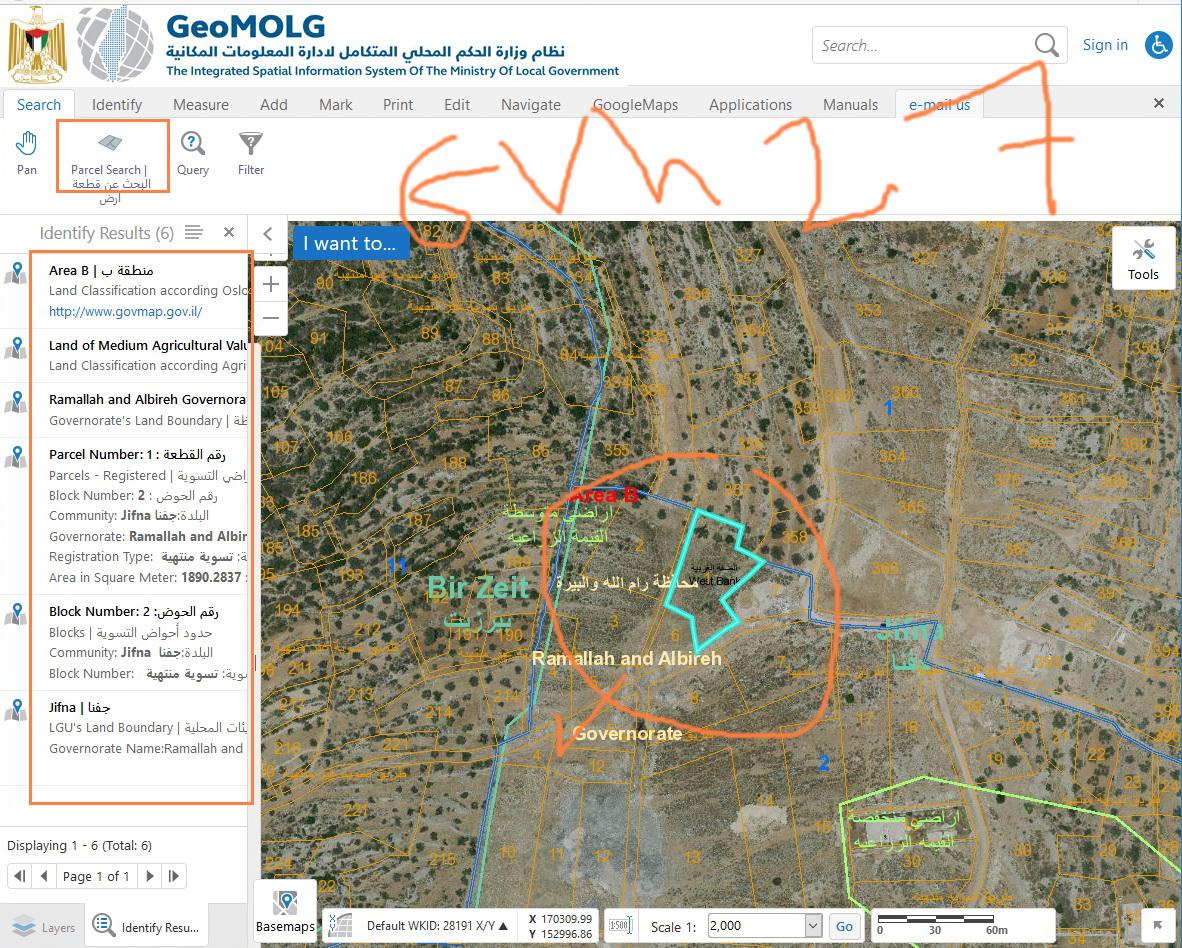
What do you think?
Best,
Majdoleen0 -
What my colleague Majdoleen is trying to say is that with each upgrade, the behavior of workflows does change as the behavior of the commands\tools that are participating in workflows are changing. For example, the “identify” tool in GE4.7\GVH2.8 includes selection while in older releases it didn’t. 0 -
Hi Majdoleen and Jamal,
After looking into this, I'm not sure how you would fix this on the workflow side. I have 2 thoughts:
1) Did the upgrade perhaps enable the Identify property on the layer in Manager? It shouldn't have, but it's possible. Please check the other layers that are being returned, and make sure that the Identify property is not enabled (unless it needs to be)
2) Did the extent that you are looking at in the workflow change since the upgrade? This could have happened by a change to the toolbar's default state, or a change to the map service draw distance (or something else I may not be thinking of). If the visible extent now includes new layers that are identifiable, they will be picked up by the identify operation.
If neither of those applies, please open a support case, and include the following:
1) A copy of the workflow
2) A copy of your site.xml
3) The exact version of GVH and GE that you upgraded from
With that, we can test and confirm if this is a bug or not.
Thanks!
Danny0 -
Thanks Daniel.
This is to confirm that:- We need the Identify property on the layers in Manager.
- The extent of the workflow does not change with the upgrade
- We already opened a support case.
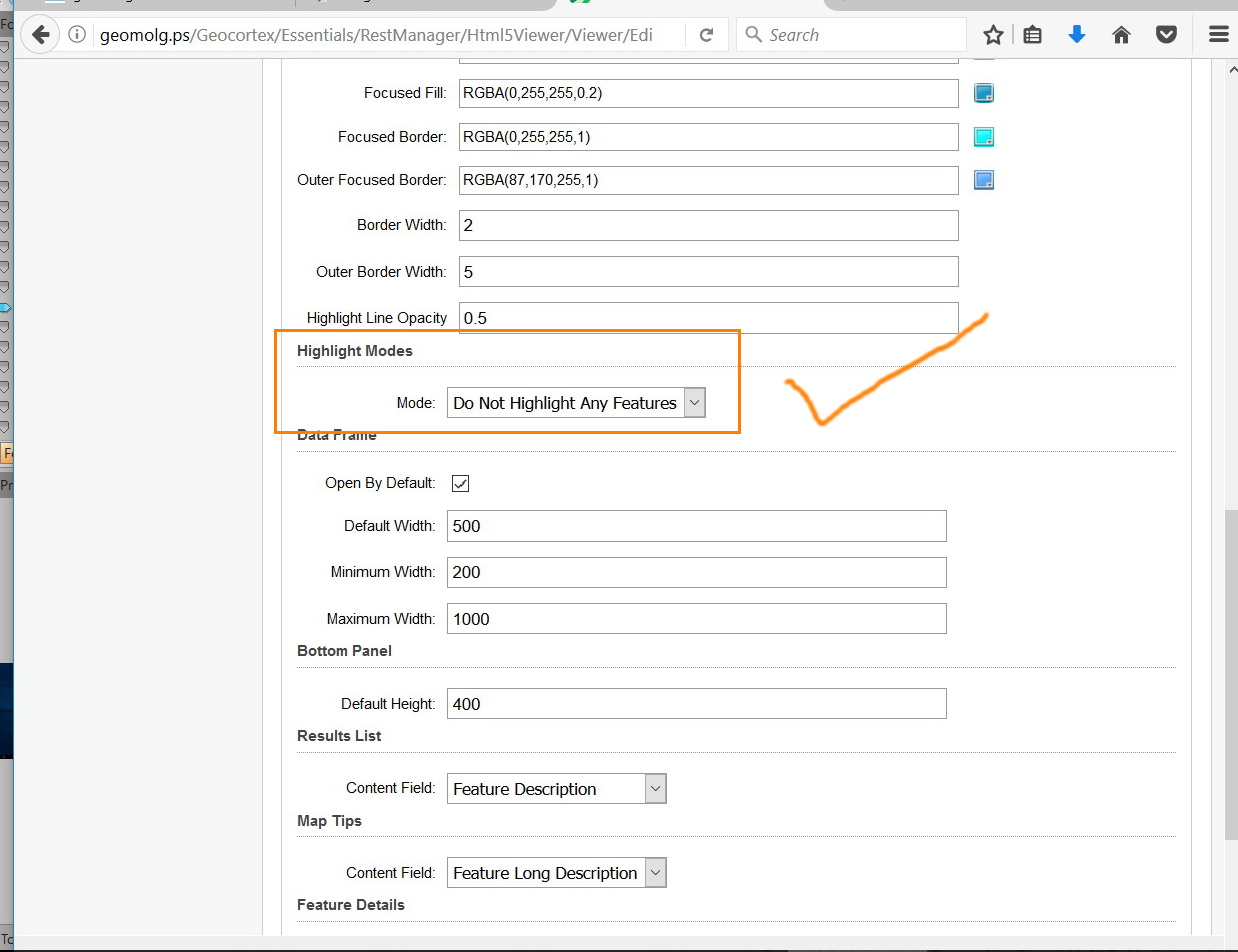
What do you think?
Best,
Majdoleen0 -
Hi Majdoleen,
I don't think this is a bug. If you invoke an Identify operation, it will identify all the visible and identifiable layers. This is the expected behaviour.
The setting in your screenshot is for the highlight module, not for identifying. To change your identify settings, you will need to go to Map > Layer Properties > and uncheck the "Allow Identify Operations" checkbox.
I spent some time yesterday trying to build an example workflow for you, but wasn't able to craft one. That being said, it should be possible. Someone will get in touch with you through the support case to assist you!
Thanks,
Danny0 -
Thanks Daniel, it will be great if we can have the highlight mode at the level of our workflow, that for sure will solve our issue, in our case, we need the identify layers but without highlighting them, only select the parcel layer as indicate in our workflow ( this was the last behavior of our workflow in GVH 2.7).
we will be waiting a reply from the support center.
Best,
Majdoleen0 -
Dear Danny,
Have you found out any solution for this issue at the level of workflow, is there an option to decide the highlight mode at the level of workflow, that for sure will solve our issue, taking into consideration that we need the identify command, and only highlight the parcel layer as indicate in our workflow.
Best,
Majdoleen0 -
Hi Majdoleen,
I don't think this is possible currently. You might be able to get this to work using the CreateHighlightLayer and SetActiveHighlightLayer, but I'm not sure it will do exactly what you are asking for.
As I mentioned, I would suggest working with your reseller in a support case to get the workflow customized for your environment.
I hope this helps!
Thanks,
Danny0
Bitte melden Sie sich an, um einen Kommentar zu hinterlassen.
Kommentare
11 Kommentare