reverse proxy and arr

I am running into a few issues getting all the pieces of our setup to work properly using a reverse proxy. I've read all the posts on this and followed the documentation, but haven't been able to get everything working. Here's my environment:
Reverse Proxy Server - Windows 2016, IIS 10 with ARR v3 and AG Web Adaptor v10.4.1
App Server - Windows 2016, IIS 10, AGS v10.4.1, GE v4.6.3, H5 v2.7.2
The web adaptor is able to access the services http://gis.cedarfalls.com/arcgis/rest/services
I've followed the forum post to setup ARR for Essentials and H5, however that portion is not working. http://gis.cedarfalls.com/h5/?viewer=cf
I have run the post installer to add my reverse proxy and added it to the application settings (and removed it to see if that was the issue).
All of this was setup prior to having a reverse proxy and worked internally with service connections using the internal url's. I've attempted to use the proxy server connection settings to the services with the same result.
Cory
0
-
Hi Cory,
Can you post a screenshot of the rule you set up for your HTML5 viewer? The 404 error makes me think it's either A) not being applied, or B) is being routed to the wrong server.
Thanks,
Danny0 -
Sure can. Before you look it though, refresh the application url. I temporarily had the rule disabled, the 404 went away and now it's a 'we can't reach this page' error in chrome. 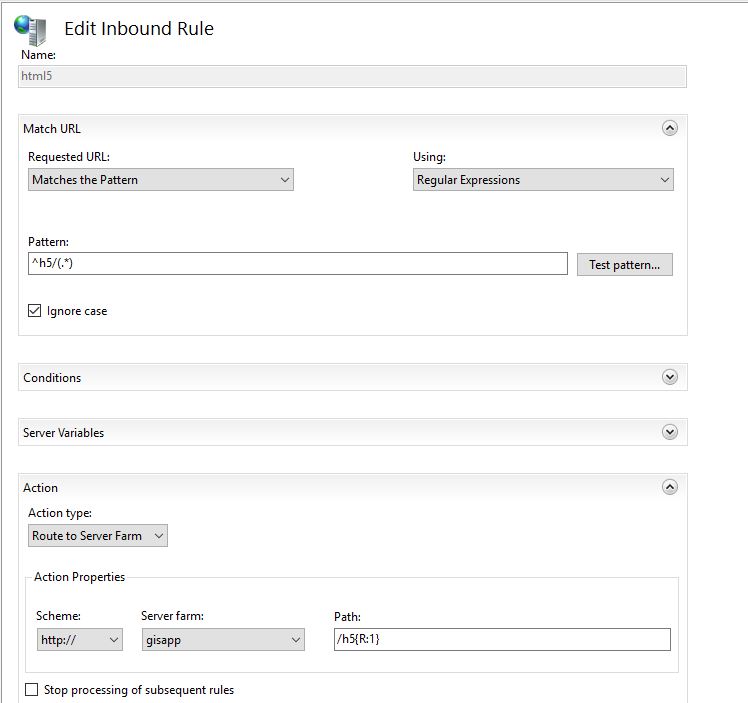 0
0 -
Hi Cory,
For your pattern, try this:
^h5(.*)
And for your path, at the bottom, try this:
/h5{R:0}
I hope this helps!
Thanks,
Danny0 -
I'll try to summarize what made this work and hope that I'm not opening up a security issue.
Using /h5{R:1} allowed the site to load, but said the services couldn't load. Their connection strings are still pointed to the internal server name.
So, to test things I setup a site with just our basemap service and pointed that connection to the proxy url.
http://gis.cedarfalls.com/h5/?viewer=test
That loads just fine outside our network.
I could have swore I tried that exact same setting before...
Thanks for the insight Danny.0
Bitte melden Sie sich an, um einen Kommentar zu hinterlassen.
Kommentare
4 Kommentare