Upgrade to Essentials 4.7.0 breaks map display in Manager

Essentials 4.7.0 HTML5 2.8.0
I upgraded from 4.6.3 and GVH 2.7.2 to the newest version and now the map does not display in Rest Manager. The map displays fine in the viewer itself when launched, just not in Rest Manager.
What's up with that?
0
-
Not event the map controls display in the map in Manager. 0 -

Hi Sean.
If you have a look at your browser's dev tools, are you seeing a 404 error finding the TiffDecoder.js file? If so, you can solve this by downloading that file from the Esri Javascript API github page (version 3.19), and adding it to the following directory:
C:\Program Files (x86)\Latitude Geographics\Geocortex Essentials\Default\REST Elements\Manager\Content\EmbeddedViewer\Resources\Scripts\esri\layers\rasterFormats
This issue should be added to the known issues KBA soon. Sorry for the inconvenience on this!
Thanks,
Danny0 -
Is this the error you mean? 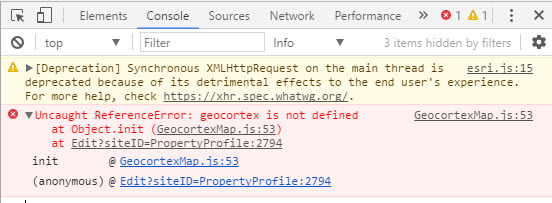 0
0 -
Hi Sean,
That actually looks different than the one I was thinking of. I'm not familiar with the one you're seeing. Have you cleared your cache since upgrading? If not, can you please give that a shot?
Thanks!
Danny0 -
Danny
Your instruction fixed my issue.
Thanks
Masao0 -
Glad to hear it Masao!
Cheers!
Danny0 -
I'm having trouble locating and getting ahold of the actual file from ESRI's GitHub. Can you guys make the file itself available more directly? 0 -
Clearing my cache did the trick. Thanks. 0 -

I was also having this issue. I found that removing some image services fixed the issue. This was not an issue in 4.6.X
I'm not sure which image service was the culprit.0 -
This is the error I get:
Uncaught Error: xhrFailed
at d (esri.js:11)
at Function.p.getText (esri.js:15)
at pa (esri.js:33)
at a (esri.js:11)
at esri.js:20
at ga (esri.js:29)
at ma (esri.js:20)
at La (esri.js:21)
at c (esri.js:21)
at Object._loadRasterFormatModules (esri.js:2910)0 -
And this:
Failed to load resource: the server responded with a status of 404 (Not Found)
p.getText @ esri.js:150 -
Nevermind, I found the code in fiddler referencing the 404 for the TiffDecoder.js.
I added the file and code from the github repository found here:
https://raw.githubusercontent.com/Esri/arcgis-js-api/master/layers/rasterFormats/TiffDecoder.js
After adding this, I was able to get my map in Manager. Thanks Danny!0 -
Hey Erik, this is exaclty my problem. Where did you add the file to? 0 -
Nevermind, I skimmed too quickly, I see Daniel already provided the location. Thanks! 0 -
GVH 2.8.1 will include the TiffDecoder.js file and all other raster format scripts included in the Esri JavaScript API (version 3.20). 0 -
Thanks, TiffDecoder.js fixed my issue. 0
Bitte melden Sie sich an, um einen Kommentar zu hinterlassen.
Kommentare
16 Kommentare