Copy drawing to feature

I have created a workflow where my users draw a polygon which then is added to a feature service. The thing is the shapes are based on DGN and my users would prefer to use DGN files.
As there is no input DGN as of yet I have been trying to convert my DGN to shapefile/geodatabase which they can then use to copy into their geodatabase. However, as I am using geocortex essentials 4.1 I am limited to what tools I can use in a workflow.
My current workflow the users draw a graphic, attributes are added, then the drawing is copied to a feature. I would like to change it so instead of drawing the graphic, they can copy a polygon from the map (or add a shapefile)
0
-
I am trying to use the workflow as suggested by Marshall in another thread however it throws an error at this query 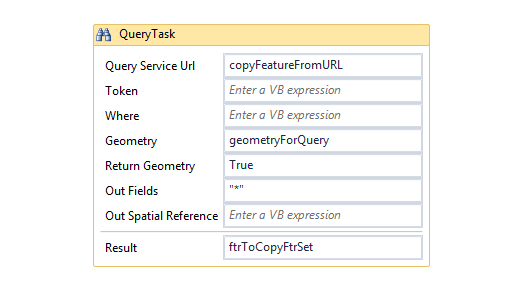 0
0 -
What's the error? 0 -
for some reason I needed "1=1" in the where clause to get it to work 0 -

The where clause indeed cannot be left empty. 0 -
I have it working but it copies all the feature attributes, I would like just the geometry (so I can copy one feature to another regardless of the schema). Is this possible? 0 -
Remove the "*" from the Out Fields parameter to just returning geometry (and objectid) and no other attributes. 0 -
You can check your feature set result by display ftrToCopyFtrSet.ToJson in a Prompt Activity. 0 -
I realized if the feature I copy to doesn't accept null fields it won't work. That is I need to copy those attributes for those fields.
How can I get around this? by assigning fields? I just want my users to be able to copy shapes from one feature to another (as they have some complex shapes with donuts that cannot be drawn in geocortex)0 -
I am still stuck on this - I cannot think of a solution except changing my schema to accept nullable. 0 -
I have assigned variables to my feature as a graphic but when it comes to updating or creating the feature, I get an error 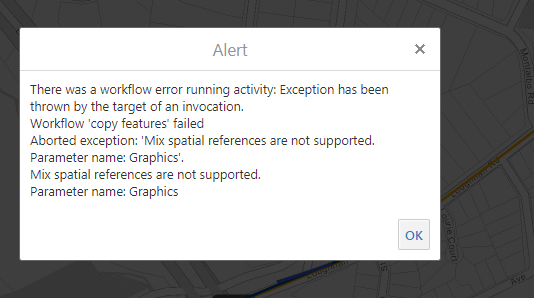 0
0 -
Hi Sylvia,
that error sounds like you might be trying to perform some task on a featureset that has features from two or more different spatial references. If that's the case, you would need seperate the features into featuresets that only use one spatial reference each. It's tricky to be more specific than that without seeing how the featureset is built in the workflow and what features it contains. Like Nico mentioned earlier, you can use .ToJson on your test featuresets to see what they look like within the workflow.
-Amanda0
Bitte melden Sie sich an, um einen Kommentar zu hinterlassen.
Kommentare
11 Kommentare