Measurement Labels not displaying in Viewer 5.2.8

We are configuring a new site with Geocortex Viewer 5.2.8, the line segment measurement text is not displaying. The white text area is drawing fine, but not the black text. The summary measurements are displaying fine. Any ideas how to fix this?
0
-

Are you using the geometry service from your own server? If so you may need to add the server url to the proxy.config file in the html5 viewer folder (C:\inetpub\wwwroot\html5Viewer\proxy.config)
eg: <serverUrl url="http://yourserver.whatever/arcgis/rest/services/"
matchAll="true"></serverUrl>0 -
Thanks Chris - this was set up, but I had forgotten to set the geometry service. We are still having the same problem. 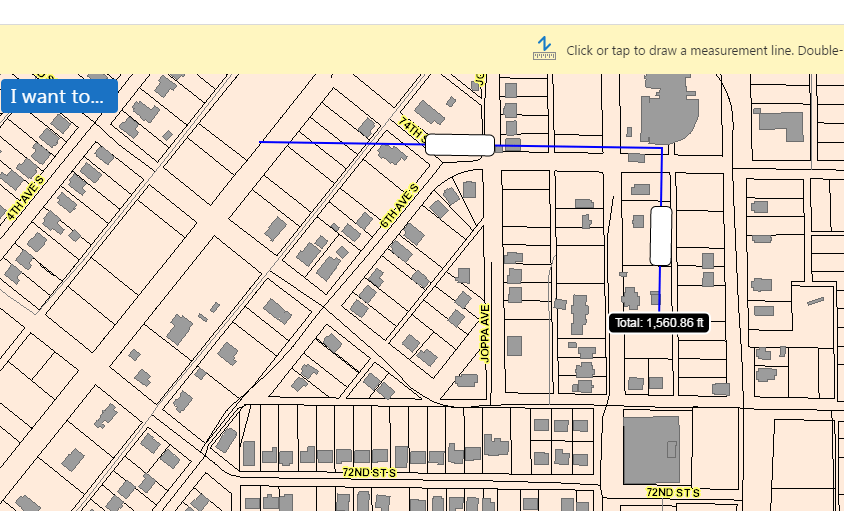 0
0 -
Hi Michael,
Can you try using the dev tools of your browser (F12) and the Network tab and see what the response is to the call to the geometry service? The numbers come from the geometry service so I suspect it's not returning values. Saying that, it is odd that the total is being displayed but not the individual measurements.
Regards,
Wayne Richard
Latitude Geographics Group Ltd.
Head Office: 300 – 1117 Wharf Street Victoria, BC Canada V8W 1T7
Tel: (250) 381-8130 | Fax: (250) 381-8132 | wrichard@latitudegeo.com
Developers of Geocortex web-based mapping software | www.geocortex.com
An Esri Platinum Business Partner0 -
We had a similar issue and it was due to the text colour and background both being set to white, under the Site > Viewer configuration. 0 -
Yep, this is similar to what we found. The measurement properties have a text box for the color and a color picker. The color picker defaulted to blue, but there was no value set in the text box. I assumed since there was a default color that things were set okay. Once I input the value, it worked fine. 0
Bitte melden Sie sich an, um einen Kommentar zu hinterlassen.
Kommentare
5 Kommentare