Unique graphic for each point

I need to show the results from a routing task - within a workflow - that returns an optimized route. I would like to show each point with a numbered symbol. This is simple task in Esri's JS API but I can't put my finger on how to do it from a workflow in Geocortex.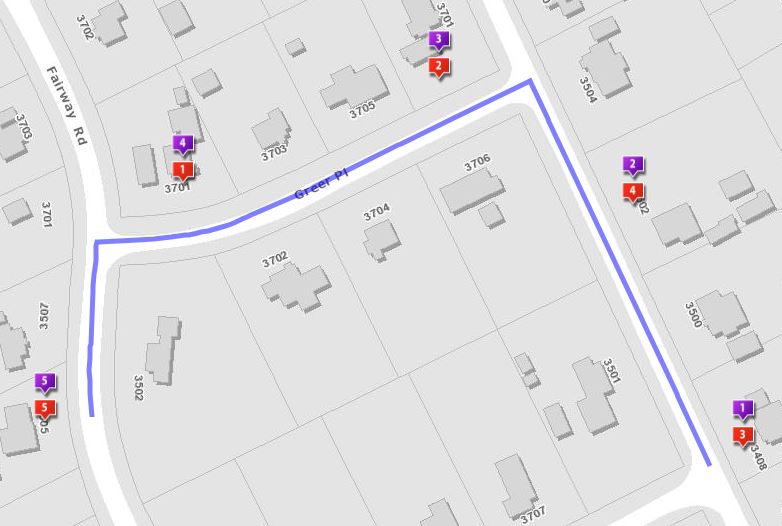
Below is kinda what I am looking for. Red markers are the order the points were placed. Purple is the optimized route.
Any advice?
0
-

Hi Bryan,
I'm not certain if this is there isn't an easier way out there, but I have seen numbered text renderers done like this before: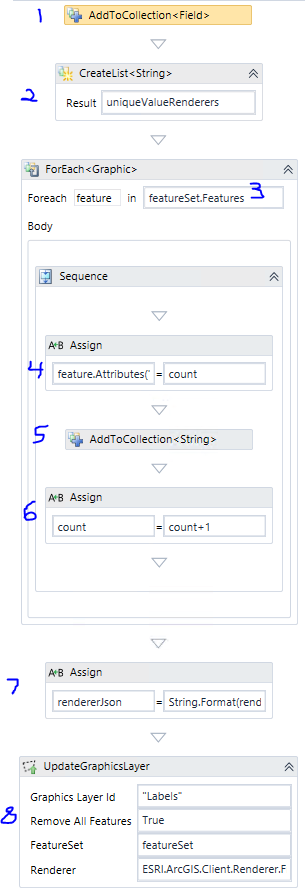
- Add a new field to your featureset to hold your ordered numbers. Eg. Add New ESRI.ArcGIS.Client.Field("LABEL", ESRI.ArcGIS.Client.Field.FieldType.String, "Label", Nothing, False, True, 0)
- Create a list to hold unique value renderer strings for each feature
- Loop through the features in your featureset
- Set the value of the field you created in step 1 to a count variable.
- Add String.Format(uniqueValueFormat, count) to the uniqueValueRenderers list. uniqueValueFormat is a variable that contains the skeleton some renderer json
"{{""value"":""{0}"",""label"":""{0}"",""description"":""{0}"",""symbol"":{{""type"":""esriTS"",""style"":""esriSLSDash"",""color"":[255,0,25,255],""xoffset"":10,""font"":{{""family"":""Arial"",""size"":12,""style"":""normal"",""weight"":""bold"",""decoration"":""none""}},""text"":""{0}""}}}}" - Increase the counter
- Format the rest of the renderer json using String.Format(rendererJsonFormat, String.Join(",", uniqueValueRenderers.ToArray())). rendererJsonFormat contains:
"{{""type"":""uniqueValue"",""field1"":""LABEL"",""field2"":null,""field3"":null,""fieldDelimiter"":"", "",""uniqueValueInfos"":[{0}]}}" - Use UpdateGraphicsLayer to display your featureset using the renderer json. ESRI.ArcGIS.Client.Renderer.FromJson(rendererJson)
Hope that helps!
-Amanda0 -
Thanks Amanda. your solution works! 0 -

Hi,
Please can you share the workflow.
Thanks.0 -
Copy the text and use File > New > From Clipboard in Workflow Designer to open it. This one is just a test, so it queries an arbitrary Airports layer from LA County. You should be ok to delete or replace the QueryTask when you apply it to your own workflow/featureset. 0
Bitte melden Sie sich an, um einen Kommentar zu hinterlassen.
Kommentare
4 Kommentare