GetCurrentUser Output WindowsAccountName

I'm using the GetCurrentUser activity to obtain the Windows Account name. I've set the output string value into a string variable.
But the next step I use an Alert box to show me who the user is and nothing appears. But when I run the workflow through the simulator, the variable value shows up.
Do I need to populate the other output arguments to obtain the value for WindowsAccountName ?
Walter
0
-

Are you having users sign in to the site via windows AD? 0 -
Kevin,
Our clients do not sign in into the viewer currently. We use Windows authentication.
Walter0 -

If you authenticate thru Windows, setup the viewer to sign-in automatically: 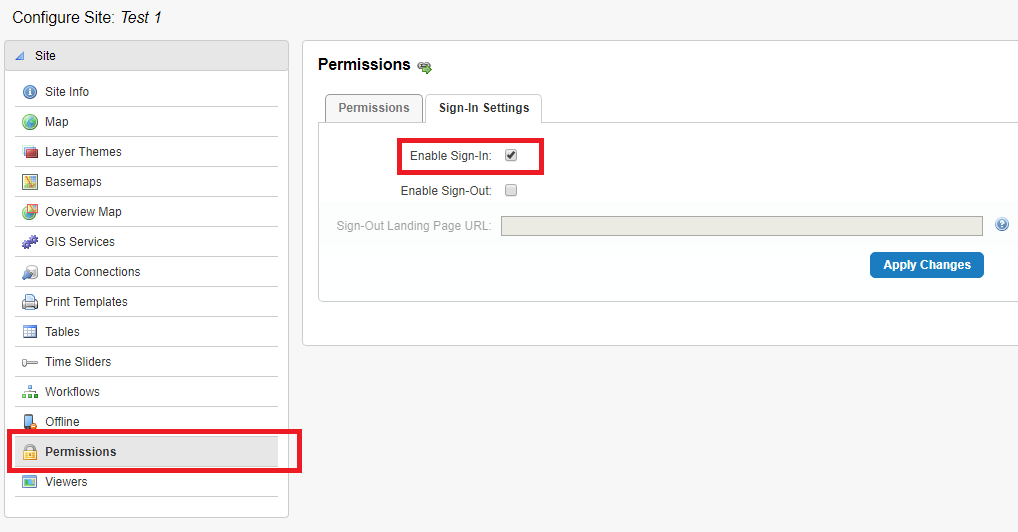
Then you will be able to get the username with the workflow.
Cheers...Rick0 -
Richard,
Thank you for your response. Although the permissions on our site already reflect your recommendation, I still cannot see the string value for the output argument for GetCurrentUser.
Walter0 -
In the Workflow Designer help file under "GetCurrentUser" it states that:
When running this activity in the Workflow Designer simulator the user will be the Windows user running the Workflow Designer application.
Great. That works fine. But how do I obtain the Windows username from the client who's currently running the workflow into a string variable?
Walter0 -
Walter, you need to enable sign in on your applications. Geocortex does not know the end user has any Windows AD context without a sign in taking place. When you are running WF designer, you are running it under the context of your own user. Geocortex, on the server is running as a service account and it does not correlate to the end client user. A signin will associate the Essentials session with the AD user, thus making the GetCurrentUser activity return the AD name claim information.
To set an Essetinals site to be secured respecting AD, open up the Permissions tab, pick the dropdown option 'Window Active Directory - All Users' and put a green checkmark on the site node.
https://imgur.com/VSHvdTN0 -
Thanks Kevin,
Forgot to add that step.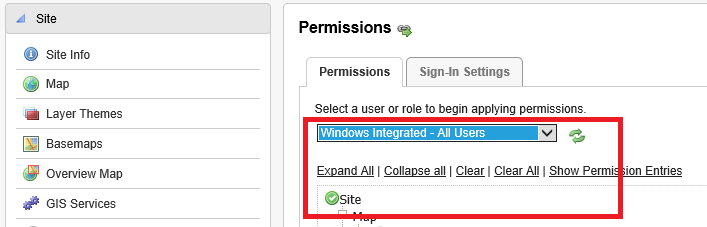 0
0 -
Gents,
Thanks for your responses. That did the trick.
Appreciate it.....Walter0
Bitte melden Sie sich an, um einen Kommentar zu hinterlassen.
Kommentare
8 Kommentare