Generalized highlighting of complex polygons

We had this issue occur (GE 4.8/GVH 2.8), and I wanted to share the solution. 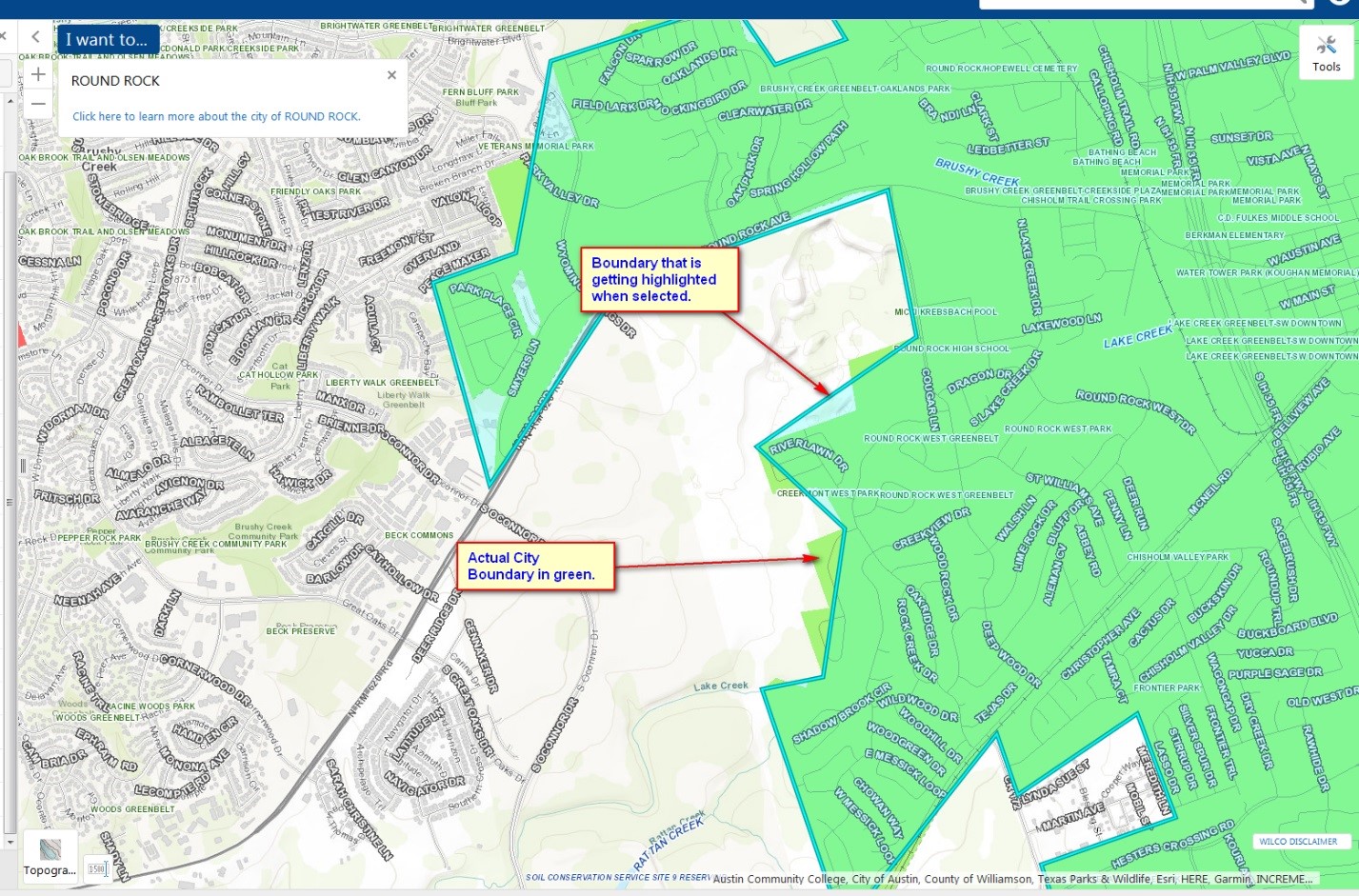
The issue was that our viewer was generalizing the geometries for the city limits. Some of the polygons that represent city limits have over 5000 polygons. Those polygons were getting reduced to improve browser performance; however, the generalization was losing information and resulting in some badly formed shortcuts across boundary lines.
To work around the issue we pushed the threshold for generalization up to 25000 vertices from 5000 in E:\Latitude Geographics\Geocortex Essentials\Default\REST Elements\Sites\Site_Name\Viewers\Viewer_Name\VirtualDirectory\Resources\Config\Default\Desktop.json.js.
We could also have avoided the issue by turning off generalization, which I recommend if users require absolute precision for all geometries.
The configuration to change was:
{
"moduleName": "Highlight",
"moduleType": "geocortex.essentialsHtmlViewer.mapping.modules.Highlight.HighlightModule",
"configuration": {
"fillColor": "RGBA(255,128,0,0.6)",
"borderColor": "RGBA(255,255,151,1)",
"borderWidth": 4,
"outerBorderColor": "RGBA(255,0,0,1)",
"focusedFillColor": "RGBA(0,255,255,0.2)",
"focusedBorderColor": "RGBA(0,255,255,1)",
"focusedOuterBorderColor": "RGBA(87,170,255,1)",
"outerBorderWidth": 5,
"highlightLineOpacity": 0.5,
"maxHighlightableGeometryVertices": 5000,
"geometryGeneralization": {
"geometryGeneralizationEnabled": true,
"thresholdVertices": 5000,
"maxDeviationInMeters": 250
}
}
},
Set the "maxHighlightableGeometryVertices" and "thresholdVertices" values to 25000, or set geometryGeneralizationEnabled to "false" to avoid the issue.
These changes go into the Desktop.json.js (and/or Tablet, Handheld.json.js) for each viewer that is affected.
Hope this helps.
Frank
0
Bitte melden Sie sich an, um einen Kommentar zu hinterlassen.
Kommentare
0 Kommentare