DisplayCaptureGeometry - Geometry - to SqlQuery as Geometry Parameter

I initially request that the client, for this particular chain of events, to first capture geometry. Can the resultant type "geometry" be used as a parameter for a sql query to query for specific "shape" attribute of a table? Please see attached image. In this specific scenario that I'm working on, normally the client would select more that one station, so I'm attempting to run a query on all selected stations.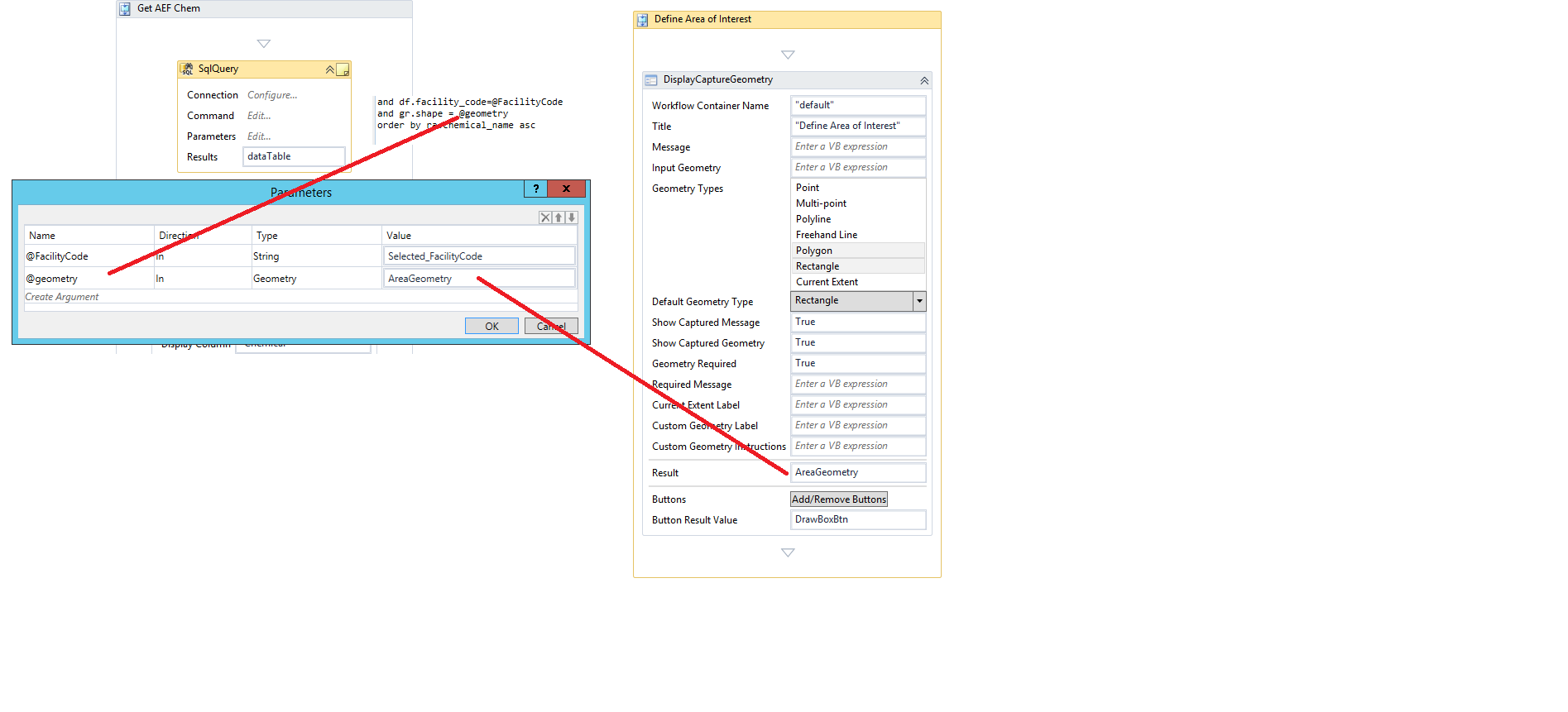
Any assistance would be appreciated.
Walter
0
-
Hi Walter,
A couple of questions to clarify what you are trying to achieve:
From the image I can gather that the display capture geometry activity (the rectangle) might contain more than one geometry (station) that you would like be able to select and use for your SQL … is that correct? In that case I think you would need an intermediate step that gets geometries for you and then use those to filter by shape … probably building your sql with IN clause.
Could you think of using a Query task instead of a SQL query activity? Do you have or can you create a layer that contains attributes returned by sqlQuery? That would give you a input geometry parameter (in your case the selected rectangle) that can intersect with the geometries (stations) that user wants to select plus additional parameters using where clause like your facility code...
I hope this helps0 -
Morning Francesca,
That is exactly what I am trying to achieve. Unfortunately, I cannot use a query task, since I am connecting to another database via the SQL query and need to intersect those stations, contained inside the rectangle generated by the display capture geometry, and use those geometries to obtain their equivalent values in the other database.
So, if the resultant geometry from the display capture geometry is a type polygon, I need to somehow obtain it's points and then past it to declare statement in my SQL query. For example:
DECLARE @area geometry::polygon(....??)
How do I obtain the points that make up the polygon? I'm using an input parameter @Geom as geometry and I'm trying to pass in the rectangle to use the "STContains" spatial function.
Walter0 -
From what I know/recall it is not possible pass shape/geometry using sql query activity.
When I had a similar need I had to save geometry in a table (even just temporary) using add graphic and then the sql activity was calling a store procedure that was doing spatial intersection … not a good news … I hope someone can say the contrary …0 -
Walter,
I created a workflow similar to what you are looking to do. I posted a snip of code on github if you'd like to take a look: https://github.com/marshboyd/Geocortex_workflows/blob/master/spatialSQLQuery
Basically it takes your POLYGON geometry string
{"spatialReference":{"wkid":2253},"rings":[[[12743742.373031495,623662.19586613774],[12743726.944881886,623661.40059055388],...,[12743742.373031495,623662.19586613774]]]}
Parses it to remove characters not required in SQL and to create
12743742.373031495 623662.19586613774, 12743726.944881886 623661.40059055388, ..., 12743742.373031495 623662.19586613774)
Then you determine if it is a single polygon or a multi polygon geometry and append the necessary type at the front and a closing parenthesis at the end as well
Polygon((12743742.373031495 623662.19586613774, 12743726.944881886 623661.40059055388, ..., 12743742.373031495 623662.19586613774))
Hope this helps0 -
Morning Marshall,
That's absolutely perfect...!! Thank you so much for that great example.
Walter0
Bitte melden Sie sich an, um einen Kommentar zu hinterlassen.
Kommentare
5 Kommentare