what does the default capture type get you?

I am using GTX 4.5 and Workflow Designer 4.5.x with the GVH 2.6:
I am trying to use the DisplayCaptureGeometry activity and set a Default Capture Type (to Polygon, which, I assume, actually means 'Rectangle' in the parlance of the Geometry Types of the Activity).
What does the Default Capture Type get me? The way it is working right now seems almost non-working. Let me explain...even though I have the Default Capture Type set to Polygon, when the activity is launched, the Rectangle Geometry Type is not highlighted in the tool and if I just start trying to draw a rectangle, nothing happens. I have to actually pick the Rectangle tool from the choices and then go ahead and draw the rectangle (this is what I expect when I DO NOT have the Default Capture Type set). What I expect with the Default Capture Type set to Polygon is that the Rectangle Geometry Type tool would be active on launch of this activity and I can, by default, start drawing using this tool.
Am I missing something? Thanks beforehand for any help,
Michael
0
-
little confused between Polygon and Rectangle on you description..
Are you select 'Geomtetry Types' with 'Polygon' and 'Rectanlge' on 'DisplayCaptureGeometry', and then set 'Default Geometry Type' as 'Rectangle'? Then it should work what you want to do so that a user does not need to click 'Geometry type' to draw the geometry on the map to capture.
Could you upload your workflow file here so that someone checks it out?
Moon-One0 -

Someone? Or Moon-One? 0 -
Moon-One (not someone)...maybe better...Munhwan :):
If I understand your response (Thanks, BTW), you suggest that there is a "Rectangle" choice in the DefaultCaptureType dialog. I just don't see it. Am I missing something?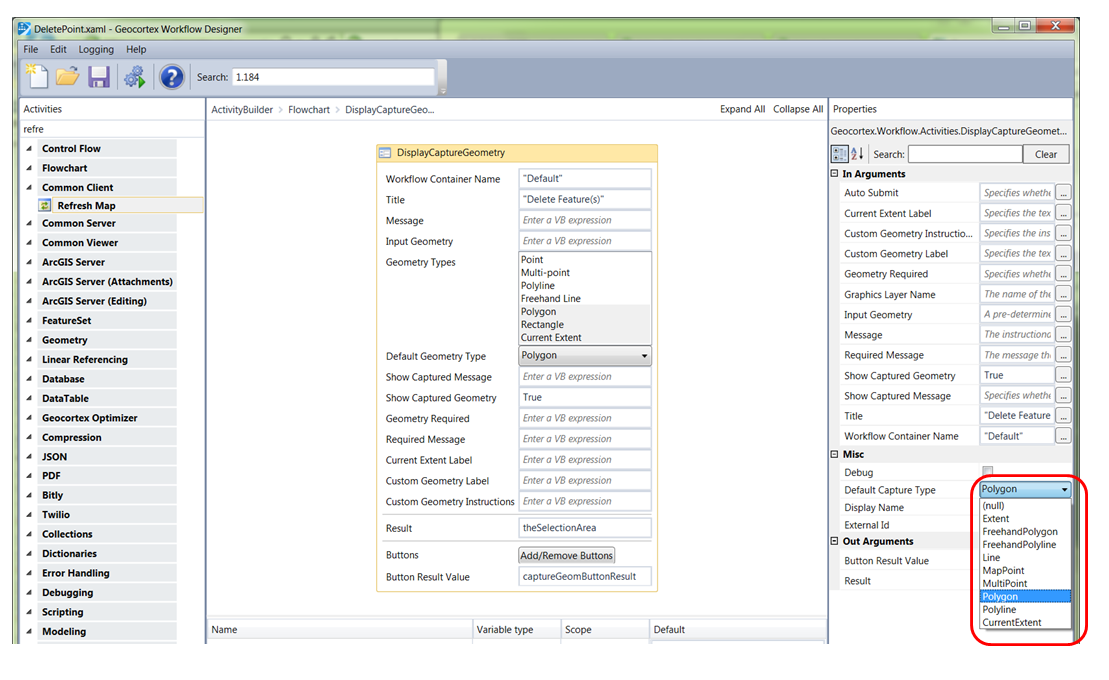 0
0 -
Try the dropdown on the activity in the main designer panel, enderneath "Geometry types," it should be in there. For reference, the rectangle and polygon are two different geometry types and two different buttons in the tool. 0 -
Zack,
Thanks for that response. Maybe my question is not clear.
Let me restate: Is there a "Default Capture Type" (In the properties section--see image above) that equates to the "Geometry Type" of "Rectangle?"
Thanks!
Michael0 -
Yes you can, but you can't see it in the properies section pointed out in your picture, because its renames "extent" in that section. I was trying to get you to make the selection in the workflow designer instead, which uses the same syntax that you're looking for ("rectnagle"). In any event, follow one of these arrows: 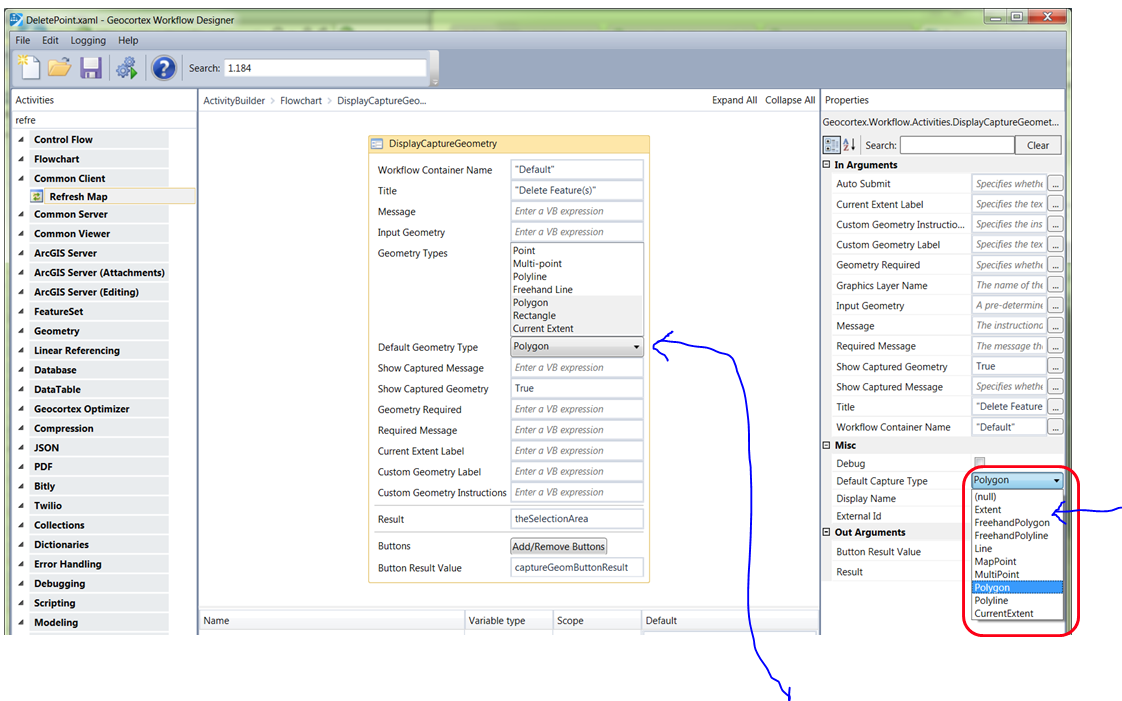 0
0
Bitte melden Sie sich an, um einen Kommentar zu hinterlassen.
Kommentare
6 Kommentare