Logic for Display Form 'Submit' button cannot be blank...

I have a workflow that allows a user to create a point on a map, and submit a photo for that point. I have a decision that if the Submit button is checked, the workflow continues to the next step. I need to add to the logic in the condition to also somehow say that the outphoto box cannot be blank, the user HAS to submit a photo AND select 'Submit' to go to the next step. Something like....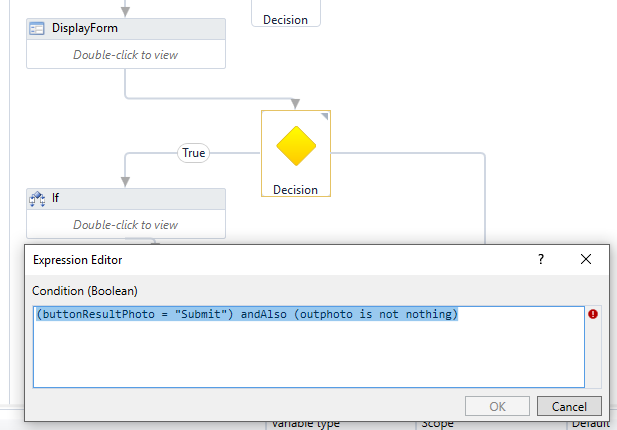
I know this is probably super simple I just dont know the correct wording...The outphoto data type is an IList<FileItem>
Thanks!
0
-
Hi Lisa,
You can try
(buttonResultPhoto = "submit") andalso (Not outphoto Is Nothing)
If it doesn't work as expected please post error that "condition" is highlighting
I hope this helps0 -
So this ended up working...
_img_ alt="User-added image" src="https://latitudegeo--c.na53.content.force.com/servlet/rtaImage?eid=907f2000000fy53&feoid=Body&refid=0EMf2000000kAC4" _/_img_
If the user selects the 'Skip' button (the first flow decision), it just skips the Photo Sequence and the workflow finishes. If the user selects the 'Submit' button AND the outphoto.count >0, then it proceeds to the photo sequence. If the user selects 'Submit' but never actually added a photo, they are redirected to the display form to prompt them to add a photo again. After extensive testing, I THINK this is working how we want it...
Thank you for your suggestion Fracesca. If I found out this isn't actually working how I expect then I will give your logic a try :)0 -

Maybe I'm not understanding the specific workflow logic, but wouldn't it be more direct to make the FilePicker a required field in your Display Form (i.e. add a required field validation to it)?
That way if they click Submit without choosing a photo they'll get a red error message within the form that says they have to upload a photo before continuing. You just have to make sure the Submit button has Cause Validation checked.
And if you want to have a Skip button too, then you can just leave the Cause Validation checkbox unchecked for that button (with it still checked for the Submit button).0
Bitte melden Sie sich an, um einen Kommentar zu hinterlassen.
Kommentare
3 Kommentare