Summarizing By Attribute in Geocortex Reports

Our team would like to know if the report designer provides an interactive configuration setting for grouping and summarizing attribute(s) of interest in Report Designer. We implemented the logic using C# but,we would prefer to not maintain extra code, if at all possible. Please see abelow for code sample and also output. Any samples out there?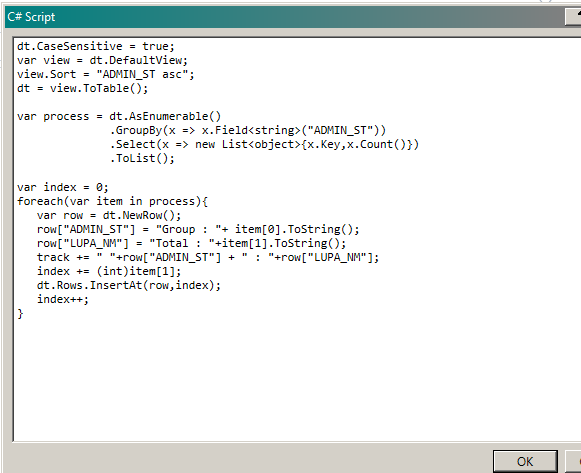
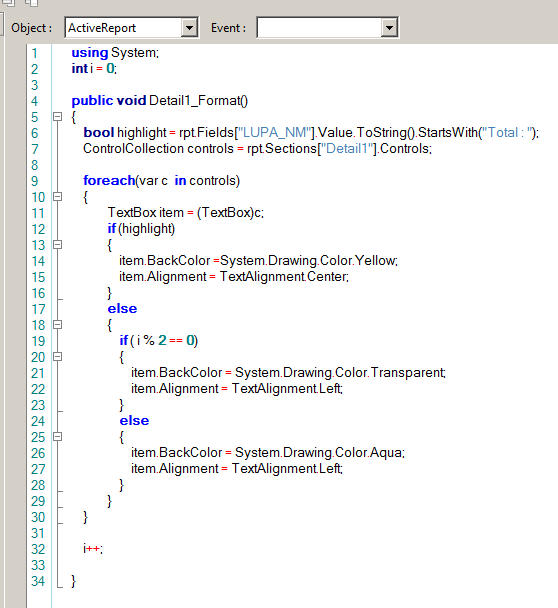
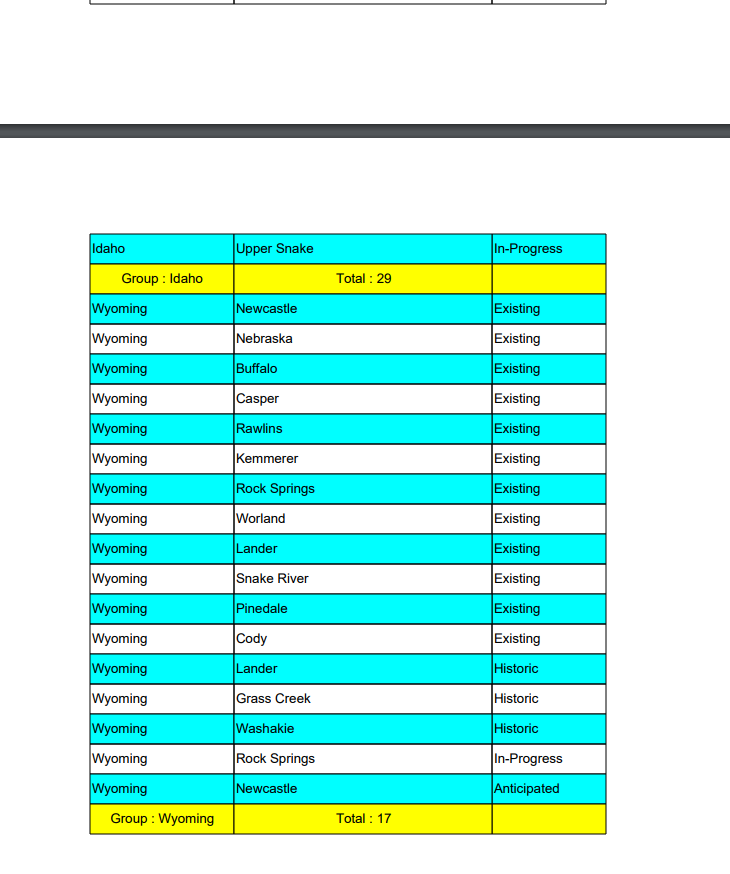
Output:
0
-

I think that the code you have may be the cleanest option, but I see why your team may not want to maintain it (lamdas aren't for everybody!). You could turn your c# activity into more wpf activities, though I'm not sure it would really help things. I'd just leave really, really good comments in the script if I were you and let your workflow team take it from there, though I would consider porting to a vb activity instead since that's the language that the report designer uses and is presumably the syntax with which yout team is most familiar. For the report designer you really don't have any good options, what you have is most likely best.
Sorry that I couldn't be more helpful. Please let us know what you end up doing.0 -

Hi Ryan,
You can get grouping and summary information using the out-of-the-box reporting controls and just one line of script.- Right click somewhere on your report in designer and choose Insert > Group Header/Footer
- Click the group header on the report designer surface to select it
- In its DataField property, fill in the name of the attribute you need to group by
- Place a TextBox control in the Group Footer to contain the summary data
- Use the following properties for the properties under the "Summary" category in the text box's property pane:
DataField: (same as the GroupHeader)
SummaryFunc: Count
SummaryRunning: Group
SummaryType: SubTotal
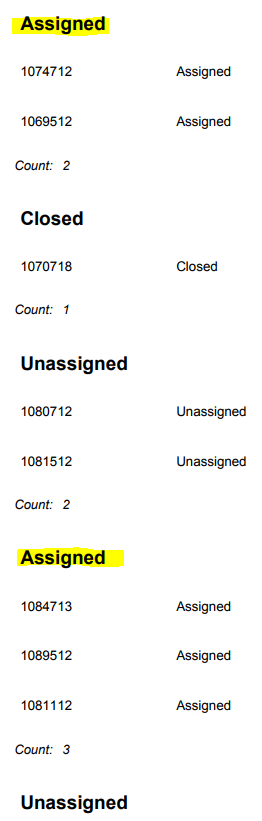
Use the following to sort the report's data by the field name you used for grouping ("status" in my case):public void ActiveReport_DataInitialize() { rpt.DataSource = ((DataSet)rpt.DataSource).Tables[0].Select(null, "status"); }This part can probably be done from a transformer workflow instead if that's your preference.
Hope that helps!
-Amanda0 -
This worked fine until I got to the script part where it said my field (the one I used for all the rest of it) didn't exist. Since my report was generated from a data table from a workflow, I just used SortFeatureSet in the workflow before I sent it to the dataset and it worked like a charm! Thanks for this! 0 -
Bobbi fix is the easiest for a master reports that that is referencing subreports being generated from a Workflow. The .Tables[0] reference the first table in the dataset. No problem if it's just a report (not sub report). I am generating 20 subreports from 20 different tables for 1 master report. Having and knowing with reliability what index # the table is to find the correct attribute to sort on was a bit out of my skillset and would require code maintenance. 0
Bitte melden Sie sich an, um einen Kommentar zu hinterlassen.
Kommentare
4 Kommentare