Disabling a tool after one use (draw, edit, plot coords, etc)

Is it possible to make a tool disable/unselect itself after use? For example, a user selects the draw tool, draws a polygon and then the tool is automatically unselected and the users pointer reverts back to normal, instead of staying on draw, so that next time they click it doesnt start another drawing.
I get a lot of users that get confused/annoyed that they have to click it off before they can pan the map or get map tips again, then they end up with several small accidental drawings they have to figure out how to delete.
0
-

There is an "Is Sticky" property in the config for each tool, I think that this is what you're looking for.
Be prepared for users who are now annoyed that they have to click the tool again every time they want to draw another polygon.0 -

You can see that when you edit the tool in manager. My question is why doesn't the Pan tool have that ability? 0 -
Because pan isn't a tool, it's a button. Buttons don't toggle, they are more one-and-done type things. All that Pan actually does is run the command to clear any active tools. 0 -
I don't see the sticky option while editing a tool in manager, but I found it in the desktop.json. Thanks. 0 -
Here's were you can find it in the Rest Manager: 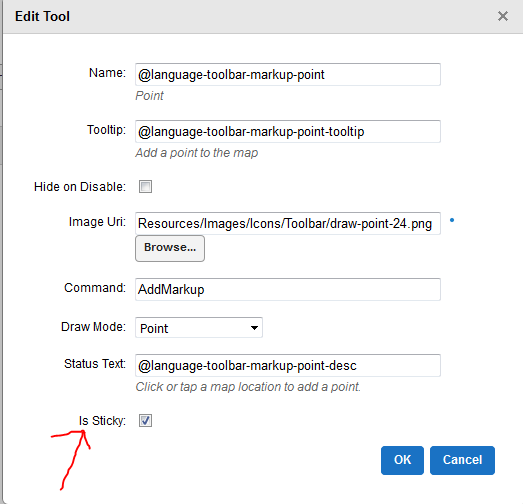 0
0
Bitte melden Sie sich an, um einen Kommentar zu hinterlassen.
Kommentare
5 Kommentare